Turn on suggestions
Auto-suggest helps you quickly narrow down your search results by suggesting possible matches as you type.
- Canon Community
- Discussions & Help
- Camera
- EOS DSLR & Mirrorless Cameras
- Re: HELP PLEASE Canon 80D Malfunction With No Err...
Options
- Subscribe to RSS Feed
- Mark Topic as New
- Mark Topic as Read
- Float this Topic for Current User
- Bookmark
- Subscribe
- Mute
- Printer Friendly Page
HELP PLEASE Canon 80D Malfunction With No Error Code

Options
- Mark as New
- Bookmark
- Subscribe
- Mute
- Subscribe to RSS Feed
- Permalink
- Report Inappropriate Content
03-05-2022 02:26 PM
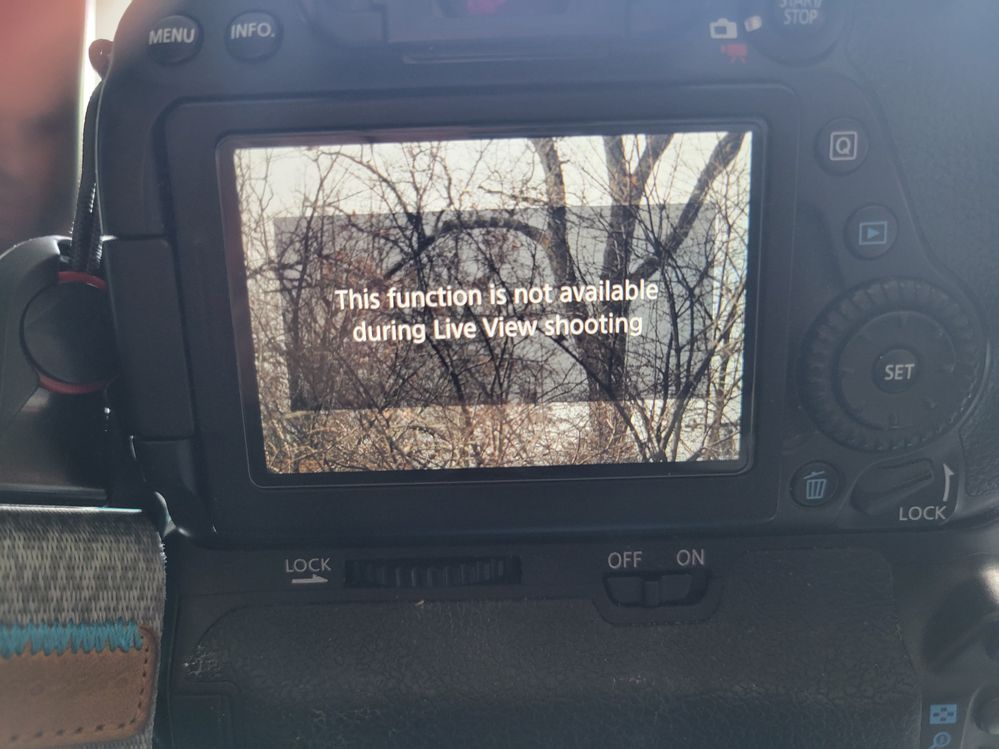
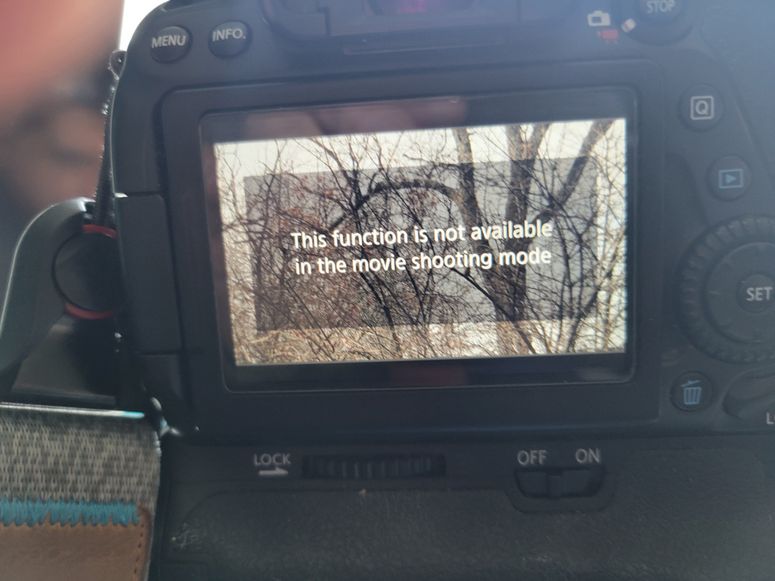
I'm having an issue with my 80D where I get a message on the screen every time I go into live view. The message reads "This function is not available during live view shooting" or "This function is not available in the movie shooting mode" depending on which mode I'm in.
The message appears as a large box covering most of the viewing area on the LCD and doesn't go way. I can take stills in live view (can't see what I'm focusing on though), but I can't start video recording at all. Autofocus works fine, but I can't see what I'm focusing on.
Here's the strange thing. If I push and hold the DOF preview button, the box goes away and I can take a pic or start recording. As soon as I release the DOF button, the box with the message comes back.
Anyone ever have something like this happen?
BTW, taking stills through the viewfinder is functioning perfectly. Pictures attached
12 REPLIES 12
Options
- Mark as New
- Bookmark
- Subscribe
- Mute
- Subscribe to RSS Feed
- Permalink
- Report Inappropriate Content
10-15-2022 08:26 AM - edited 10-15-2022 08:28 AM
Thanks I've done that at least twice, once with Canon on the line.
BTW, it just happened out of nowhere while I was shooting. It was fine one second and not the next. Nothing was changed.


Options
- Mark as New
- Bookmark
- Subscribe
- Mute
- Subscribe to RSS Feed
- Permalink
- Report Inappropriate Content
10-15-2022 08:49 AM - edited 10-15-2022 11:24 AM
Greetings,
I agree with Waddizzle. A setting is likely the cause of this behavior. The message is not an error, I believe its the camera telling you it can't do something with the current settings or shooting mode you have selected.
I've spent several hours now learning the cause and effect relationship a setting can have under different shooting modes, and my camera has 2 independant and very different Photo and CINE menus.
~Rick
Bay Area - CA
~R5 C (1.1.3.1), ~RF Trinity, ~RF 100 Macro, ~RF 100~400, ~RF 100~500, ~RF 200-800, ~RF 1.4x TC, BG-R10, 430EX III-RT ~DxO PhotoLab Elite ~DaVinci Resolve Studio ~ImageClass MF644Cdw MF656Cdw ~Pixel 10 ~CarePaks Are Worth It

Options
- Mark as New
- Bookmark
- Subscribe
- Mute
- Subscribe to RSS Feed
- Permalink
- Report Inappropriate Content
01-16-2025 03:32 PM
I had this issue and it was so frustrating. For me, it was a stuck focus button! You just have to pop it up yourself or take it somewhere where they can.

- « Previous
-
- 1
- 2
- Next »
- « Previous
-
- 1
- 2
- Next »

Announcements
07/22/2026: New firmware updates are available.
EOS R6 Mark III - Version 1.1.0
05/13/2026: New firmware updates are available.
EOS R5 Mark II - Version 1.3.0
EOS R6 Mark II - Version 1.7.0
04/28/2026: Service Notice: Caution Concerning use of Lithium Batteries
03/17/2026: New firmware updates are available.
SELPHY CP1500 - Version 1.0.7.0
02/23/2026: New firmware update is available for EOS C50- Version 1.0.3.1
01/23/2026: New firmware update is available for RF 24-105mm F4 IS USM- Version 2.0.7
01/20/2026: New firmware updates are available.
10/21/2025: Service Notice: To Users of the Compact Digital Camera PowerShot V1
10/15/2025: New firmware updates are available.
Speedlite EL-5 - Version 1.2.0
Speedlite EL-1 - Version 1.1.0
Speedlite Transmitter ST-E10 - Version 1.2.0
07/28/2025: Notice of Free Repair Service for the Mirrorless Camera EOS R50 (Black)
05/21/2025: New firmware update available for EOS C500 Mark II - Version 1.1.5.1
Related Content
- EOS Rebel T6 showing Error 70/80 in EOS DSLR & Mirrorless Cameras
- EOS R5 only shows "?" during playback in EOS DSLR & Mirrorless Cameras
- EOS R50 V still won't let me do IRL live stream in EOS DSLR & Mirrorless Cameras
- PowerShot SX740 HS Err 60, lens won't retract, now no power - covered under the service notice after in Point & Shoot Digital Cameras
- EOS R50 "Set button to cancel" error message in EOS DSLR & Mirrorless Cameras

Ⓒ 2026
Canon U.S.A Inc. All Rights Reserved. Reproduction in whole or part without permission is prohibited.
