Turn on suggestions
Auto-suggest helps you quickly narrow down your search results by suggesting possible matches as you type.
- Canon Community
- Discussions & Help
- Camera
- EOS DSLR & Mirrorless Cameras
- Re: Film rewinds instead of loading
Options
- Subscribe to RSS Feed
- Mark Topic as New
- Mark Topic as Read
- Float this Topic for Current User
- Bookmark
- Subscribe
- Mute
- Printer Friendly Page

Options
- Mark as New
- Bookmark
- Subscribe
- Mute
- Subscribe to RSS Feed
- Permalink
- Report Inappropriate Content
05-28-2020 12:22 PM
I have a rebel eos k2. This camera likes to rewind new rolls of film instead of loading them. I'm not sure what's causing this. Any help would be much appreciated. Thank you.
Solved! Go to Solution.
1 ACCEPTED SOLUTION
Accepted Solutions


Options
- Mark as New
- Bookmark
- Subscribe
- Mute
- Subscribe to RSS Feed
- Permalink
- Report Inappropriate Content
05-28-2020 02:38 PM
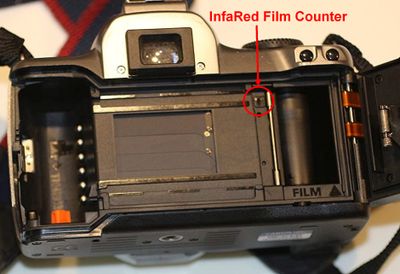
Your camera uses an InfraRed sensor for counting film sprockets. It is probably malfunctioning. You could have a look to see it it looks alright, but you will probably need to replace the camera. The used price is only about $25-$50 so any repair would be more costly.
Mike Sowsun
5 REPLIES 5

Options
- Mark as New
- Bookmark
- Subscribe
- Mute
- Subscribe to RSS Feed
- Permalink
- Report Inappropriate Content
05-28-2020 01:18 PM
Best bet is to call Canon 1 (800) 652-2666
EB
EOS 1DX and many lenses.
EOS 1DX and many lenses.


Options
- Mark as New
- Bookmark
- Subscribe
- Mute
- Subscribe to RSS Feed
- Permalink
- Report Inappropriate Content
05-28-2020 01:35 PM
Hi there!
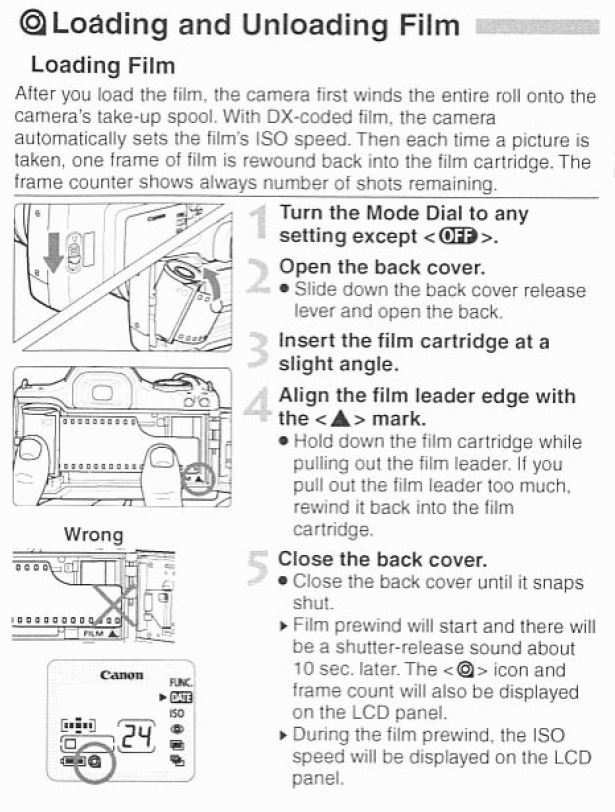
Looking over the manual, it says that when you load film, it will wind the entire roll of film onto the camera's take-up spool, and when you take a photo, it will rewind the film frame-by-frame into the cartridge. I've attached an image of page 15 from the manual here:
Options
- Mark as New
- Bookmark
- Subscribe
- Mute
- Subscribe to RSS Feed
- Permalink
- Report Inappropriate Content
05-28-2020 01:51 PM
All is does is push the film all the way back into the canister...it doesn't load it at all and the screen doesn't show the number of exposures like it is supposed to. Just flashes the little symbol like when you finish a roll and it's done rewinding it...thats why I say it's rewinding instead of loading...
Options
- Mark as New
- Bookmark
- Subscribe
- Mute
- Subscribe to RSS Feed
- Permalink
- Report Inappropriate Content
05-28-2020 02:38 PM
Your camera uses an InfraRed sensor for counting film sprockets. It is probably malfunctioning. You could have a look to see it it looks alright, but you will probably need to replace the camera. The used price is only about $25-$50 so any repair would be more costly.
Mike Sowsun
Options
- Mark as New
- Bookmark
- Subscribe
- Mute
- Subscribe to RSS Feed
- Permalink
- Report Inappropriate Content
05-28-2020 02:40 PM
Yeah...I had a feeling it would be more costly to repair than the camera is worth....thanks anyway...I appreciate it

Announcements
07/22/2026: New firmware updates are available.
EOS R6 Mark III - Version 1.1.0
05/13/2026: New firmware updates are available.
EOS R5 Mark II - Version 1.3.0
EOS R6 Mark II - Version 1.7.0
04/28/2026: Service Notice: Caution Concerning use of Lithium Batteries
03/17/2026: New firmware updates are available.
SELPHY CP1500 - Version 1.0.7.0
02/23/2026: New firmware update is available for EOS C50- Version 1.0.3.1
01/23/2026: New firmware update is available for RF 24-105mm F4 IS USM- Version 2.0.7
01/20/2026: New firmware updates are available.
10/21/2025: Service Notice: To Users of the Compact Digital Camera PowerShot V1
10/15/2025: New firmware updates are available.
Speedlite EL-5 - Version 1.2.0
Speedlite EL-1 - Version 1.1.0
Speedlite Transmitter ST-E10 - Version 1.2.0
07/28/2025: Notice of Free Repair Service for the Mirrorless Camera EOS R50 (Black)
05/21/2025: New firmware update available for EOS C500 Mark II - Version 1.1.5.1
Related Content
- Canon EOS3 film loading error code in EOS DSLR & Mirrorless Cameras
- Images Being Truncated in Photo Viewers: Only Happens to EOS T1i images on my Win10 Computer in EOS DSLR & Mirrorless Cameras
- DPP Software not working in Camera Software
- EOS Rebel K2 How to recover from accidental midroll rewind in EOS DSLR & Mirrorless Cameras
- Thoughts on DPP Version 4.21.11.0 in Camera Software

Ⓒ 2026
Canon U.S.A Inc. All Rights Reserved. Reproduction in whole or part without permission is prohibited.
