Turn on suggestions
Auto-suggest helps you quickly narrow down your search results by suggesting possible matches as you type.
- Canon Community
- Discussions & Help
- Camera
- EOS DSLR & Mirrorless Cameras
- Re: Customizing Menu Screen Colors
Options
- Subscribe to RSS Feed
- Mark Topic as New
- Mark Topic as Read
- Float this Topic for Current User
- Bookmark
- Subscribe
- Mute
- Printer Friendly Page
Customizing Menu Screen Colors

Options
- Mark as New
- Bookmark
- Subscribe
- Mute
- Subscribe to RSS Feed
- Permalink
- Report Inappropriate Content
04-22-2018 05:46 PM
Beyond the few options that the camera offers does anyone know of a way to customize the color scheme of the menu screen on my Rebel t6. Maybe a plug-in or download?
4 REPLIES 4

Options
- Mark as New
- Bookmark
- Subscribe
- Mute
- Subscribe to RSS Feed
- Permalink
- Report Inappropriate Content
04-22-2018 06:17 PM
@Skylerwrote:Beyond the few options that the camera offers does anyone know of a way to customize the color scheme of the menu screen on my Rebel t6. Maybe a plug-in or download?
To provide that would require an addition to the camera's firmware, and Canon quite naturally doesn't provide any guidance to assist users in monkeying with the firmware. And I think there's a good case to be made that if Canon wanted to increase the size of the firmware, there are more useful features that could be added.
I suppose it's possible that Magic Lantern, which operates by using a different firmware package to override the one resident in the camera, may provide such a capability. But few of us use ML, and some of us aren't even convinced that it's provably safe (to the camera) to do so.
Bob
Philadelphia, Pennsylvania USA
Philadelphia, Pennsylvania USA


Options
- Mark as New
- Bookmark
- Subscribe
- Mute
- Subscribe to RSS Feed
- Permalink
- Report Inappropriate Content
04-22-2018 06:20 PM
@Skylerwrote:Beyond the few options that the camera offers does anyone know of a way to customize the color scheme of the menu screen on my Rebel t6. Maybe a plug-in or download?
My T5 only allows for changes to the LCD brightness. I suspect the T6 would be similar, brightness control only.
--------------------------------------------------------
"Enjoying photography since 1972."
"Enjoying photography since 1972."

Options
- Mark as New
- Bookmark
- Subscribe
- Mute
- Subscribe to RSS Feed
- Permalink
- Report Inappropriate Content
04-23-2018 10:27 AM
"But few of us use ML ..."
I don't believe ML offers that, maybe a new version does that I am unaware of. But if it did, I still would not use it and I would advise others to not use ML either. But its your camera and you should do as you see fit.
EB
EOS 1DX and many lenses.
EOS 1DX and many lenses.

Options
- Mark as New
- Bookmark
- Subscribe
- Mute
- Subscribe to RSS Feed
- Permalink
- Report Inappropriate Content
04-23-2018 11:10 AM
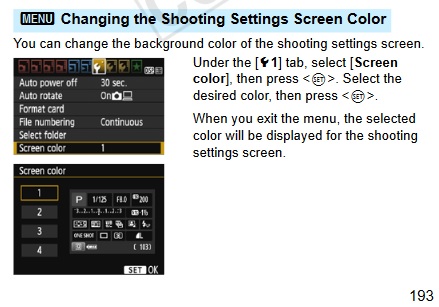
Not true, Waddizzle:

Announcements
07/22/2026: New firmware updates are available.
EOS R6 Mark III - Version 1.1.0
05/13/2026: New firmware updates are available.
EOS R5 Mark II - Version 1.3.0
EOS R6 Mark II - Version 1.7.0
04/28/2026: Service Notice: Caution Concerning use of Lithium Batteries
03/17/2026: New firmware updates are available.
SELPHY CP1500 - Version 1.0.7.0
02/23/2026: New firmware update is available for EOS C50- Version 1.0.3.1
01/23/2026: New firmware update is available for RF 24-105mm F4 IS USM- Version 2.0.7
01/20/2026: New firmware updates are available.
10/21/2025: Service Notice: To Users of the Compact Digital Camera PowerShot V1
10/15/2025: New firmware updates are available.
Speedlite EL-5 - Version 1.2.0
Speedlite EL-1 - Version 1.1.0
Speedlite Transmitter ST-E10 - Version 1.2.0
07/28/2025: Notice of Free Repair Service for the Mirrorless Camera EOS R50 (Black)
05/21/2025: New firmware update available for EOS C500 Mark II - Version 1.1.5.1
Related Content
- EOS R5 Mark II firmware 1.30 notes in Camera Software
- G7X Mark II - 2sec preview looks perfect but has green tint in gallery & after import in Point & Shoot Digital Cameras
- PowerShot IXY 650/ELPH 360 Vertical colored lines on LCD screen in Point & Shoot Digital Cameras
- EOS R6 Mark II - Unable to add False Color as Custom Button in EOS DSLR & Mirrorless Cameras
- CanonG7x mark III: Lens Stuck Out, Not Turning On, Static in Point & Shoot Digital Cameras

Ⓒ 2026
Canon U.S.A Inc. All Rights Reserved. Reproduction in whole or part without permission is prohibited.
