Turn on suggestions
Auto-suggest helps you quickly narrow down your search results by suggesting possible matches as you type.
- Canon Community
- Discussions & Help
- Camera
- EOS DSLR & Mirrorless Cameras
- Re: Color temperature changing during video shot (...
Options
- Subscribe to RSS Feed
- Mark Topic as New
- Mark Topic as Read
- Float this Topic for Current User
- Bookmark
- Subscribe
- Mute
- Printer Friendly Page
Color temperature changing during video shot (7D)

Options
- Mark as New
- Bookmark
- Subscribe
- Mute
- Subscribe to RSS Feed
- Permalink
- Report Inappropriate Content
03-23-2017 05:54 AM - edited 03-23-2017 05:55 AM
Hello!
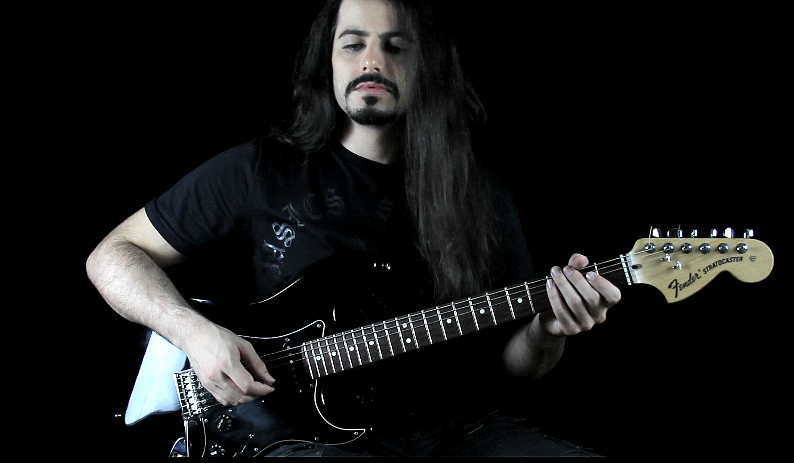
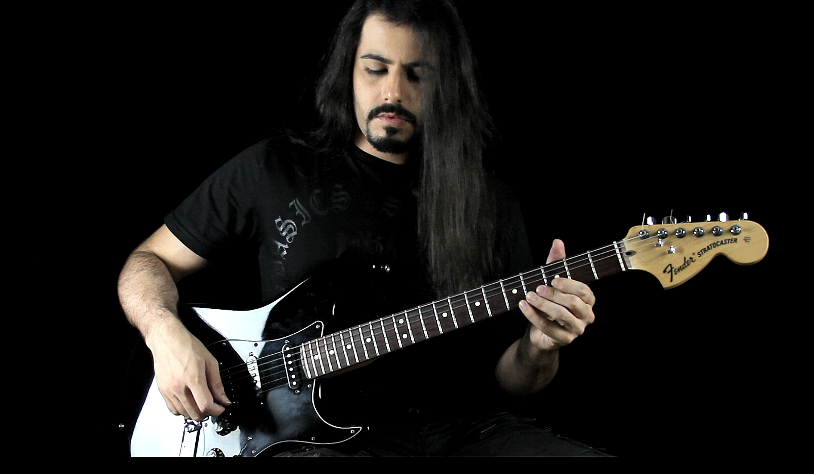
Yesterday I shot some videos with my 7D and after downloading the videos to my laptop I noticed every movie starts with the correct color temperature and after a few seconds the colors seem a lot hotter.
Does somebody knows why this happens and how can I prevent that?
Here are some facts:
* I was using Live View so I could trigger movie recording remotely from my laptop (I was shooting alone).
* I recorded SEVERAL takes within a period of 4 hours, each take lasting about 2 minutes, and waiting about 1 or 2 minutes before starting recording the next take (sometimes I started immediately). I kept just the very last ones, so I don't know if this issue was happening during the first takes. Could this problem be related to camera sensor working for hours straight, even taking a break of 1 or 2 minutes between each take?
* Light sources remained constant during the entire recording session.
Below are some screenshots so you can see what I'm talking about:
Thanks!
AT THE START OF THE VIDEO:
AFTER A FEW SECONDS (notice how skin tones changed drastically):
12 REPLIES 12
Options
- Mark as New
- Bookmark
- Subscribe
- Mute
- Subscribe to RSS Feed
- Permalink
- Report Inappropriate Content
10-08-2017 01:24 PM
I just discovered that you ar totally right. Not sure how I got to the C setting but YOUR CORRECT. Thank you so much for the insight greatly appreciated.


Options
- Mark as New
- Bookmark
- Subscribe
- Mute
- Subscribe to RSS Feed
- Permalink
- Report Inappropriate Content
10-08-2017 03:07 PM
@Rdf254 wrote:
No this happens in Manual mode.
Manual shooting mode, and the other creative modes, are independent of the WB setting. But, congrats on finding a resolution.
--------------------------------------------------------
"Enjoying photography since 1972."
"Enjoying photography since 1972."
Options
- Mark as New
- Bookmark
- Subscribe
- Mute
- Subscribe to RSS Feed
- Permalink
- Report Inappropriate Content
10-08-2017 03:39 PM
Thanks for pointing me in the right direction funny how simple things get overlooked.

- « Previous
-
- 1
- 2
- Next »
- « Previous
-
- 1
- 2
- Next »
Announcements
07/22/2026: New firmware updates are available.
EOS R6 Mark III - Version 1.1.0
05/13/2026: New firmware updates are available.
EOS R5 Mark II - Version 1.3.0
EOS R6 Mark II - Version 1.7.0
04/28/2026: Service Notice: Caution Concerning use of Lithium Batteries
03/17/2026: New firmware updates are available.
SELPHY CP1500 - Version 1.0.7.0
02/23/2026: New firmware update is available for EOS C50- Version 1.0.3.1
01/23/2026: New firmware update is available for RF 24-105mm F4 IS USM- Version 2.0.7
01/20/2026: New firmware updates are available.
10/21/2025: Service Notice: To Users of the Compact Digital Camera PowerShot V1
10/15/2025: New firmware updates are available.
Speedlite EL-5 - Version 1.2.0
Speedlite EL-1 - Version 1.1.0
Speedlite Transmitter ST-E10 - Version 1.2.0
07/28/2025: Notice of Free Repair Service for the Mirrorless Camera EOS R50 (Black)
05/21/2025: New firmware update available for EOS C500 Mark II - Version 1.1.5.1
Related Content
- EOS R6 Mark III How to retain video settings like on EOS R6 in EOS DSLR & Mirrorless Cameras
- EOS Rebel G Shutter Button not Working in EOS DSLR & Mirrorless Cameras
- Feature Request: Expand “Same expo. for new aperture” to Manual Aperture Changes in EOS DSLR & Mirrorless Cameras
- R1 & RF 24-105 f2.8 Z = can't change the aperture in EF & RF Lenses
- Weird dots in photos EOS 2000D in EOS DSLR & Mirrorless Cameras

Ⓒ 2026
Canon U.S.A Inc. All Rights Reserved. Reproduction in whole or part without permission is prohibited.
