Turn on suggestions
Auto-suggest helps you quickly narrow down your search results by suggesting possible matches as you type.
- Canon Community
- Discussions & Help
- Camera
- EOS DSLR & Mirrorless Cameras
- Re: Can't get my Canon 80d to sync with my Neewer ...
Options
- Subscribe to RSS Feed
- Mark Topic as New
- Mark Topic as Read
- Float this Topic for Current User
- Bookmark
- Subscribe
- Mute
- Printer Friendly Page
Can't get my Canon 80d to sync with my Neewer external flash set up

Options
- Mark as New
- Bookmark
- Subscribe
- Mute
- Subscribe to RSS Feed
- Permalink
- Report Inappropriate Content
03-09-2019 04:22 PM
So I recently purchased the Neewer NW-561 Flash Speedlite kit for my Canon EOS 80D camera. it seems to connect well, because everything flashes together as it should. However , when i go to the flash control settings , and then go to external flash function settings , I get a message saying , "This menu cannot be displayed. Incompatible flash or flash's power is turned off." Also I dont see the results from the flash in my photos. Is my camera incompatible or is it a setting or something i'm missing? Can someone help!!!!!!!!!!!!!!!!!!!
6 REPLIES 6


Options
- Mark as New
- Bookmark
- Subscribe
- Mute
- Subscribe to RSS Feed
- Permalink
- Report Inappropriate Content
03-12-2019 09:10 AM
This sounds like a question for Newer. If you are in TTL mode, it seems like you are getting the pre-flash, but not the main flash. Try in manual mode.
If you really want compatibility, I would suggest you get a Canon flash.

Options
- Mark as New
- Bookmark
- Subscribe
- Mute
- Subscribe to RSS Feed
- Permalink
- Report Inappropriate Content
01-06-2023 01:39 PM
Im having this exact problem. Did you ever solve this?

Options
- Mark as New
- Bookmark
- Subscribe
- Mute
- Subscribe to RSS Feed
- Permalink
- Report Inappropriate Content
01-08-2023 03:02 PM
A very quick search of this flash points out clearly that this flash does not support camera menu settings.
That is because this is a COMPLETELY MANUAL flash. It does not communicate with cameras. It only flashes!
Options
- Mark as New
- Bookmark
- Subscribe
- Mute
- Subscribe to RSS Feed
- Permalink
- Report Inappropriate Content
01-08-2023 03:22 PM
Thanks mate but I got it working. Works perfectly with the 80d. Just has to be through viewfinder rather then the monitor. 👌

Options
- Mark as New
- Bookmark
- Subscribe
- Mute
- Subscribe to RSS Feed
- Permalink
- Report Inappropriate Content
01-08-2023 03:41 PM
@Teeblue98 wrote:Thanks mate but I got it working. Works perfectly with the 80d. Just has to be through viewfinder rather then the monitor. 👌
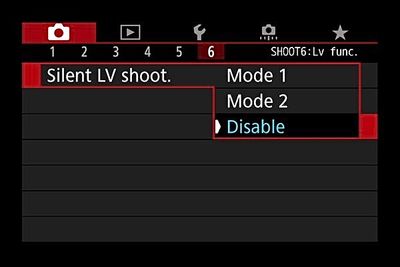
It will work using the rear screen LiveView display, but first you will need to go into the LiveView menu and disable LiveView “Silent Shooting” which is set by default.
Mike Sowsun
Options
- Mark as New
- Bookmark
- Subscribe
- Mute
- Subscribe to RSS Feed
- Permalink
- Report Inappropriate Content
01-08-2023 03:55 PM
amazing!!!! Thanks so much mate just done that. Mike you absolute legend


Announcements
05/13/2026: New firmware updates are available.
EOS R5 Mark II - Version 1.3.0
EOS R6 Mark II - Version 1.7.0
04/28/2026: Service Notice: Caution Concerning use of Lithium Batteries
03/17/2026: New firmware updates are available.
SELPHY CP1500 - Version 1.0.7.0
02/23/2026: New firmware update is available for EOS C50- Version 1.0.3.1
01/23/2026: New firmware update is available for RF 24-105mm F4 IS USM- Version 2.0.7
01/20/2026: New firmware updates are available.
12/22/2025: New firmware update is available for EOS R6 Mark III- Version 1.0.2
10/21/2025: Service Notice: To Users of the Compact Digital Camera PowerShot V1
10/15/2025: New firmware updates are available.
Speedlite EL-5 - Version 1.2.0
Speedlite EL-1 - Version 1.1.0
Speedlite Transmitter ST-E10 - Version 1.2.0
07/28/2025: Notice of Free Repair Service for the Mirrorless Camera EOS R50 (Black)
05/21/2025: New firmware update available for EOS C500 Mark II - Version 1.1.5.1
Related Content
- EOS R50 won't sync with Neewer TT560 flash in Speedlite Flashes
- How to use neewer tt560 flash speedlite on eos 6d mark ii in Speedlite Flashes
- How to get EOS R3 to recognize Speedlite EL-5 in EOS DSLR & Mirrorless Cameras
- Canon 80D: cannot use flash anymore (built-in & external) in EOS DSLR & Mirrorless Cameras
- 470ex AI auto metering to avoid overexposure in Speedlite Flashes

Ⓒ 2026
Canon U.S.A Inc. All Rights Reserved. Reproduction in whole or part without permission is prohibited.
