Turn on suggestions
Auto-suggest helps you quickly narrow down your search results by suggesting possible matches as you type.
- Canon Community
- Discussions & Help
- Camera
- EOS DSLR & Mirrorless Cameras
- Broken EOS R50 (Black) Mode Dial
Options
- Subscribe to RSS Feed
- Mark Topic as New
- Mark Topic as Read
- Float this Topic for Current User
- Bookmark
- Subscribe
- Mute
- Printer Friendly Page

Options
- Mark as New
- Bookmark
- Subscribe
- Mute
- Subscribe to RSS Feed
- Permalink
- Report Inappropriate Content
03-23-2026
05:27 PM
- last edited on
03-25-2026
09:06 AM
by
 James_C
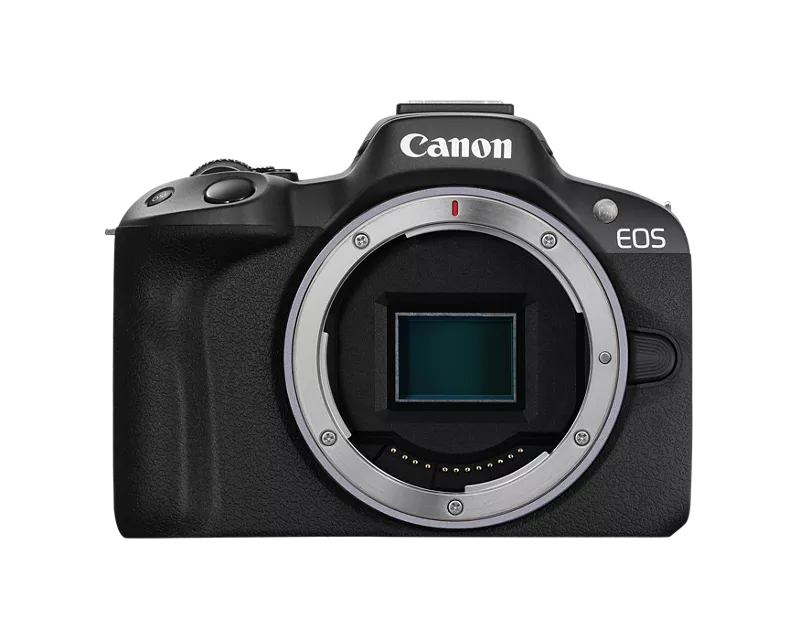
My Canon EOS R50's mode dial broke off, and I wanted to know if it could be reattached. I was looking through the Canon Community and found a few similar situations where people's Canon R50 mode dial also broke off. It looks like Canon made a notice for a free repair since this happened to several people, so I wanted to know how I would send it to them to get it repaired. My serial number starts with 23 by the way.
I tried putting it back on, but it's not staying on. To turn the camera on and off, I have to push down the mode dial slightly, and then move the switch to turn it on and off. I can't change the camera's mode, as it's stuck in video mode. If I accidentally bump or shake the camera, it turns off since the mode dial is loose.
Any help would be greatly appreciated, thank you!
Notice of Free Repair Service for Canon R50
Solved! Go to Solution.
1 ACCEPTED SOLUTION
Accepted Solutions


Options
- Mark as New
- Bookmark
- Subscribe
- Mute
- Subscribe to RSS Feed
- Permalink
- Report Inappropriate Content
03-23-2026 05:31 PM
Did you create a My Canon account and register your camera? You should then be able to request a repair.
--
Ricky
Camera: EOS R5 II, RF 50mm f/1.2L, RF 135mm f/1.8L
Lighting: Profoto Lights & Modifiers
Ricky
Camera: EOS R5 II, RF 50mm f/1.2L, RF 135mm f/1.8L
Lighting: Profoto Lights & Modifiers
9 REPLIES 9
Options
- Mark as New
- Bookmark
- Subscribe
- Mute
- Subscribe to RSS Feed
- Permalink
- Report Inappropriate Content
03-23-2026 05:31 PM
Did you create a My Canon account and register your camera? You should then be able to request a repair.
--
Ricky
Camera: EOS R5 II, RF 50mm f/1.2L, RF 135mm f/1.8L
Lighting: Profoto Lights & Modifiers
Ricky
Camera: EOS R5 II, RF 50mm f/1.2L, RF 135mm f/1.8L
Lighting: Profoto Lights & Modifiers

Options
- Mark as New
- Bookmark
- Subscribe
- Mute
- Subscribe to RSS Feed
- Permalink
- Report Inappropriate Content
03-23-2026 09:10 PM
The link posted for the free repair has the R50 registration link on it, so please register using that link, then contact Canon via clicking "Contact Us".
>> Owns/Owned both Canon EOS mirrorless full-frame and APS-C cameras and associated RF, RF-S and EF adapted lenses - inventory tends to change on short notice. Same for flashes, tripods, bags, straps, etc.
Plus>> Canon imagePROGRAF PRO-1100 Printer. My photos are edited using no Adobe products.
>>The opinions and assistance are my own. Please don't blame Canon for any mistakes on my part.

Options
- Mark as New
- Bookmark
- Subscribe
- Mute
- Subscribe to RSS Feed
- Permalink
- Report Inappropriate Content
03-23-2026 09:37 PM
Here's a contact number if you want to give them a call. The support team is solid but I would do like Ricky suggests and create an account a register the R50 prior to calling, it really streamlines the process.
800-652-2666
Marc
Windy City
To find common ground you must be willing to search for it.
Our interests intersect more than they diverge.
R5 Mk II ~ R6 Mk III ~ R7
Lenses: RF Trinity and others
Adobe and DxO PhotoLab Elite for post processing
Personal Gallery
Options
- Mark as New
- Bookmark
- Subscribe
- Mute
- Subscribe to RSS Feed
- Permalink
- Report Inappropriate Content
03-23-2026 09:39 PM
Yes, I did. I'll try requesting for a repair. The free repair says the first two digits of the serial number should be between 19 and 23, and mine starts with 23. Will that be okay?
Options
- Mark as New
- Bookmark
- Subscribe
- Mute
- Subscribe to RSS Feed
- Permalink
- Report Inappropriate Content
03-23-2026 09:41 PM
Okay, I registered the R50 with the MyCanon account. I'll call them or chat during their hours tomorrow and see what happens. If that doesn't work, I'll try and see if they can do a general repair under the warranty. Do you know how long the warranty typically is? Thank you by the way
Options
- Mark as New
- Bookmark
- Subscribe
- Mute
- Subscribe to RSS Feed
- Permalink
- Report Inappropriate Content
03-23-2026 09:46 PM
When I have sent gear to them it normally turns in about two weeks including the shipping time but I have CarePaks for my equipment so it may be different without the CarePak.
As for the warranty the date of purchase has some impact but they may resolve it based on it being a known problem with the R50.
Marc
Windy City
To find common ground you must be willing to search for it.
Our interests intersect more than they diverge.
R5 Mk II ~ R6 Mk III ~ R7
Lenses: RF Trinity and others
Adobe and DxO PhotoLab Elite for post processing
Personal Gallery
Options
- Mark as New
- Bookmark
- Subscribe
- Mute
- Subscribe to RSS Feed
- Permalink
- Report Inappropriate Content
03-24-2026 07:16 PM
Okay, and is it guaranteed that they'll fix it 100% if they said they will?
Options
- Mark as New
- Bookmark
- Subscribe
- Mute
- Subscribe to RSS Feed
- Permalink
- Report Inappropriate Content
03-24-2026 11:02 PM
It is more than likely guaranteed if they said they will. Remember to follow all of the shipping instructions in the document they sent to make it easier.
Options
- Mark as New
- Bookmark
- Subscribe
- Mute
- Subscribe to RSS Feed
- Permalink
- Report Inappropriate Content
03-28-2026 03:57 PM
When I submitted the request it said the repair fee is $0 and the shipping & handling is $0, but the shipping label they shared doesn't qualify for free shipping. What should I do? I don't think I can contact them anymore because it says my product isn't supported anymore.


Announcements
07/22/2026: New firmware updates are available.
EOS R6 Mark III - Version 1.1.0
05/13/2026: New firmware updates are available.
EOS R5 Mark II - Version 1.3.0
EOS R6 Mark II - Version 1.7.0
04/28/2026: Service Notice: Caution Concerning use of Lithium Batteries
03/17/2026: New firmware updates are available.
SELPHY CP1500 - Version 1.0.7.0
02/23/2026: New firmware update is available for EOS C50- Version 1.0.3.1
01/23/2026: New firmware update is available for RF 24-105mm F4 IS USM- Version 2.0.7
01/20/2026: New firmware updates are available.
10/21/2025: Service Notice: To Users of the Compact Digital Camera PowerShot V1
10/15/2025: New firmware updates are available.
Speedlite EL-5 - Version 1.2.0
Speedlite EL-1 - Version 1.1.0
Speedlite Transmitter ST-E10 - Version 1.2.0
07/28/2025: Notice of Free Repair Service for the Mirrorless Camera EOS R50 (Black)
05/21/2025: New firmware update available for EOS C500 Mark II - Version 1.1.5.1
Related Content
- Canon EOS R50 mode dial broken in EOS DSLR & Mirrorless Cameras
- Canon EOS R50 Mode Dial Broken – How to Apply for Free Repair Service? in EOS DSLR & Mirrorless Cameras
- EOS R50 Mode Dial Button Broken in EOS DSLR & Mirrorless Cameras
- EOS R50 (black) Dial Mode and Power Switch Broken in EOS DSLR & Mirrorless Cameras

Ⓒ 2026
Canon U.S.A Inc. All Rights Reserved. Reproduction in whole or part without permission is prohibited.
