Turn on suggestions
Auto-suggest helps you quickly narrow down your search results by suggesting possible matches as you type.
- Canon Community
- Discussions & Help
- Camera
- EOS DSLR & Mirrorless Cameras
- 6d Mark ii - Drive Mode with remote controller opt...
Options
- Subscribe to RSS Feed
- Mark Topic as New
- Mark Topic as Read
- Float this Topic for Current User
- Bookmark
- Subscribe
- Mute
- Printer Friendly Page

Options
- Mark as New
- Bookmark
- Subscribe
- Mute
- Subscribe to RSS Feed
- Permalink
- Report Inappropriate Content
03-29-2018 09:13 PM
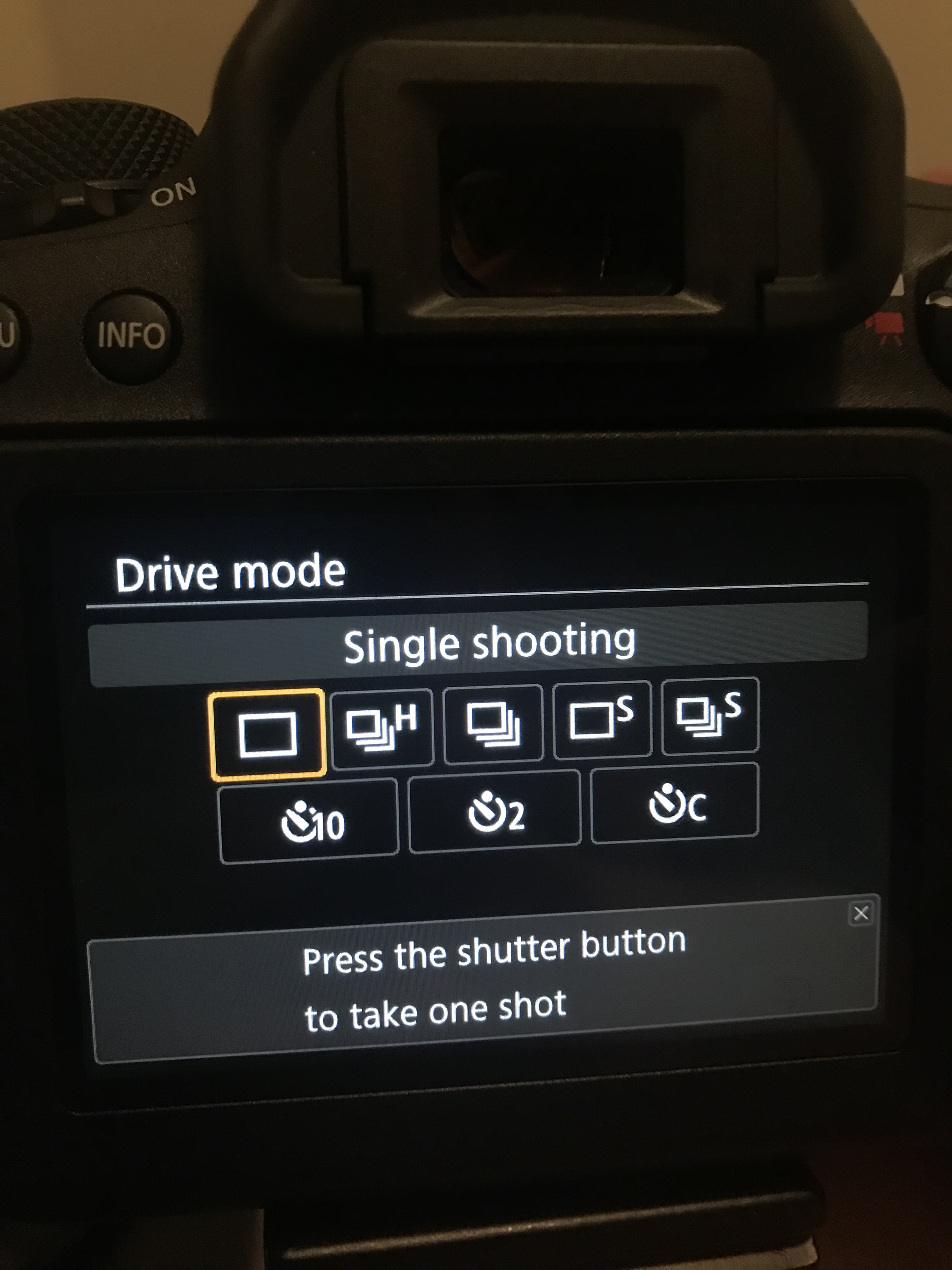
Hello, I am trying to set up a remote control to fire, but it is not showing the option with control to select, only with the timer. I updated the firmware but it did not work. Is there any other configuration for this?
Solved! Go to Solution.
1 ACCEPTED SOLUTION
Accepted Solutions
Options
- Mark as New
- Bookmark
- Subscribe
- Mute
- Subscribe to RSS Feed
- Permalink
- Report Inappropriate Content
03-30-2018 06:53 AM
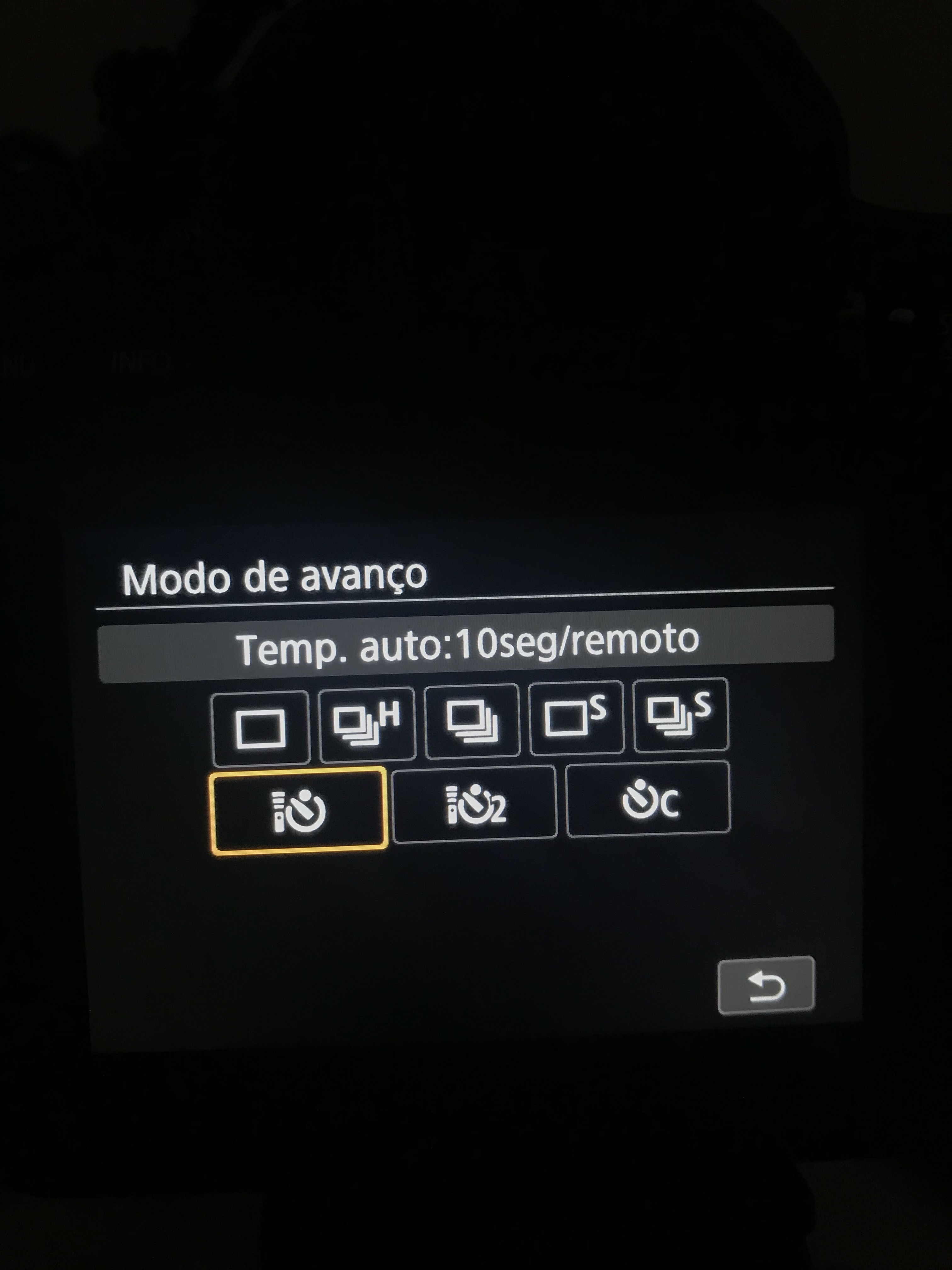
Well, I managed to make the controls appear.
But I'm not really sure what the specific change is to do this.
1) I updated the camera firmware (but did not change the option)
2) Reset the camera settings. This made the camera show the controls. (like in the picture).
But I do not know which option activates or deactivates this function, does anyone know?
Thanks
5 REPLIES 5


Options
- Mark as New
- Bookmark
- Subscribe
- Mute
- Subscribe to RSS Feed
- Permalink
- Report Inappropriate Content
03-29-2018 10:29 PM
I think that is how it works. You must set the camera to self timer mode, 2 seconds or 10 seconds, to use a wired remote.
--------------------------------------------------------
"Enjoying photography since 1972."
"Enjoying photography since 1972."

Options
- Mark as New
- Bookmark
- Subscribe
- Mute
- Subscribe to RSS Feed
- Permalink
- Report Inappropriate Content
03-30-2018 12:40 AM
@Waddizzlewrote:I think that is how it works. You must set the camera to self timer mode, 2 seconds or 10 seconds, to use a wired remote.
I think for wireless remote, you must set camera to self timer mode but you don't have to when using wired remote.
================================================
Diverhank's photos on Flickr
Diverhank's photos on Flickr
Options
- Mark as New
- Bookmark
- Subscribe
- Mute
- Subscribe to RSS Feed
- Permalink
- Report Inappropriate Content
03-30-2018 06:53 AM
Well, I managed to make the controls appear.
But I'm not really sure what the specific change is to do this.
1) I updated the camera firmware (but did not change the option)
2) Reset the camera settings. This made the camera show the controls. (like in the picture).
But I do not know which option activates or deactivates this function, does anyone know?
Thanks

Options
- Mark as New
- Bookmark
- Subscribe
- Mute
- Subscribe to RSS Feed
- Permalink
- Report Inappropriate Content
03-31-2018 01:05 AM - edited 03-31-2018 01:07 AM
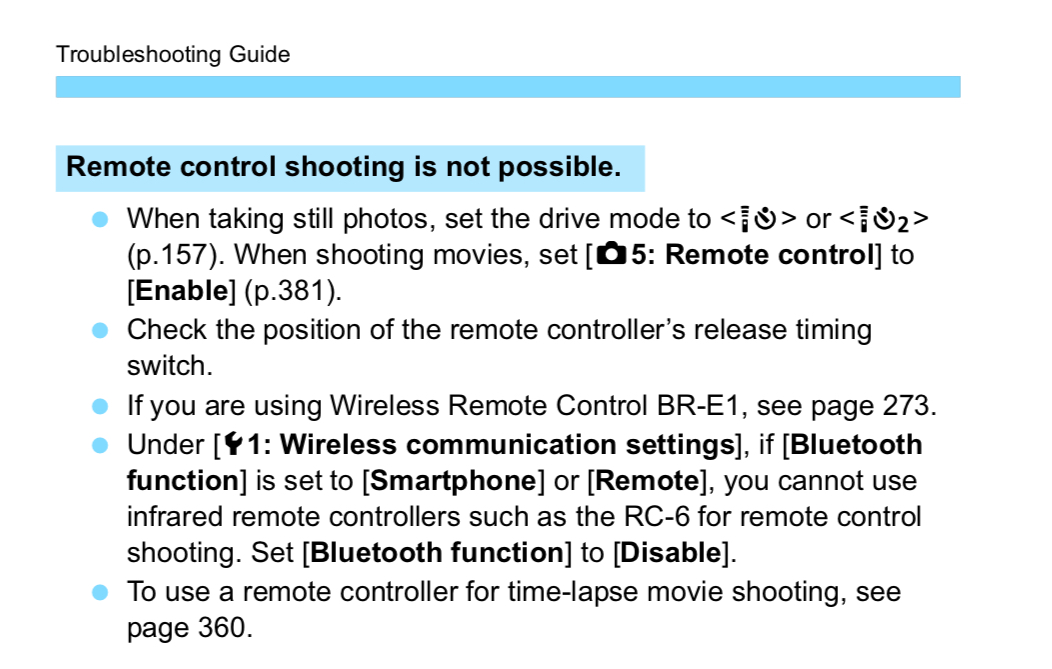
The symbols you now see are for Infrared remote like the RC-6 only You may have been playing around with Bluetooth remote, and according to the manual, that would disable the Infrared remote.
Mike Sowsun
Options
- Mark as New
- Bookmark
- Subscribe
- Mute
- Subscribe to RSS Feed
- Permalink
- Report Inappropriate Content
04-09-2021 03:32 AM - edited 04-09-2021 03:33 AM
Hi,
to make use IR comunitation with Canon 6D mark II needs.
1. MENU: Turn off BLUETOOTH
2. Canon - go to video mode
3. MENU - time collection ON
after this can be use any IR conection.
Rad

Announcements
07/22/2026: New firmware updates are available.
EOS R6 Mark III - Version 1.1.0
05/13/2026: New firmware updates are available.
EOS R5 Mark II - Version 1.3.0
EOS R6 Mark II - Version 1.7.0
04/28/2026: Service Notice: Caution Concerning use of Lithium Batteries
03/17/2026: New firmware updates are available.
SELPHY CP1500 - Version 1.0.7.0
02/23/2026: New firmware update is available for EOS C50- Version 1.0.3.1
01/23/2026: New firmware update is available for RF 24-105mm F4 IS USM- Version 2.0.7
01/20/2026: New firmware updates are available.
10/21/2025: Service Notice: To Users of the Compact Digital Camera PowerShot V1
10/15/2025: New firmware updates are available.
Speedlite EL-5 - Version 1.2.0
Speedlite EL-1 - Version 1.1.0
Speedlite Transmitter ST-E10 - Version 1.2.0
07/28/2025: Notice of Free Repair Service for the Mirrorless Camera EOS R50 (Black)
05/21/2025: New firmware update available for EOS C500 Mark II - Version 1.1.5.1
Related Content
- EOS R6 Mark III Firmware Version 1.1.0 available for download in Camera Software
- EOS R5 Mark II minor Firmware Update, Version 1.3.1 in Camera Software
- EOS R6 MARK II no choice to connect to wireless remote in EOS DSLR & Mirrorless Cameras
- EOS R6 Mark II Exposure compensation not working with Remote Control BR-E2 in EOS DSLR & Mirrorless Cameras
- Sony tripod focus and zoom controls incompatible with EOS R10 w/ EF-EOS R adapter in Camera Accessories

Ⓒ 2026
Canon U.S.A Inc. All Rights Reserved. Reproduction in whole or part without permission is prohibited.
