Turn on suggestions
Auto-suggest helps you quickly narrow down your search results by suggesting possible matches as you type.
- Canon Community
- Discussions & Help
- Camera
- EOS DSLR & Mirrorless Cameras
- 5D Mark ii Banding (?) Issue
Options
- Subscribe to RSS Feed
- Mark Topic as New
- Mark Topic as Read
- Float this Topic for Current User
- Bookmark
- Subscribe
- Mute
- Printer Friendly Page
5D Mark ii Banding (?) Issue

Options
- Mark as New
- Bookmark
- Subscribe
- Mute
- Subscribe to RSS Feed
- Permalink
- Report Inappropriate Content
08-07-2020 02:07 PM - edited 08-07-2020 02:13 PM
Hey everyone... I'm hoping there's someone out there that can help me figure something out.. I have been having issues with my Canon 5D Markii. I have done a ton of troubleshooting and research but it doesn't seem like there's any explanation for the issue I'm having.
If you take a look at the pictures below, you will see white "banding"? At first I thought it was some kind of sun flair, but it doesn't matter the time of day or where the sun is or even what lens I use. The issue is intermittent, and I've even taken it to my local camera store (they had no ideas as to the issue)
The two track pictures were taken at about 4:00 PM .. 5 minutes from each other, same settings, just different sides of the track. Track runs from South to North.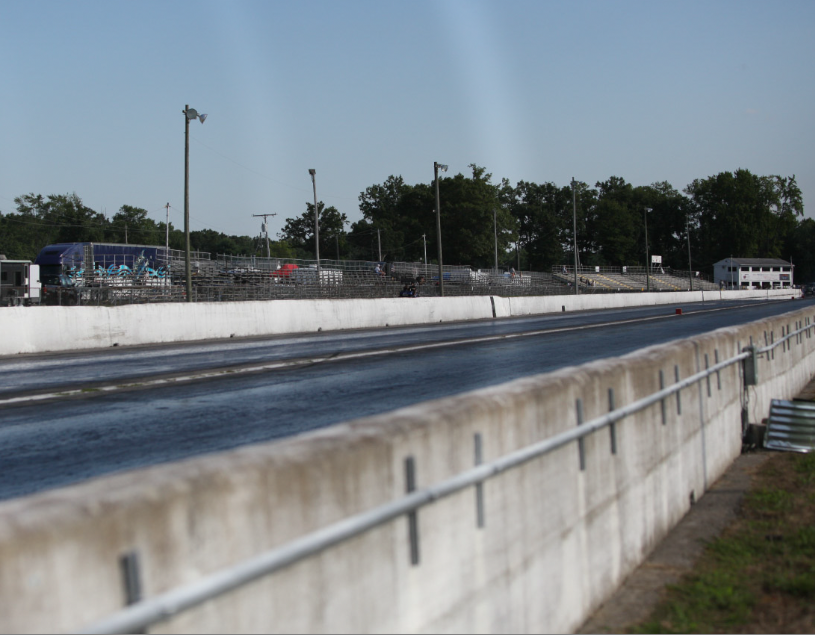

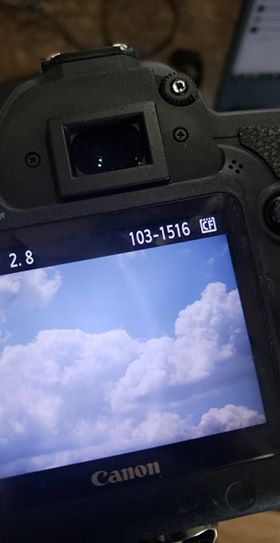
12 REPLIES 12


Options
- Mark as New
- Bookmark
- Subscribe
- Mute
- Subscribe to RSS Feed
- Permalink
- Report Inappropriate Content
08-07-2020 03:02 PM
It could be a hair or two above the sensor. You can use the sensor cleaning function to take a look-see.
Options
- Mark as New
- Bookmark
- Subscribe
- Mute
- Subscribe to RSS Feed
- Permalink
- Report Inappropriate Content
08-07-2020 03:09 PM
That is weird looking. Turn off all of the noise reduction and lighting correction settings. Does it occur with all lenses?
--------------------------------------------------------
"Enjoying photography since 1972."
"Enjoying photography since 1972."
Options
- Mark as New
- Bookmark
- Subscribe
- Mute
- Subscribe to RSS Feed
- Permalink
- Report Inappropriate Content
08-07-2020 03:33 PM
Ive alreadyu taken it in and had the sensor looked at & Cleaned.
Options
- Mark as New
- Bookmark
- Subscribe
- Mute
- Subscribe to RSS Feed
- Permalink
- Report Inappropriate Content
08-07-2020 03:33 PM
Tried it 😞 Happens with all lenses (with or without filters)
Options
- Mark as New
- Bookmark
- Subscribe
- Mute
- Subscribe to RSS Feed
- Permalink
- Report Inappropriate Content
08-07-2020 03:44 PM - edited 08-07-2020 03:46 PM
It is too out of focus to be on the sensor.
Does it ever move around?
Could be a light leak around the lens. Try covering the lens/mount junction with black gaffers tape.
Options
- Mark as New
- Bookmark
- Subscribe
- Mute
- Subscribe to RSS Feed
- Permalink
- Report Inappropriate Content
08-07-2020 03:55 PM
It never moves around. Never though about the mount junction having a light leak... gonna have to look into that

Options
- Mark as New
- Bookmark
- Subscribe
- Mute
- Subscribe to RSS Feed
- Permalink
- Report Inappropriate Content
08-07-2020 04:25 PM - edited 08-07-2020 04:28 PM
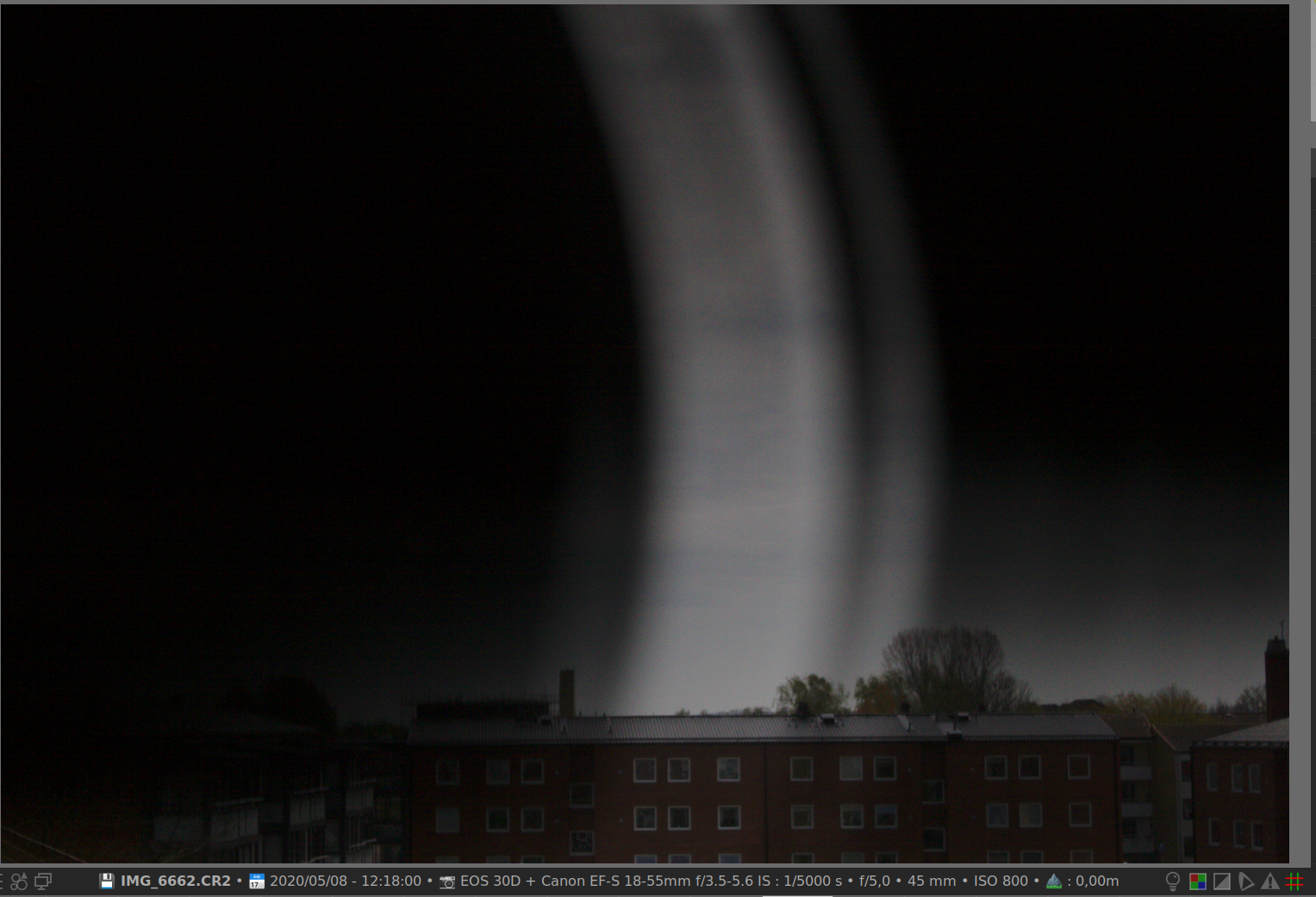
Shutter failure. My 30D looks the same when taking pictures with a fast shutter speed.

Options
- Mark as New
- Bookmark
- Subscribe
- Mute
- Subscribe to RSS Feed
- Permalink
- Report Inappropriate Content
08-07-2020 04:30 PM - edited 08-07-2020 04:31 PM
@Peter wrote:Shutter failure. My 30D looks the same when taking pictures with a fast shutter speed.
I had considered that. The lines are not straight, though. There are two nice curves.
--------------------------------------------------------
"Enjoying photography since 1972."
"Enjoying photography since 1972."
Options
- Mark as New
- Bookmark
- Subscribe
- Mute
- Subscribe to RSS Feed
- Permalink
- Report Inappropriate Content
08-07-2020 04:41 PM - edited 08-08-2020 05:08 AM
@Waddizzle wrote:
@Peter wrote:Shutter failure. My 30D looks the same when taking pictures with a fast shutter speed.
I had considered that. The lines are not straight, though. There are two nice curves.
And picture from my 30D below

Announcements
07/22/2026: New firmware updates are available.
EOS R6 Mark III - Version 1.1.0
05/13/2026: New firmware updates are available.
EOS R5 Mark II - Version 1.3.0
EOS R6 Mark II - Version 1.7.0
04/28/2026: Service Notice: Caution Concerning use of Lithium Batteries
03/17/2026: New firmware updates are available.
SELPHY CP1500 - Version 1.0.7.0
02/23/2026: New firmware update is available for EOS C50- Version 1.0.3.1
01/23/2026: New firmware update is available for RF 24-105mm F4 IS USM- Version 2.0.7
01/20/2026: New firmware updates are available.
10/21/2025: Service Notice: To Users of the Compact Digital Camera PowerShot V1
10/15/2025: New firmware updates are available.
Speedlite EL-5 - Version 1.2.0
Speedlite EL-1 - Version 1.1.0
Speedlite Transmitter ST-E10 - Version 1.2.0
07/28/2025: Notice of Free Repair Service for the Mirrorless Camera EOS R50 (Black)
05/21/2025: New firmware update available for EOS C500 Mark II - Version 1.1.5.1
Related Content
- Canon 24-70mm F2.8 II stopped focusing in EF & RF Lenses
- Vertical banding on LCD when articulating screen — Canon R6 Mark II in EOS DSLR & Mirrorless Cameras
- R6 Mark II WiFi Connectivity Issues when pushing to SFTP in EOS DSLR & Mirrorless Cameras
- EOS R5 Mark II minor Firmware Update, Version 1.3.1 in Camera Software
- A series of images not displaying in camera or when downloaded - EOS R5 Mk II in EOS DSLR & Mirrorless Cameras

Ⓒ 2026
Canon U.S.A Inc. All Rights Reserved. Reproduction in whole or part without permission is prohibited.
