Turn on suggestions
Auto-suggest helps you quickly narrow down your search results by suggesting possible matches as you type.
- Canon Community
- Discussions & Help
- Camera
- EOS DSLR & Mirrorless Cameras
- Re: 1dx mk ii. WiFi issue.
Options
- Subscribe to RSS Feed
- Mark Topic as New
- Mark Topic as Read
- Float this Topic for Current User
- Bookmark
- Subscribe
- Mute
- Printer Friendly Page
1dx mk ii. WiFi issue.

Options
- Mark as New
- Bookmark
- Subscribe
- Mute
- Subscribe to RSS Feed
- Permalink
- Report Inappropriate Content
09-06-2021 08:48 AM
I have a wft-e6 and have used it on my 1dx mkii and workef
flawlessly. Later I tethered via Ethernet cord to computer. Now the 1dx mkii will not recognize the wft. I tried the transmitter on a friends mkii and works perfectly so it is my camera. Any fix suggestions before I send it back to CPS?
2 REPLIES 2


Options
- Mark as New
- Bookmark
- Subscribe
- Mute
- Subscribe to RSS Feed
- Permalink
- Report Inappropriate Content
09-06-2021 09:54 AM
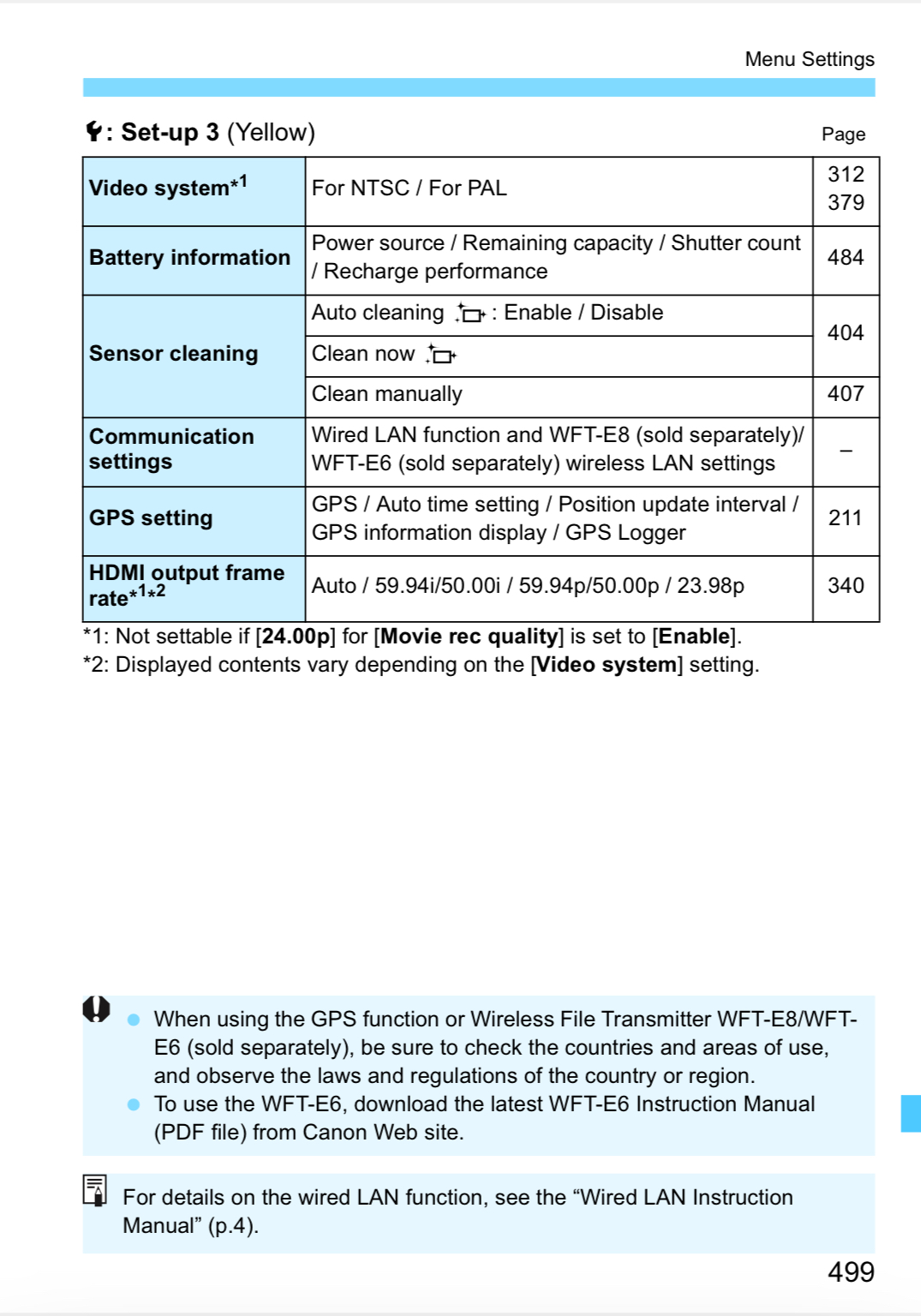
Did you change or check your [Communication Settings}?
--------------------------------------------------------
"Enjoying photography since 1972."
"Enjoying photography since 1972."

Options
- Mark as New
- Bookmark
- Subscribe
- Mute
- Subscribe to RSS Feed
- Permalink
- Report Inappropriate Content
09-06-2021 10:00 AM
The network communications settings with the 1DX series cameras are a bit convoluted. I suspect when you connected via ethernet, that is now the default communications setting for your 1DX II. Go back into network settings to choose the wireless adapter and if necessary run the setup wizard again to enable the settings for it.
I use ethernet as my primary transfer for my 1DX through 1DX III bodies since that serves my needs. Once the network wizard did the initial setup, I copied the IP address and set it to fixed to avoid a slow initial connect with Win 10. Otherwise it was taking up to a minute for it to handshake with my workstation instead of the couple of seconds it should.
Rodger
EOS 1DX M3, 1DX M2, 1DX, 5DS R, M6 Mark II, 1D M2, EOS 650 (film), many lenses, XF400 video


Announcements
11/20/2025: New firmware updates are available.
EOS R6 Mark III - Version 1.0.1
EOS R5 Mark II - Version 1.2.0
PowerShot G7 X Mark III - Version 1.4.0
PowerShot SX740 HS - Version 1.0.2
10/21/2025: Service Notice: To Users of the Compact Digital Camera PowerShot V1
10/15/2025: New firmware updates are available.
Speedlite EL-5 - Version 1.2.0
Speedlite EL-1 - Version 1.1.0
Speedlite Transmitter ST-E10 - Version 1.2.0
07/28/2025: Notice of Free Repair Service for the Mirrorless Camera EOS R50 (Black)
07/24/2025: New firmware updates are available.
07/23/2025: New firmware updates are available.
7/17/2025: New firmware updates are available.
05/21/2025: New firmware update available for EOS C500 Mark II - Version 1.1.5.1
02/20/2025: New firmware updates are available.
RF70-200mm F2.8 L IS USM Z - Version 1.0.6
RF24-105mm F2.8 L IS USM Z - Version 1.0.9
RF100-300mm F2.8 L IS USM - Version 1.0.8
RF50mm F1.4 L VCM - Version 1.0.2
RF24mm F1.4 L VCM - Version 1.0.3
01/22/2024: Canon Supports Disaster Relief Efforts in California
01/14/2025: Steps to resolve still image problem when using certain SanDisk SD cards with the Canon EOS R5 Mark II
Related Content
- RF 100mm f2.8 macro lens serious focusing issues in EF & RF Lenses
- EDSDK keeps showing "EDS_ERR_DEVICE_BUSY" when attemping to download video. in Camera Software
- How to adapt M42 lens on EF-S mount for EOS 2000D in EF & RF Lenses
- Canon R50 V Serial Cannot be Registered to USA. in EOS DSLR & Mirrorless Cameras
- R6 Mark III Error 70 when trying to import into Lightroom Classic in EOS DSLR & Mirrorless Cameras

Ⓒ 2025
Canon U.S.A Inc. All Rights Reserved. Reproduction in whole or part without permission is prohibited.
