Turn on suggestions
Auto-suggest helps you quickly narrow down your search results by suggesting possible matches as you type.
- Canon Community
- Discussions & Help
- Camera
- EF & RF Lenses
- Canon RF 100-400 Autofocus problem
Options
- Subscribe to RSS Feed
- Mark Topic as New
- Mark Topic as Read
- Float this Topic for Current User
- Bookmark
- Subscribe
- Mute
- Printer Friendly Page

Options
- Mark as New
- Bookmark
- Subscribe
- Mute
- Subscribe to RSS Feed
- Permalink
- Report Inappropriate Content
02-27-2023 04:01 PM
Hello,
Does anybody have an issue with autofocusing in 400mm with this lens? When I extend the lens to 400mm and try to focus, the lens is not focusing. I have to retract the lens to 100mm and refocus. Only then autofocus works. It happens almost every time in any mode(M,Av,Tv or Fv). Camera Canon R6.
Solved! Go to Solution.
1 ACCEPTED SOLUTION
Accepted Solutions
Options
- Mark as New
- Bookmark
- Subscribe
- Mute
- Subscribe to RSS Feed
- Permalink
- Report Inappropriate Content
02-27-2023 07:19 PM - edited 02-27-2023 07:49 PM
I just reset the camera setting and the default is "on" for this setting.
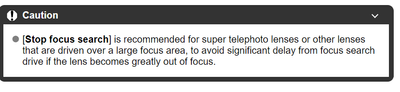
from the canon r6 manual below instructions need to be expended:
15 REPLIES 15


Options
- Mark as New
- Bookmark
- Subscribe
- Mute
- Subscribe to RSS Feed
- Permalink
- Report Inappropriate Content
02-27-2023 04:26 PM
I don't own this lens, but just a couple questions to help troubleshoot:
- If you adjust the zoom just a bit less than 400mm, does it then work? i.e. does it fail only when exactly at 400mm?
- Any differences if the stabilizer is on vs off?
--
Ricky
Camera: EOS R5 II, RF 50mm f/1.2L, RF 135mm f/1.8L
Lighting: Profoto Lights & Modifiers
Ricky
Camera: EOS R5 II, RF 50mm f/1.2L, RF 135mm f/1.8L
Lighting: Profoto Lights & Modifiers
Options
- Mark as New
- Bookmark
- Subscribe
- Mute
- Subscribe to RSS Feed
- Permalink
- Report Inappropriate Content
02-27-2023 04:37 PM - edited 02-27-2023 04:38 PM
This is my second RF100-400 IS USM lens. Both behave the same, whether IS is ON or OFF. The autofocus is not working when I extend the lens to 400mm and it's out of focus no matter which button I use(back buttons or main release button). I tried to gradually zoom out while holding AF button and sometimes it start focusing at around 135mm. But most of the time I have to retract the lens to 100mm in order for lens to start autofocusing.

Options
- Mark as New
- Bookmark
- Subscribe
- Mute
- Subscribe to RSS Feed
- Permalink
- Report Inappropriate Content
02-27-2023 04:48 PM
If you have other RF Mount lenses do they work correctly on this camera.
-Demetrius
Current Gear: EOS 5D Mark IV, EF 16-35mm F/2.8L III USM, EF 24-70mm F/2.8L II USM, EF 50 F/1.8 STM, EF 85mm F/1.8 USM, EF 70-200mm F/2.8L IS III USM, 470EX-AI & 600EX II-RT
Retired Gear: EOS 40D & Sigma 17-50mm F/2.8 EX DC OS HSM
-Demetrius
Bodies: EOS 5D Mark IV
Lenses: EF F/2.8 Holy Trinity
Speedlites: 420EX, 470EX-AI, 550EX & 600EX II-RT
Bodies: EOS 5D Mark IV
Lenses: EF F/2.8 Holy Trinity
Speedlites: 420EX, 470EX-AI, 550EX & 600EX II-RT
Options
- Mark as New
- Bookmark
- Subscribe
- Mute
- Subscribe to RSS Feed
- Permalink
- Report Inappropriate Content
02-27-2023 04:57 PM
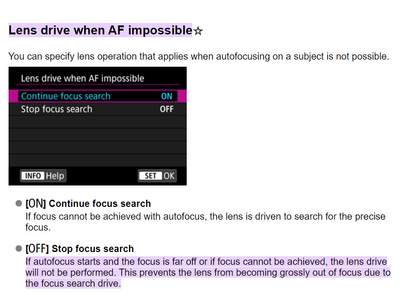
Update: The "problem" is solved. In the menu; AF; #4; "Lens drive when AF impossible" was OFF. When I changed it to ON, AF is working without any problem.
Options
- Mark as New
- Bookmark
- Subscribe
- Mute
- Subscribe to RSS Feed
- Permalink
- Report Inappropriate Content
02-27-2023 06:24 PM
You shouldn't have to enable that setting to force the lens to focus.
This is sounding like you have an issue with the camera. I would first reset all settings and try things out again. If the issue remains, you probably should look at sending it in for a repair.
--
Ricky
Camera: EOS R5 II, RF 50mm f/1.2L, RF 135mm f/1.8L
Lighting: Profoto Lights & Modifiers
Ricky
Camera: EOS R5 II, RF 50mm f/1.2L, RF 135mm f/1.8L
Lighting: Profoto Lights & Modifiers
Options
- Mark as New
- Bookmark
- Subscribe
- Mute
- Subscribe to RSS Feed
- Permalink
- Report Inappropriate Content
02-27-2023 07:03 PM
Thanks, You may be right. My other RF24-105 L f/4 lens is not doing this. But it's not 100-400mm zoom. I'm going to call Canon tech support tomorrow about this, will see what they say.

Options
- Mark as New
- Bookmark
- Subscribe
- Mute
- Subscribe to RSS Feed
- Permalink
- Report Inappropriate Content
02-27-2023 07:11 PM
@Len29,
I think the default is "on" for this setting. I'd have to verify.
Canon : Product Manual : EOS R6 : Customizing AF Functions (start.canon)
~Rick
Bay Area - CA
~R5 C (1.1.3.1), ~RF Trinity, ~RF 100 Macro, ~RF 100~400, ~RF 100~500, ~RF 200-800, ~RF 1.4x TC, BG-R10, 430EX III-RT ~DxO PhotoLab Elite ~DaVinci Resolve Studio ~ImageClass MF644Cdw MF656Cdw ~Pixel 10 ~CarePaks Are Worth It
Options
- Mark as New
- Bookmark
- Subscribe
- Mute
- Subscribe to RSS Feed
- Permalink
- Report Inappropriate Content
02-27-2023 07:19 PM - edited 02-27-2023 07:49 PM
I just reset the camera setting and the default is "on" for this setting.
from the canon r6 manual below instructions need to be expended:
Options
- Mark as New
- Bookmark
- Subscribe
- Mute
- Subscribe to RSS Feed
- Permalink
- Report Inappropriate Content
02-28-2023 04:21 PM - edited 02-28-2023 04:23 PM
I called Canon tech support today regarding my issue. Their response was: Your lens and camera work within the normal operation. And they suggest using "Lens drive when AF impossible" and "Continue focus search: ON.

Announcements
07/22/2026: New firmware updates are available.
EOS R6 Mark III - Version 1.1.0
05/13/2026: New firmware updates are available.
EOS R5 Mark II - Version 1.3.0
EOS R6 Mark II - Version 1.7.0
04/28/2026: Service Notice: Caution Concerning use of Lithium Batteries
03/17/2026: New firmware updates are available.
SELPHY CP1500 - Version 1.0.7.0
02/23/2026: New firmware update is available for EOS C50- Version 1.0.3.1
01/23/2026: New firmware update is available for RF 24-105mm F4 IS USM- Version 2.0.7
01/20/2026: New firmware updates are available.
10/21/2025: Service Notice: To Users of the Compact Digital Camera PowerShot V1
10/15/2025: New firmware updates are available.
Speedlite EL-5 - Version 1.2.0
Speedlite EL-1 - Version 1.1.0
Speedlite Transmitter ST-E10 - Version 1.2.0
07/28/2025: Notice of Free Repair Service for the Mirrorless Camera EOS R50 (Black)
05/21/2025: New firmware update available for EOS C500 Mark II - Version 1.1.5.1
Related Content
- EOS Rebel T7 shows "Busy" icon and runs slow, especially with flash in EOS DSLR & Mirrorless Cameras
- Aperture communication issues between Canon EOS R8 and sigma 150-600mm f/5-6.3 DG OS HSM C in EOS DSLR & Mirrorless Cameras
- Canon AF35M II/Autoboy 2 flash not working in Point & Shoot Digital Cameras
- USB-C not charging my EOS R50 V in EOS DSLR & Mirrorless Cameras
- Canon PowerShot V1 and Hot and Stuck pixels issue in Point & Shoot Digital Cameras

Ⓒ 2026
Canon U.S.A Inc. All Rights Reserved. Reproduction in whole or part without permission is prohibited.
