Turn on suggestions
Auto-suggest helps you quickly narrow down your search results by suggesting possible matches as you type.
- Canon Community
- Discussions & Help
- Printer
- Desktop Inkjet Printers
- Re: my canon mg2100 prints the text twice, with th...
Options
- Subscribe to RSS Feed
- Mark Topic as New
- Mark Topic as Read
- Float this Topic for Current User
- Bookmark
- Subscribe
- Mute
- Printer Friendly Page
my canon mg2100 prints the text twice, with the second set of words acting as a shadow

Options
- Mark as New
- Bookmark
- Subscribe
- Mute
- Subscribe to RSS Feed
- Permalink
- Report Inappropriate Content
09-10-2013 12:16 PM
my printer is printing off balance and creating two sets of text. one set of text is shadowing the other. i know this is confusing, but help please 🙂
6 REPLIES 6


Options
- Mark as New
- Bookmark
- Subscribe
- Mute
- Subscribe to RSS Feed
- Permalink
- Report Inappropriate Content
09-12-2013 09:22 AM
Hi hayleebs!
So that the Community can help you better, we will need to know any error messages you're seeing, and the Computer Operating System you're using (Windows XP/Vista/7/8 or Mac 10.x), as well as the way you connect to your device (USB or networked via WiFi or Ethernet).
Any other details you'd like to give will only help the Community better understand your issue!
If this is an urgent support need, please CLICK HERE to reach our friendly Technical Support Team by phone or email.
Thanks and have a great day!
Options
- Mark as New
- Bookmark
- Subscribe
- Mute
- Subscribe to RSS Feed
- Permalink
- Report Inappropriate Content
09-12-2013 11:17 AM - edited 09-12-2013 11:19 AM
I'm having a similar problem.
I have not had any error messages and my printer is connected via USB.

Options
- Mark as New
- Bookmark
- Subscribe
- Mute
- Subscribe to RSS Feed
- Permalink
- Report Inappropriate Content
09-16-2013 12:20 PM
Hi hayleebs and LordSnow,
It seems like you may have a dirty encoder in your printer. For more information on cleaning your encoder film, check out this excellent article from our Knowledge Base: Cleaning the Encoder Film MG2120.
If this didn't work, or if you have any other questions, please feel free to Contact Us!
Did this answer your question? Please click the Accept as Solution button so that others may find the answer as well.
Options
- Mark as New
- Bookmark
- Subscribe
- Mute
- Subscribe to RSS Feed
- Permalink
- Report Inappropriate Content
10-13-2015 04:26 AM
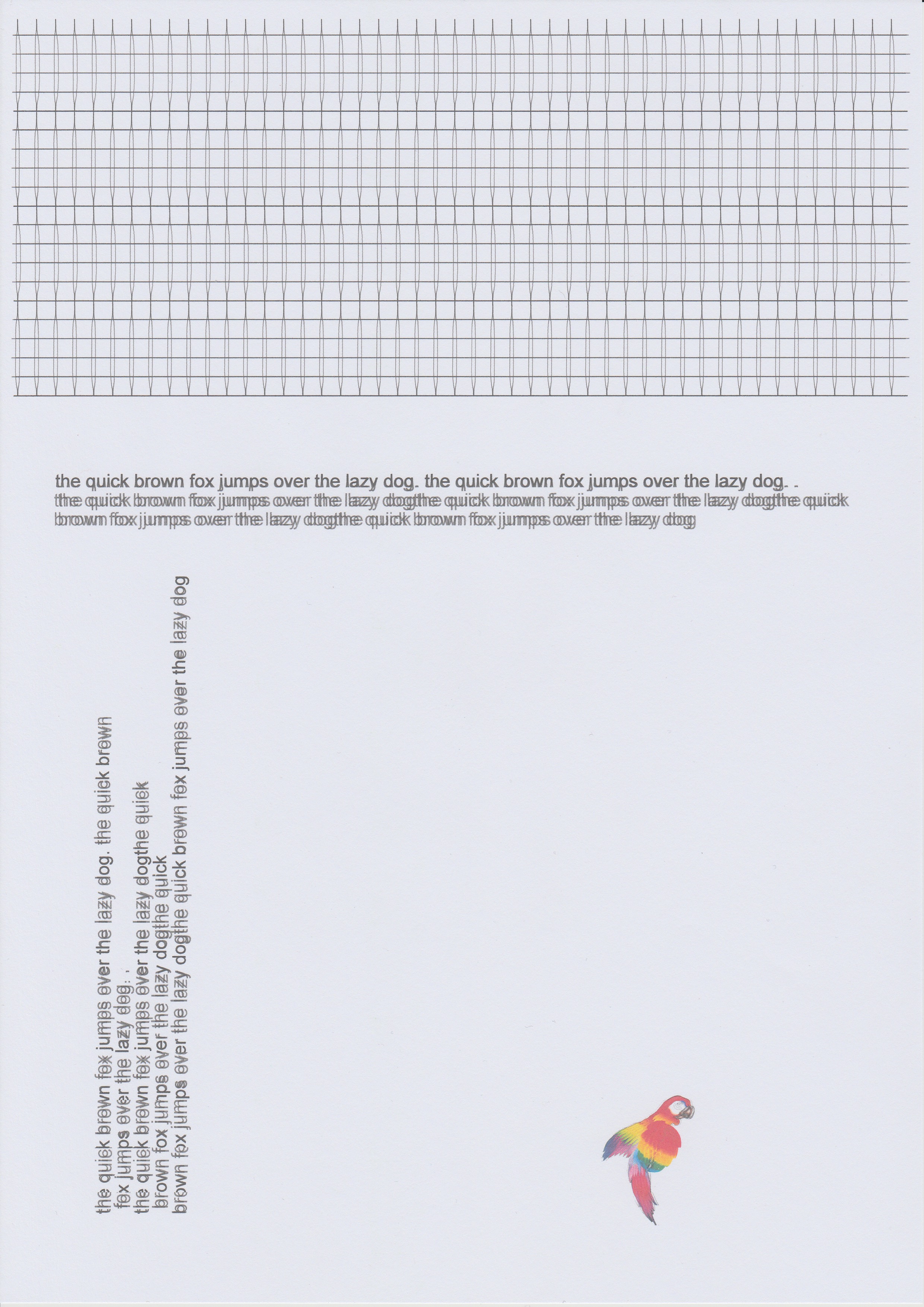
I got this issue. I already cleant the encoder film and the encoder disc.
In the image, the pattern above should be just squares.
I can bypass the problem, when i set the paper type to photo paper every time I print.
Then it takes photo black instead of pigment black. But then duplex is not working. I also have to copy using a computer and scan and print it.
Options
- Mark as New
- Bookmark
- Subscribe
- Mute
- Subscribe to RSS Feed
- Permalink
- Report Inappropriate Content
12-12-2015 11:21 AM
This is EXACTLY what's happening to me. And, like your sample, only SOME areas come out double; others are normal. Really need a fix here!!!
Options
- Mark as New
- Bookmark
- Subscribe
- Mute
- Subscribe to RSS Feed
- Permalink
- Report Inappropriate Content
12-12-2015 12:03 PM
Thank goodness for YouTube. This user, Bassam, uploaded a video showing exactly what to do.
I have a Pixma MG2100, and the encoder strip is extremely hard to see (and not that easy to get to). He is cleaning the exact same printer.

Announcements
07/22/2026: New firmware updates are available.
EOS R6 Mark III - Version 1.1.0
05/13/2026: New firmware updates are available.
EOS R5 Mark II - Version 1.3.0
EOS R6 Mark II - Version 1.7.0
04/28/2026: Service Notice: Caution Concerning use of Lithium Batteries
03/17/2026: New firmware updates are available.
SELPHY CP1500 - Version 1.0.7.0
02/23/2026: New firmware update is available for EOS C50- Version 1.0.3.1
01/23/2026: New firmware update is available for RF 24-105mm F4 IS USM- Version 2.0.7
01/20/2026: New firmware updates are available.
10/21/2025: Service Notice: To Users of the Compact Digital Camera PowerShot V1
10/15/2025: New firmware updates are available.
Speedlite EL-5 - Version 1.2.0
Speedlite EL-1 - Version 1.1.0
Speedlite Transmitter ST-E10 - Version 1.2.0
07/28/2025: Notice of Free Repair Service for the Mirrorless Camera EOS R50 (Black)
05/21/2025: New firmware update available for EOS C500 Mark II - Version 1.1.5.1
Related Content
- PIXMA TS6420a All-In-One: red shadows on text in Desktop Inkjet Printers
- Canon Pixma pro 200s - shadow print/double image/ghost line issue in Professional Photo Printers
- PIXMA PRO-200 prints don't match what's on my monitor in Professional Photo Printers
- PIXMA MG7720 acting like it is out of ink in Desktop Inkjet Printers
- Color Misregistration Issue (multicolor print Offset) on Canon imageRUNNER ADVANCE 350i in Production Printing

Ⓒ 2026
Canon U.S.A Inc. All Rights Reserved. Reproduction in whole or part without permission is prohibited.
