Turn on suggestions
Auto-suggest helps you quickly narrow down your search results by suggesting possible matches as you type.
- Canon Community
- Discussions & Help
- Printer
- Desktop Inkjet Printers
- Re: faded color with MG 7120
Options
- Subscribe to RSS Feed
- Mark Topic as New
- Mark Topic as Read
- Float this Topic for Current User
- Bookmark
- Subscribe
- Mute
- Printer Friendly Page

Options
- Mark as New
- Bookmark
- Subscribe
- Mute
- Subscribe to RSS Feed
- Permalink
- Report Inappropriate Content
08-30-2015 07:52 PM
I'm finally getting around to printing color pix on my MG7120 (with Mac 10.6.8 from Photoshop Elements file}.
The photo is bright, saturated, and contrasty. The print is flat and unsaturated almost to being a monotone.
I am using glossy photo paper and have selected high quality. Is there something I can do or is the printer defective?
Solved! Go to Solution.
1 ACCEPTED SOLUTION
Accepted Solutions
Options
- Mark as New
- Bookmark
- Subscribe
- Mute
- Subscribe to RSS Feed
- Permalink
- Report Inappropriate Content
09-01-2015 12:35 PM
I forgot to say that I had run the test and it came out perfect. (Thanks anyway, Patrick.)
I then noticed that the paper I was using said laser, not ink-jet, so I wondered if that was the problem. Rooting around in the closet I came upon a couple sheets of Canon matte photo paper that had come with the printer. I tried that and, voila!, the colors came out true. So maybe the printer didn't like Hammerhill brand, or laser paper needs different inks, but the problem turned out to be the PAPER!
Problem solved. Now I need to run out and buy paper.
2 REPLIES 2


Options
- Mark as New
- Bookmark
- Subscribe
- Mute
- Subscribe to RSS Feed
- Permalink
- Report Inappropriate Content
09-01-2015 12:14 PM
Hi taueva,
First, please make sure that the ink tanks are installed in the printer correctly and are in the correct order. The order from left to right is as follows:
CLI-251BK
CLI-251GY
CLI-251Y
PGI-250PGBK
CLI-251C
CLI-251M
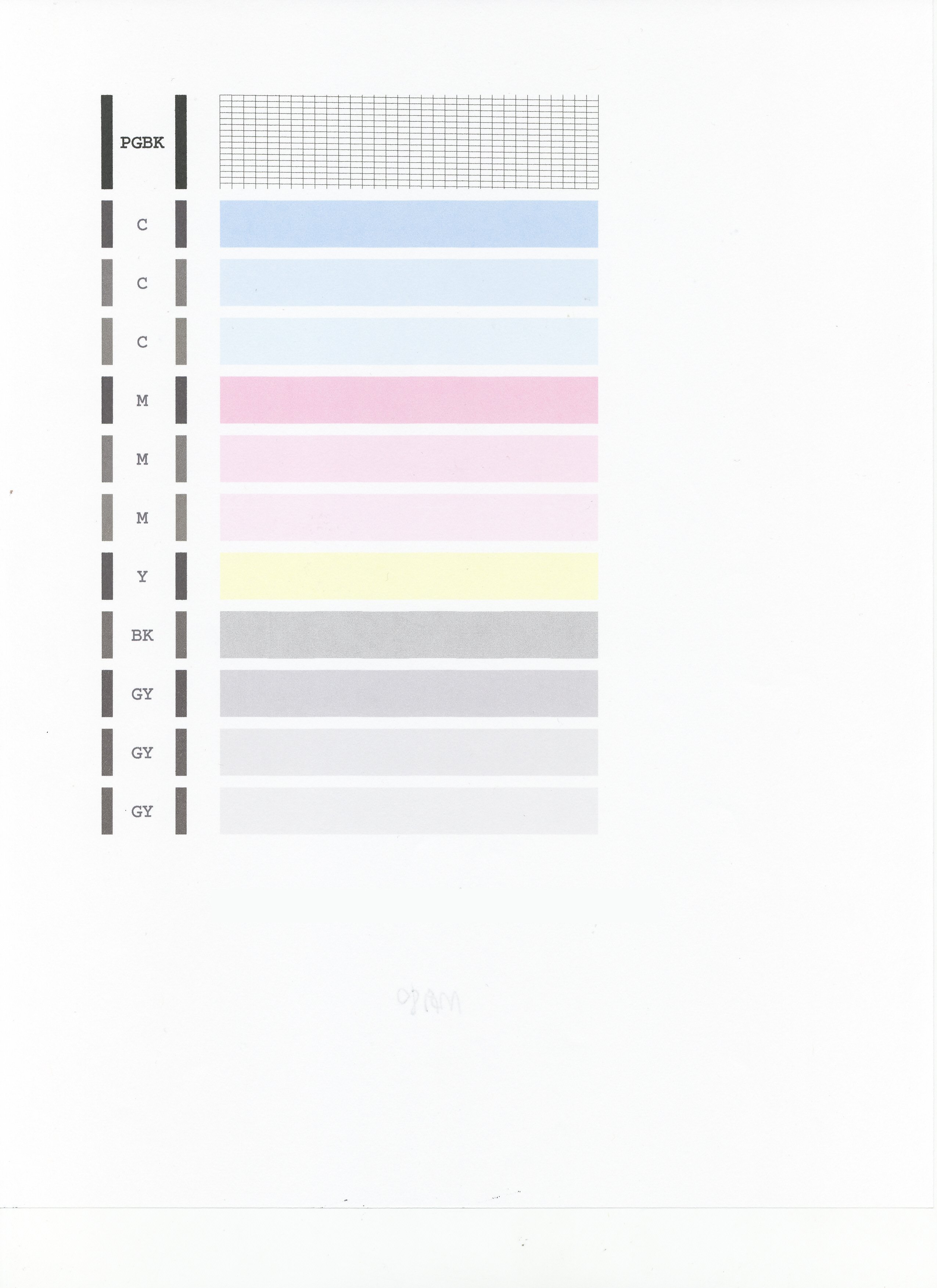
Next, a test of the printer should be performed. This will tell us if the printer is working correctly. To do this, please load letter-sized paper in the PIXMA MG7120 and follow these steps:
1. Flick the HOME screen and then tap Setup.
2. Tap Maintenance.
3. Tap Print nozzle check pattern.
4. Tap Yes.
The Nozzle Check will print. Please compare your printout to the exampleat the end of this post. If they differ, please perform a few printhead cleanings. To perform cleanings, please follow these steps:
1. Flick the HOME screen and then tap Setup.
2. Tap Maintenance.
3. Tap Cleaning.
4. Tap Yes to clean the printhead.
5. Tap Yes to print another Nozzle Check.
Does the Nozzle Check print correctly?
Options
- Mark as New
- Bookmark
- Subscribe
- Mute
- Subscribe to RSS Feed
- Permalink
- Report Inappropriate Content
09-01-2015 12:35 PM
I forgot to say that I had run the test and it came out perfect. (Thanks anyway, Patrick.)
I then noticed that the paper I was using said laser, not ink-jet, so I wondered if that was the problem. Rooting around in the closet I came upon a couple sheets of Canon matte photo paper that had come with the printer. I tried that and, voila!, the colors came out true. So maybe the printer didn't like Hammerhill brand, or laser paper needs different inks, but the problem turned out to be the PAPER!
Problem solved. Now I need to run out and buy paper.

Announcements
07/22/2026: New firmware updates are available.
EOS R6 Mark III - Version 1.1.0
05/13/2026: New firmware updates are available.
EOS R5 Mark II - Version 1.3.0
EOS R6 Mark II - Version 1.7.0
04/28/2026: Service Notice: Caution Concerning use of Lithium Batteries
03/17/2026: New firmware updates are available.
SELPHY CP1500 - Version 1.0.7.0
02/23/2026: New firmware update is available for EOS C50- Version 1.0.3.1
01/23/2026: New firmware update is available for RF 24-105mm F4 IS USM- Version 2.0.7
01/20/2026: New firmware updates are available.
10/21/2025: Service Notice: To Users of the Compact Digital Camera PowerShot V1
10/15/2025: New firmware updates are available.
Speedlite EL-5 - Version 1.2.0
Speedlite EL-1 - Version 1.1.0
Speedlite Transmitter ST-E10 - Version 1.2.0
07/28/2025: Notice of Free Repair Service for the Mirrorless Camera EOS R50 (Black)
05/21/2025: New firmware update available for EOS C500 Mark II - Version 1.1.5.1
Related Content
- imageCLASS MF665Cdw prints solid blue pages, faded black text, other issues in Office Printers
- imagePROGRAF PRO 310 colors faded. in Professional Photo Printers
- PIXMA G6000 and G7000 all in one inkjet printers faded color issue in Desktop Inkjet Printers
- New PIXMA TS6420a prints faded black prints on "cardstock" setting in Desktop Inkjet Printers
- PIXMA G7000 Series: Used laser paper and now colors are faded in Desktop Inkjet Printers

Ⓒ 2026
Canon U.S.A Inc. All Rights Reserved. Reproduction in whole or part without permission is prohibited.
