cancel
Showing results for 
Show  only  | Search instead for 
Did you mean: 

Won't scan mp830

stevekaz
Apprentice

My MP830 stopped scanning and copying.  It will print just fine.  The light source does not come on.  The focusing bar does not move across the platen.  I have unplugged the printer overnight.  Still will not scan/copy.  There was no new software added proximally.  Vista ultimate 64.  HP Touchsmart tablet.  This set up worked for years.  When I got a 6A00 message, I cleaned the plastic blades and reset the sponge and the 6A00 message stopped.  I don't think the copy/scan issue is related.  Any suggestions?  Thanks in advance.

40 REPLIES 40

drtofu
Apprentice

I had this problem and fixed it.  I wrote up a giant reply here detailing how I fixed it but it disappeared/got deleted?

In a nutshell, the problem was the flex cable connecting the moving scanner head to the edge of the scanner (under the platen).  That cable curls and uncurls as the scanner head moves, and in my case, one of the conductors inside it broke.  
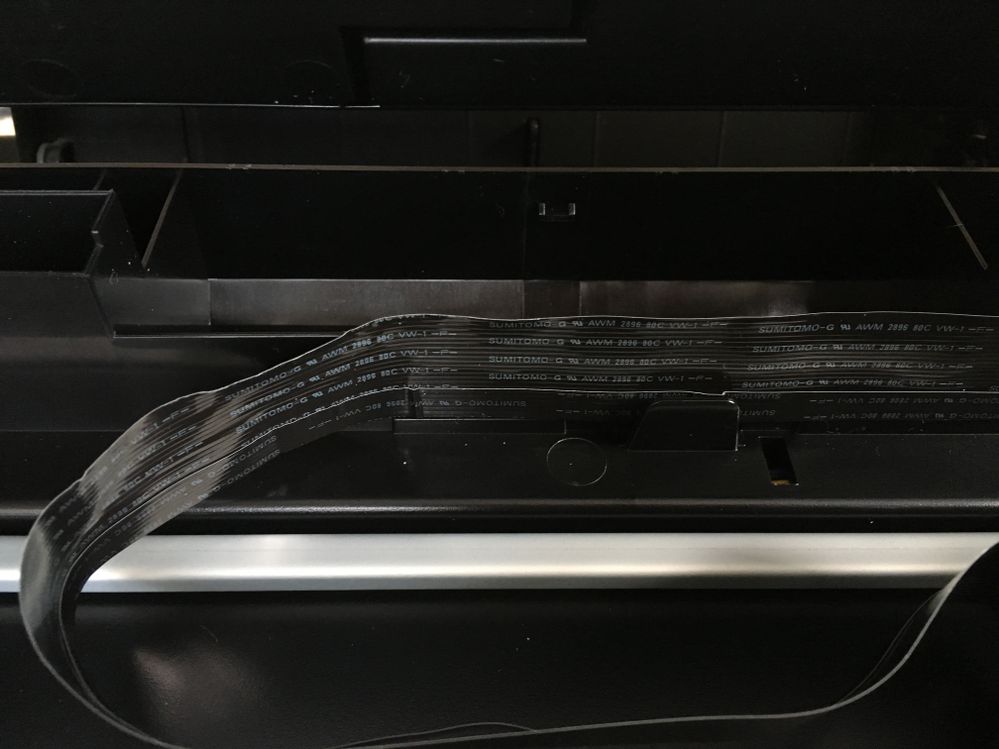
IMG_3042.JPG

I figured it out using a multimeter at each end of the cable and found that one/some conductors didn't work.

See the kink on the smaller cable?  That's the broken one and probably where it broke.  

I fixed it by buying a similar flex cable (hard because of the length) "A1 FFCs - Long Flex Cable for Raspberry Pi Camera - Black 1m/3.28ft (2 Pack)" on Amazon for $7.  The important part was the 'pitch' — the space and width of the conductors — since it needed to slot into the existing flex cable ports.

I removed the old cable, cut to length, trimmed off the unneeded lines (I think there were more conductors than I needed) and scraped off the plastic at the ends to reveal the conductors which I connected to the flex cable ports.

I was happily surprised that it worked — it was a kind of a shot in the dark!  It was pretty major surgery but it's still working years later (with light use).

Putting this info here in the hopes that it helps someone else.  I can't believe I did all this but this is a great machine.

Holiday
Announcements
12/15/2025: New firmware update available for EOS C50 - Version 1.0.1.1

11/20/2025: New firmware updates are available.

EOS R6 Mark III - Version 1.0.1

EOS R3 - Version 2.0.0

EOS R1 - Version 1.2.0

EOS R5 Mark II - Version 1.2.0

EOS R5 - Version 2.2.1

PowerShot G7 X Mark III - Version 1.4.0

PowerShot SX740 HS - Version 1.0.2


10/21/2025: Service Notice: To Users of the Compact Digital Camera PowerShot V1

10/15/2025: New firmware updates are available.

Speedlite EL-5 - Version 1.2.0

Speedlite EL-1 - Version 1.1.0

Speedlite Transmitter ST-E10 - Version 1.2.0


07/28/2025: Notice of Free Repair Service for the Mirrorless Camera EOS R50 (Black)

07/24/2025: New firmware updates are available.


07/23/2025: New firmware updates are available.

EOS R5C - Version 1.1.1.1

EOS C80 - Version 1.0.3.1


7/17/2025: New firmware updates are available.

EOS R7 - Version 1.7.1

EOS R10 - Version 1.7.0

EOS R8 - Version 1.5.0

EOS R50 - Version 1.4.0

Powershot V10 - Version 1.4.0

Powershot V1 - Version 1.1.0

EOS R50V - Version 1.1.1


05/21/2025: New firmware update available for EOS C500 Mark II - Version 1.1.5.1

02/20/2025: New firmware updates are available.

RF70-200mm F2.8 L IS USM Z - Version 1.0.6

RF24-105mm F2.8 L IS USM Z - Version 1.0.9

RF100-300mm F2.8 L IS USM - Version 1.0.8

RF50mm F1.4 L VCM - Version 1.0.2

RF24mm F1.4 L VCM - Version 1.0.3


01/22/2024: Canon Supports Disaster Relief Efforts in California
01/14/2025: Steps to resolve still image problem when using certain SanDisk SD cards with the Canon EOS R5 Mark II
