Turn on suggestions
Auto-suggest helps you quickly narrow down your search results by suggesting possible matches as you type.
- Canon Community
- Discussions & Help
- Printer
- Desktop Inkjet Printers
- Re: Quick Menu Driver not installed
Options
- Subscribe to RSS Feed
- Mark Topic as New
- Mark Topic as Read
- Float this Topic for Current User
- Bookmark
- Subscribe
- Mute
- Printer Friendly Page
Quick Menu Driver not installed

Options
- Mark as New
- Bookmark
- Subscribe
- Mute
- Subscribe to RSS Feed
- Permalink
- Report Inappropriate Content
01-12-2018 06:49 PM
Hi Guys,
Ive just purchased a MB2760 which is installed on my Widows 10 PC. The printer seems to be working fine but when the computer starts I get a small window popping up saying " A driver supporting quick menu is not installed" Any ideas please? Thank you
Alan
4 REPLIES 4
Options
- Mark as New
- Bookmark
- Subscribe
- Mute
- Subscribe to RSS Feed
- Permalink
- Report Inappropriate Content
01-13-2018 09:43 PM
So no ideas on how to fix this problem guys?
Options
- Mark as New
- Bookmark
- Subscribe
- Mute
- Subscribe to RSS Feed
- Permalink
- Report Inappropriate Content
01-13-2018 09:48 PM
Hi, Clarkey62!
We appreciate your participation, though we need to let you know that your product appears to be a model that is not supported by our team here at Canon USA. The Canon Community Forum is hosted and moderated within the United States by Canon USA. We are only able to provide support for Canon products manufactured for and used within the US market.
If you live outside the United States, please click http://global.canon/en.html and select your country to find support in your part of the world.
Feel free to discuss Canon products sold outside of the United States, but please be aware that you will not receive support directly from Canon USA.
Thanks for choosing Canon!
Options
- Mark as New
- Bookmark
- Subscribe
- Mute
- Subscribe to RSS Feed
- Permalink
- Report Inappropriate Content
06-08-2018 05:46 PM
Maybe this will help Clarkey62!
I'm having the same problem. Trying to install Canon PIXMA i8720 and am unable to open up the Quick Menu. I get the message that a driver was not installed. Huh?
I see nothing in the other manual about how to set up wireless and was hoping the instructions were in the Quick Menu since the installation of wireless is proving a bigger problem than I anticipated.

Options
- Mark as New
- Bookmark
- Subscribe
- Mute
- Subscribe to RSS Feed
- Permalink
- Report Inappropriate Content
06-11-2018 05:02 PM
Hi Shardik,
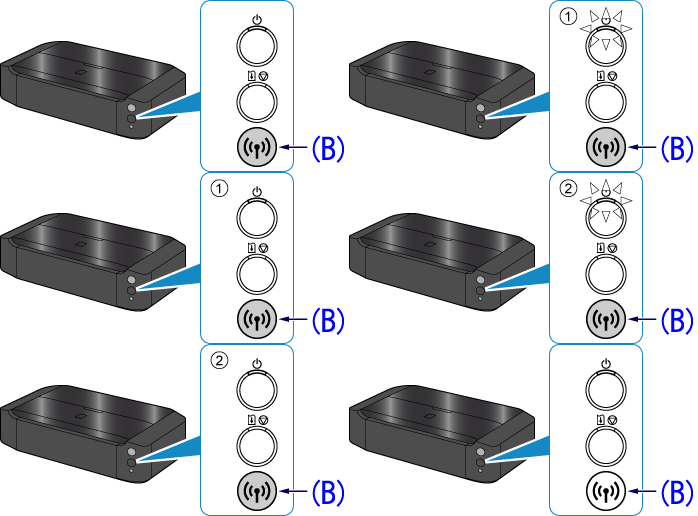
To place your printer into cableless setup mode, follow the steps below.
1. Hold down the Wi-Fi button (B) on the printer until the (white) POWER lamp flashes 2 times, then release the Wi-Fi button after the second flash.
1. Hold down the Wi-Fi button (B) on the printer until the (white) POWER lamp flashes 2 times, then release the Wi-Fi button after the second flash.
2. Make sure that the (blue) Wi-Fi lamp flashes quickly and the (white) POWER lamp is lit.
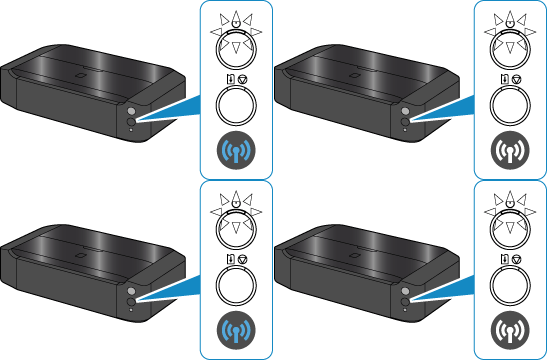
The printer is now in cableless setup mode. Proceed with installing the software on your computer or using Canon PRINT Inkjet / SELPHY to connect the printer to your wireless network.
Once connected to the wireless network, you should be able to install the printer drivers and programs like the Quick Menu.
This didn't answer your question or issue? Please call or email us at one of the methods on the Contact Us page for further assistance.
Did this answer your question? Please click the Accept as Solution button so that others may find the answer as well.


Announcements
07/22/2026: New firmware updates are available.
EOS R6 Mark III - Version 1.1.0
05/13/2026: New firmware updates are available.
EOS R5 Mark II - Version 1.3.0
EOS R6 Mark II - Version 1.7.0
04/28/2026: Service Notice: Caution Concerning use of Lithium Batteries
03/17/2026: New firmware updates are available.
SELPHY CP1500 - Version 1.0.7.0
02/23/2026: New firmware update is available for EOS C50- Version 1.0.3.1
01/23/2026: New firmware update is available for RF 24-105mm F4 IS USM- Version 2.0.7
01/20/2026: New firmware updates are available.
10/21/2025: Service Notice: To Users of the Compact Digital Camera PowerShot V1
10/15/2025: New firmware updates are available.
Speedlite EL-5 - Version 1.2.0
Speedlite EL-1 - Version 1.1.0
Speedlite Transmitter ST-E10 - Version 1.2.0
07/28/2025: Notice of Free Repair Service for the Mirrorless Camera EOS R50 (Black)
05/21/2025: New firmware update available for EOS C500 Mark II - Version 1.1.5.1
Related Content
- imageCLASS MFC743Cdw - No scan, no print, not working and can't reach Canon support after months. in Office Printers
- RS40 Scanner driver installation error on Windows 11 in Scanners
- TS7720 I cannot print after installing Tahoe OS 26.6on my Mac Book Air in Desktop Inkjet Printers
- MF662Cdw Driver Install Pack for Windows Error in Printer Software & Networking
- PIXMA TS6520 cannot install ARM drivers in Printer Software & Networking

Ⓒ 2026
Canon U.S.A Inc. All Rights Reserved. Reproduction in whole or part without permission is prohibited.
