10-26-2020 07:42 PM
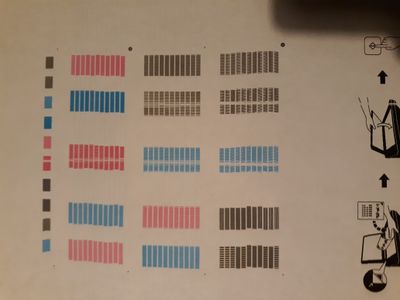
First time posting in here. I have an MX492 printer and just replaced the cartridges with recycled ones (XL). I'm getting streaks down every page I print. I had the problem before with the original ink but was told by a tech who checked it out that I just needed to replace the ink. But here I am with the same problem. Any ideas what causes this? Thanks!
10-26-2020 07:43 PM
By the way, I've tried every maintence tool available. Alignment, cleaning, deep cleaning, etc.
12-02-2020 01:27 PM
Hi munkytown,
Based on your description of the issue, it would appear as though the encoder/timing strip in your PIXMA MX492 is dirty or smudged and would need to be cleaned. To clean the encoder/timing strip, please follow the steps outlined in the following Knowledgebase Article available from Canon's web site:

https://support.usa.canon.com/kb/index?page=content&id=ART164873
After cleaning, please attempt to print again.
11/20/2025: New firmware updates are available.
EOS R6 Mark III - Version 1.0.1
EOS R5 Mark II - Version 1.2.0
PowerShot G7 X Mark III - Version 1.4.0
PowerShot SX740 HS - Version 1.0.2
10/15/2025: New firmware updates are available.
Speedlite EL-5 - Version 1.2.0
Speedlite EL-1 - Version 1.1.0
Speedlite Transmitter ST-E10 - Version 1.2.0
07/24/2025: New firmware updates are available.
07/23/2025: New firmware updates are available.
7/17/2025: New firmware updates are available.
02/20/2025: New firmware updates are available.
RF70-200mm F2.8 L IS USM Z - Version 1.0.6
RF24-105mm F2.8 L IS USM Z - Version 1.0.9
RF100-300mm F2.8 L IS USM - Version 1.0.8
RF50mm F1.4 L VCM - Version 1.0.2
RF24mm F1.4 L VCM - Version 1.0.3
Canon U.S.A Inc. All Rights Reserved. Reproduction in whole or part without permission is prohibited.