Turn on suggestions
Auto-suggest helps you quickly narrow down your search results by suggesting possible matches as you type.
- Canon Community
- Discussions & Help
- Printer
- Desktop Inkjet Printers
- Re: Printer Printing Green
Options
- Subscribe to RSS Feed
- Mark Topic as New
- Mark Topic as Read
- Float this Topic for Current User
- Bookmark
- Subscribe
- Mute
- Printer Friendly Page
Printer Printing Green

Options
- Mark as New
- Bookmark
- Subscribe
- Mute
- Subscribe to RSS Feed
- Permalink
- Report Inappropriate Content
09-21-2016 12:51 PM
I just bought a brand new black ink but its printing green? If I printed something from mircosoft word it comes out black but if i print from something else like a screenshot or USPS tracking, it comes out green. what should I do?
5 REPLIES 5


Options
- Mark as New
- Bookmark
- Subscribe
- Mute
- Subscribe to RSS Feed
- Permalink
- Report Inappropriate Content
09-22-2016 08:23 AM
Hi, becvu3!
So that the Community can help you better, we will need to know exactly which Canon printer model you're using, and which operating system is running on your computer (Windows or Mac OS, and which version thereof). That, and any other details you'd like to give will help the Community better understand your issue!
If this is a time-sensitive matter, our US-based technical support team is standing by, ready to help 24/7 via Email at http://Canon.us/SupportCF or by phone at 1-800-OK-CANON (1-800-652-2666) weekdays between 10 AM and 10 PM ET (7 AM to 7 PM PT).
Thanks and have a great day!
Options
- Mark as New
- Bookmark
- Subscribe
- Mute
- Subscribe to RSS Feed
- Permalink
- Report Inappropriate Content
09-27-2016 12:40 PM
I have a canon MC420. I'm using a MacBook with a 10.9.5 version

Options
- Mark as New
- Bookmark
- Subscribe
- Mute
- Subscribe to RSS Feed
- Permalink
- Report Inappropriate Content
09-28-2016 10:15 AM
Hi becvu3,
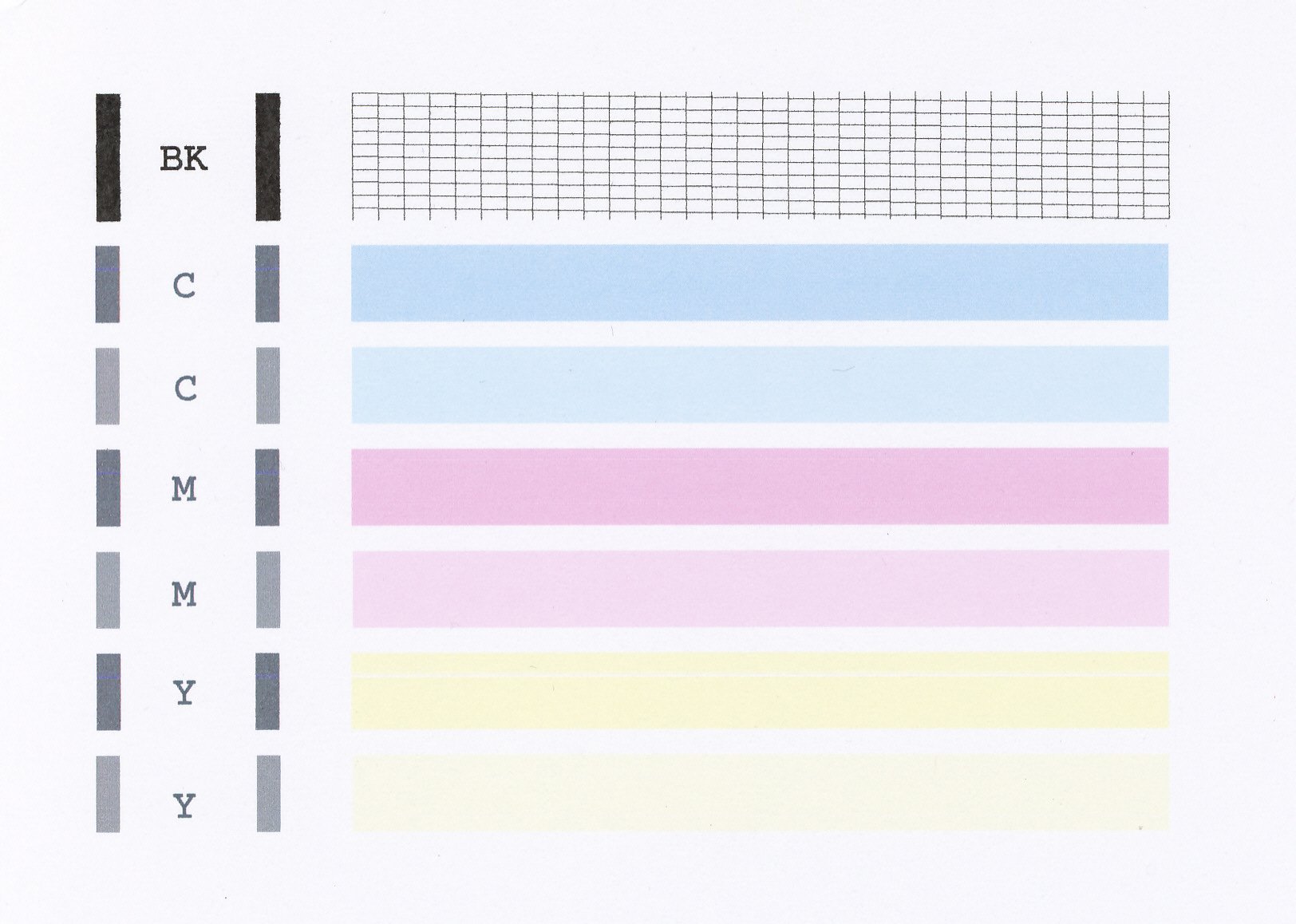
A test of your PIXMA MX420 should be performed. This will tell us if the printer is working correctly. To do this, please load letter-sized paper in the PIXMA MX420 and follow these steps:
1. Press the <Setup> button on your PIXMA MX420.
2. Select Maintenance and press <OK>.
3. Press <OK> on Nozzle Check.
4. Press <OK> on Yes.
The Nozzle Check will print. Please compare your printout to the example that has been attached to the bottom of this post. If they differ, please perform a few printhead cleanings.
To perform cleanings, please follow these steps:
1. Press <Setup> on your PIXMA MX420.
2. Select Maintenance and press <OK>.
3. Press <OK> on Cleaning.
4. Press <OK> on Yes.
After a few cleanings, please print another Nozzle Check.
Does the test page printed from your PIXMA MX420 print correctly? If not, it is recommended that you contact our support group using the following link:
https://www.usa.canon.com/internet/portal/us/home/contactus
Options
- Mark as New
- Bookmark
- Subscribe
- Mute
- Subscribe to RSS Feed
- Permalink
- Report Inappropriate Content
05-02-2020 10:44 PM
Hi, I've done the troubleshooting procedure you suggested but why my printer still doing the same? Hoping for another alternative way to solve the problem, thank you.
Options
- Mark as New
- Bookmark
- Subscribe
- Mute
- Subscribe to RSS Feed
- Permalink
- Report Inappropriate Content
06-22-2021 09:01 AM
Hi, I have a Canon G3110 for a year and it was working correctly, but a few days ago it started to print all in green. I haven´t changed the colors, I have made all of the maintenance and they are all ok.
What is the problem?
Regards,
Nicolas M.

Announcements
07/22/2026: New firmware updates are available.
EOS R6 Mark III - Version 1.1.0
05/13/2026: New firmware updates are available.
EOS R5 Mark II - Version 1.3.0
EOS R6 Mark II - Version 1.7.0
04/28/2026: Service Notice: Caution Concerning use of Lithium Batteries
03/17/2026: New firmware updates are available.
SELPHY CP1500 - Version 1.0.7.0
02/23/2026: New firmware update is available for EOS C50- Version 1.0.3.1
01/23/2026: New firmware update is available for RF 24-105mm F4 IS USM- Version 2.0.7
01/20/2026: New firmware updates are available.
10/21/2025: Service Notice: To Users of the Compact Digital Camera PowerShot V1
10/15/2025: New firmware updates are available.
Speedlite EL-5 - Version 1.2.0
Speedlite EL-1 - Version 1.1.0
Speedlite Transmitter ST-E10 - Version 1.2.0
07/28/2025: Notice of Free Repair Service for the Mirrorless Camera EOS R50 (Black)
05/21/2025: New firmware update available for EOS C500 Mark II - Version 1.1.5.1
Related Content
- TR8600 printer, faint printing and missing lines in Desktop Inkjet Printers
- MF 269 dw II recognized by Mac but offline or online but will not print in Office Printers
- TS6320 prints blank pages, but test pages and copies are fine in Desktop Inkjet Printers
- printer not responding in Printer Software & Networking
- Latest Photo Printer Software for TR8620 Printer, or 3rd party suggestions in Desktop Inkjet Printers

Ⓒ 2026
Canon U.S.A Inc. All Rights Reserved. Reproduction in whole or part without permission is prohibited.
