Turn on suggestions
Auto-suggest helps you quickly narrow down your search results by suggesting possible matches as you type.
- Canon Community
- Discussions & Help
- Printer
- Desktop Inkjet Printers
- Re: My printer started printing "shadow/double" le...
Options
- Subscribe to RSS Feed
- Mark Topic as New
- Mark Topic as Read
- Float this Topic for Current User
- Bookmark
- Subscribe
- Mute
- Printer Friendly Page
PIXMA iP7250 prints "shadow/double" letters, words, sentences, etc... making the text unreadable

Options
- Mark as New
- Bookmark
- Subscribe
- Mute
- Subscribe to RSS Feed
- Permalink
- Report Inappropriate Content
06-07-2016
12:11 PM
- last edited on
10-18-2023
08:19 AM
by
 Danny
Danny
43 REPLIES 43
Options
- Mark as New
- Bookmark
- Subscribe
- Mute
- Subscribe to RSS Feed
- Permalink
- Report Inappropriate Content
06-26-2019 07:59 AM
It's now been a few months since my last post and Canon have still not acknowledged that this is a common fault. Their only advice is to take the printer to a service centre where they will quote to have it repaired.
I have communicated with a service centre and they have advised that they have never seen any similar faults and have no idea what the fault may be without further investigation, however I will have to pay for any such investigation.
According to other posts, this is the common scenario and the general response is that the printer is 'not worth repairing'. I have not yet seen any conclusive information which identifies the root cause of the fault.
This means that we are in a hopeless situation. Canon won't investigate further or acknowledge the fault and their repair centres simply advise to get a new printer.
This isn't good enough Canon !!
Options
- Mark as New
- Bookmark
- Subscribe
- Mute
- Subscribe to RSS Feed
- Permalink
- Report Inappropriate Content
06-28-2019 01:09 PM - edited 06-28-2019 02:17 PM
Exact the same problem !!
- Canon Pixma MX922
- Windows 10 64bit
- I have used both WiFi and USB
- I have done all suggestions
Please help me !!
Options
- Mark as New
- Bookmark
- Subscribe
- Mute
- Subscribe to RSS Feed
- Permalink
- Report Inappropriate Content
07-20-2019 01:52 PM
Same problem here. If I can't find a solution, will ditch the printer and go with one from HP.
Options
- Mark as New
- Bookmark
- Subscribe
- Mute
- Subscribe to RSS Feed
- Permalink
- Report Inappropriate Content
07-29-2019 06:29 PM
Same here... I've tried for over a year to figure it out on wi-fi MX 922. Trying suggestions that don't work. Frustrated.
Options
- Mark as New
- Bookmark
- Subscribe
- Mute
- Subscribe to RSS Feed
- Permalink
- Report Inappropriate Content
07-29-2019 06:57 PM
Obviously, Canon is keeping a deaf ear on this subject and refuses to offer a solution or adequate offer. So much for customer support. MY solution: get an HP or a Brother and ditch Canon. Forever. Printers are not that expensive. It just bugs me that I just went out and puurchased 3 new sets of ink for the Canon printer, which are now useless.
Options
- Mark as New
- Bookmark
- Subscribe
- Mute
- Subscribe to RSS Feed
- Permalink
- Report Inappropriate Content
08-02-2019 04:25 PM
Hello,
OMG I did it.
Sorry for my english.
My printer works much better now.
Sorry- it's in Czech languague.
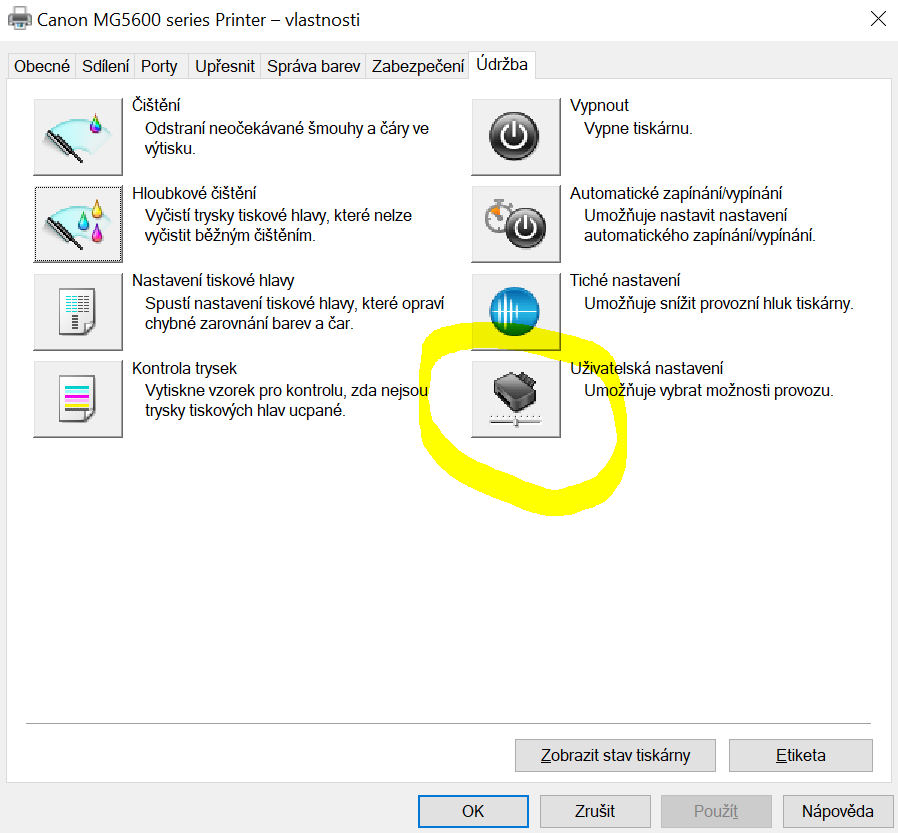
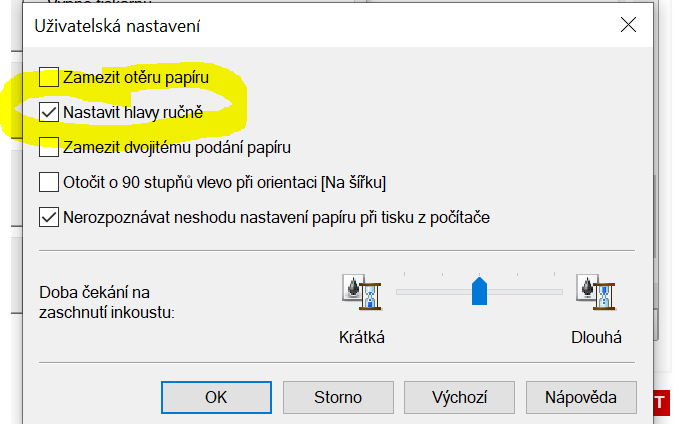
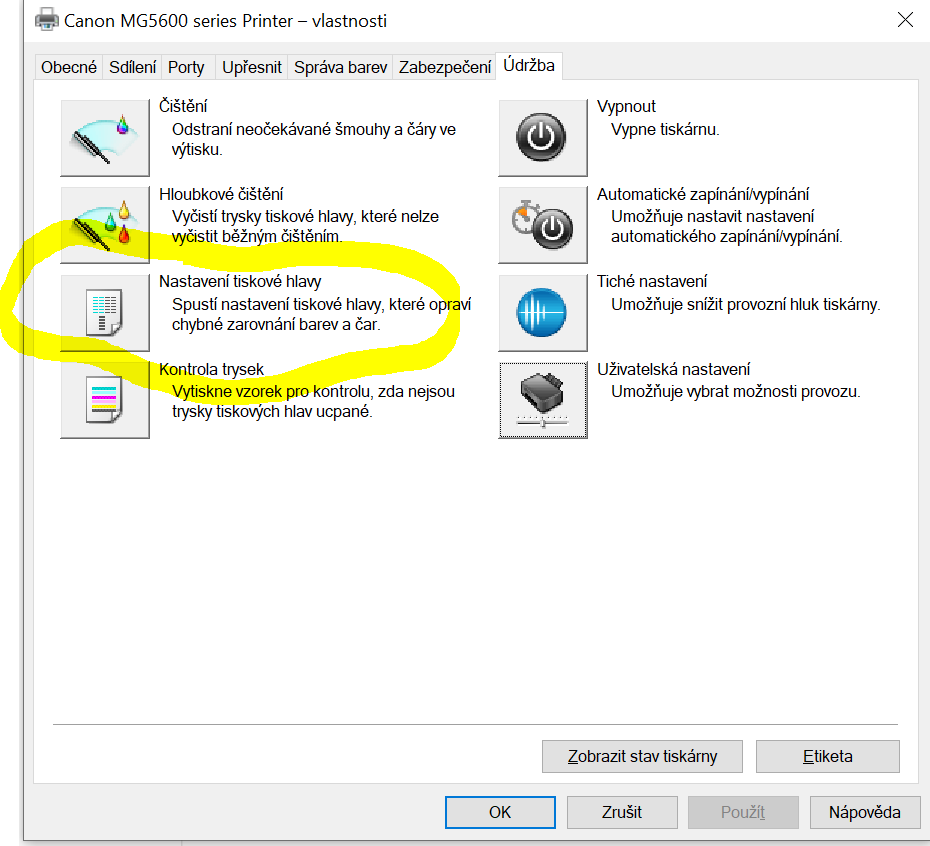
You have to set up printer head MANUALLY !!!
Go to printer settings and something like "maintenance". ETC as per pictures. Let me know, if it helps.
Options
- Mark as New
- Bookmark
- Subscribe
- Mute
- Subscribe to RSS Feed
- Permalink
- Report Inappropriate Content
08-03-2019 09:09 AM
Manual alignment works for some people, however it doesn't work in all cases. In my case, some of the settings are +5 but the alignment is still out. They would probably need to be +10 but you can't enter values that high and so the head never aligns.
Options
- Mark as New
- Bookmark
- Subscribe
- Mute
- Subscribe to RSS Feed
- Permalink
- Report Inappropriate Content
08-03-2019 09:14 AM - edited 08-03-2019 09:14 AM
Where is Canon's response to this problem??? Has anyone heard from them about this?
Options
- Mark as New
- Bookmark
- Subscribe
- Mute
- Subscribe to RSS Feed
- Permalink
- Report Inappropriate Content
08-03-2019 09:51 PM
All attempts by myself so far to get Canon to acknowledge that this is a common fault and investigate it further have failed.
Canon simply direct consumers to their repair centres to 'evaluate' the problem at the consumer's cost and the repair centres recommend printer replacement because replacement parts would exceed the cost of a new printer.
Options
- Mark as New
- Bookmark
- Subscribe
- Mute
- Subscribe to RSS Feed
- Permalink
- Report Inappropriate Content
08-04-2019 01:02 AM
We have two Canon printers, MG5650 and MX450 and on both printers is the same problem after approx. 4,5 years.

Announcements
07/22/2026: New firmware updates are available.
EOS R6 Mark III - Version 1.1.0
05/13/2026: New firmware updates are available.
EOS R5 Mark II - Version 1.3.0
EOS R6 Mark II - Version 1.7.0
04/28/2026: Service Notice: Caution Concerning use of Lithium Batteries
03/17/2026: New firmware updates are available.
SELPHY CP1500 - Version 1.0.7.0
02/23/2026: New firmware update is available for EOS C50- Version 1.0.3.1
01/23/2026: New firmware update is available for RF 24-105mm F4 IS USM- Version 2.0.7
01/20/2026: New firmware updates are available.
10/21/2025: Service Notice: To Users of the Compact Digital Camera PowerShot V1
10/15/2025: New firmware updates are available.
Speedlite EL-5 - Version 1.2.0
Speedlite EL-1 - Version 1.1.0
Speedlite Transmitter ST-E10 - Version 1.2.0
07/28/2025: Notice of Free Repair Service for the Mirrorless Camera EOS R50 (Black)
05/21/2025: New firmware update available for EOS C500 Mark II - Version 1.1.5.1
Related Content
- PIXMA G7020 only prints in red from all ink tanks in Desktop Inkjet Printers
- TR8600 printer, faint printing and missing lines in Desktop Inkjet Printers
- MF 269 dw II recognized by Mac but offline or online but will not print in Office Printers
- PIXMA TS6320 prints blank pages, but test pages and copies are fine in Desktop Inkjet Printers
- PIXMA TS3720 not responding in Desktop Inkjet Printers

Ⓒ 2026
Canon U.S.A Inc. All Rights Reserved. Reproduction in whole or part without permission is prohibited.
