Turn on suggestions
Auto-suggest helps you quickly narrow down your search results by suggesting possible matches as you type.
- Canon Community
- Discussions & Help
- Printer
- Desktop Inkjet Printers
- Re: PIXMA TS6420a "Cannot Communicate with Scanner...
Options
- Subscribe to RSS Feed
- Mark Topic as New
- Mark Topic as Read
- Float this Topic for Current User
- Bookmark
- Subscribe
- Mute
- Printer Friendly Page
PIXMA TS6420a "Cannot Communicate with Scanner" Error

Options
- Mark as New
- Bookmark
- Subscribe
- Mute
- Subscribe to RSS Feed
- Permalink
- Report Inappropriate Content
12-08-2022
06:53 AM
- last edited on
12-09-2022
09:08 AM
by
 Danny
Danny
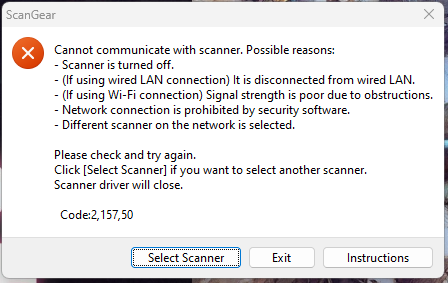
I can never scan photos or documents to my computer from this printer. I run the IJ printer utility and tell it to scan it comes back with a "cannot communicate with the scanner" error. I've reinstalled the driver package, ensured I am connected and it has a signal for my wifi, and ensured my scanner is selected yet I still get this error.
I've attached a photo of the error box I'm receiving
7 REPLIES 7


Options
- Mark as New
- Bookmark
- Subscribe
- Mute
- Subscribe to RSS Feed
- Permalink
- Report Inappropriate Content
12-08-2022 09:47 AM - edited 12-08-2022 09:54 AM
Greetings,
I see you are running Windows OS. What version and build?
What version of the drivers did you install?
Do you have any 3rd party anti-virus or firewall software installed?
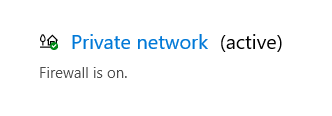
If Windows Security is the only security software you are using, please temporarily disable the windows firewall for the network profile (Domain, Private or Public) and retest. The Active profile wil show (active) so you know which one you are using.
~Rick
Bay Area - CA
~R5 C (1.1.3.1), ~RF Trinity, ~RF 100 Macro, ~RF 100~400, ~RF 100~500, ~RF 200-800, ~RF 1.4x TC, BG-R10, 430EX III-RT ~DxO PhotoLab Elite ~DaVinci Resolve Studio ~ImageClass MF644Cdw MF656Cdw ~Pixel 10 ~CarePaks Are Worth It
Options
- Mark as New
- Bookmark
- Subscribe
- Mute
- Subscribe to RSS Feed
- Permalink
- Report Inappropriate Content
12-08-2022 09:55 AM
I'm running Windows 11 version 22H2, build 22621.819
The driver version is Canon Inkjet Printer Driver 3.80
Options
- Mark as New
- Bookmark
- Subscribe
- Mute
- Subscribe to RSS Feed
- Permalink
- Report Inappropriate Content
12-08-2022 11:36 AM
Any 3rd party security software?
And did you test after temporarily disabling the firewall?
~Rick
Bay Area - CA
~R5 C (1.1.3.1), ~RF Trinity, ~RF 100 Macro, ~RF 100~400, ~RF 100~500, ~RF 200-800, ~RF 1.4x TC, BG-R10, 430EX III-RT ~DxO PhotoLab Elite ~DaVinci Resolve Studio ~ImageClass MF644Cdw MF656Cdw ~Pixel 10 ~CarePaks Are Worth It
Options
- Mark as New
- Bookmark
- Subscribe
- Mute
- Subscribe to RSS Feed
- Permalink
- Report Inappropriate Content
12-09-2022 01:27 AM
Just Windows Defender.
I tried disabling the firewall just now and it didn't work at first, then scanned and sent one thing to my computer, then stopped working again.
Options
- Mark as New
- Bookmark
- Subscribe
- Mute
- Subscribe to RSS Feed
- Permalink
- Report Inappropriate Content
12-09-2022 10:26 AM
Greetings,
Try setting a policy based exception allowing the software through the FW.
Open Windows Security
Click on Firewall & network protection.
Click the “Allow an app through firewall” option
Next page click Change Settings and agree
Now find the app, "IJ Scan Utility" or name of Scanning Utility in the list, add check mark for the network profile (Private / Public) you are using.
Then ok. Restart the machine and try scanning again.
~Rick
Bay Area - CA
~R5 C (1.1.3.1), ~RF Trinity, ~RF 100 Macro, ~RF 100~400, ~RF 100~500, ~RF 200-800, ~RF 1.4x TC, BG-R10, 430EX III-RT ~DxO PhotoLab Elite ~DaVinci Resolve Studio ~ImageClass MF644Cdw MF656Cdw ~Pixel 10 ~CarePaks Are Worth It
Options
- Mark as New
- Bookmark
- Subscribe
- Mute
- Subscribe to RSS Feed
- Permalink
- Report Inappropriate Content
12-10-2022 02:22 AM
I'm still getting the same error even after adding it to the exemption list for my firewall.
Options
- Mark as New
- Bookmark
- Subscribe
- Mute
- Subscribe to RSS Feed
- Permalink
- Report Inappropriate Content
04-28-2023 06:53 PM
Was this issue ever resolved? I'm getting the same error message. When I first set up the printer I was able to scan, now (only the 2nd time trying to use the scanner) it comes up with the same error message you attached above. I issue the command from my Windows 11 PC and the printer does the scan, it finishes and comes up with the error. Funny how it can communicate with the printer to initiate the scan, but when it finishes the scan it will not send the scan to my PC. Hoping someone on the forum can help since I've been on hold with customer support for 48 minutes and counting.


Announcements
07/22/2026: New firmware updates are available.
EOS R6 Mark III - Version 1.1.0
05/13/2026: New firmware updates are available.
EOS R5 Mark II - Version 1.3.0
EOS R6 Mark II - Version 1.7.0
04/28/2026: Service Notice: Caution Concerning use of Lithium Batteries
03/17/2026: New firmware updates are available.
SELPHY CP1500 - Version 1.0.7.0
02/23/2026: New firmware update is available for EOS C50- Version 1.0.3.1
01/23/2026: New firmware update is available for RF 24-105mm F4 IS USM- Version 2.0.7
01/20/2026: New firmware updates are available.
10/21/2025: Service Notice: To Users of the Compact Digital Camera PowerShot V1
10/15/2025: New firmware updates are available.
Speedlite EL-5 - Version 1.2.0
Speedlite EL-1 - Version 1.1.0
Speedlite Transmitter ST-E10 - Version 1.2.0
07/28/2025: Notice of Free Repair Service for the Mirrorless Camera EOS R50 (Black)
05/21/2025: New firmware update available for EOS C500 Mark II - Version 1.1.5.1
Related Content
- Canon CR-120 Ranger Driver Question in Scanners
- Prograf PRO 1100 - Professional Print and Layout Error in Printer Software & Networking
- PIXMA TS3722: "Communicating with the printer... Please wait momentarily" in Desktop Inkjet Printers
- imageCLASS MF232w new router communication issue, Wi-Fi light flashing in Printer Software & Networking
- Can’t print to PIXMA TR7120 using iOS print app in Printer Software & Networking

Ⓒ 2026
Canon U.S.A Inc. All Rights Reserved. Reproduction in whole or part without permission is prohibited.
