Turn on suggestions
Auto-suggest helps you quickly narrow down your search results by suggesting possible matches as you type.
- Canon Community
- Discussions & Help
- Printer
- Desktop Inkjet Printers
- Re: App printing faded colours
Options
- Subscribe to RSS Feed
- Mark Topic as New
- Mark Topic as Read
- Float this Topic for Current User
- Bookmark
- Subscribe
- Mute
- Printer Friendly Page
PIXMA G3570 App printing faded colours, OK from laptop

Options
- Mark as New
- Bookmark
- Subscribe
- Mute
- Subscribe to RSS Feed
- Permalink
- Report Inappropriate Content
11-29-2023
11:33 AM
- last edited on
11-29-2023
11:48 AM
by
 Danny
Danny
Hi, I have the following issue with my PIXMA G3570 printer.
When I print a photo directly from my phone using the Canon PRINT App I get very faded washed out prints (below right). Printing the same photo from my laptop I get a print quality I would expect (below left).
There are no adjustments I can see in the print app, what can I do to improve them?
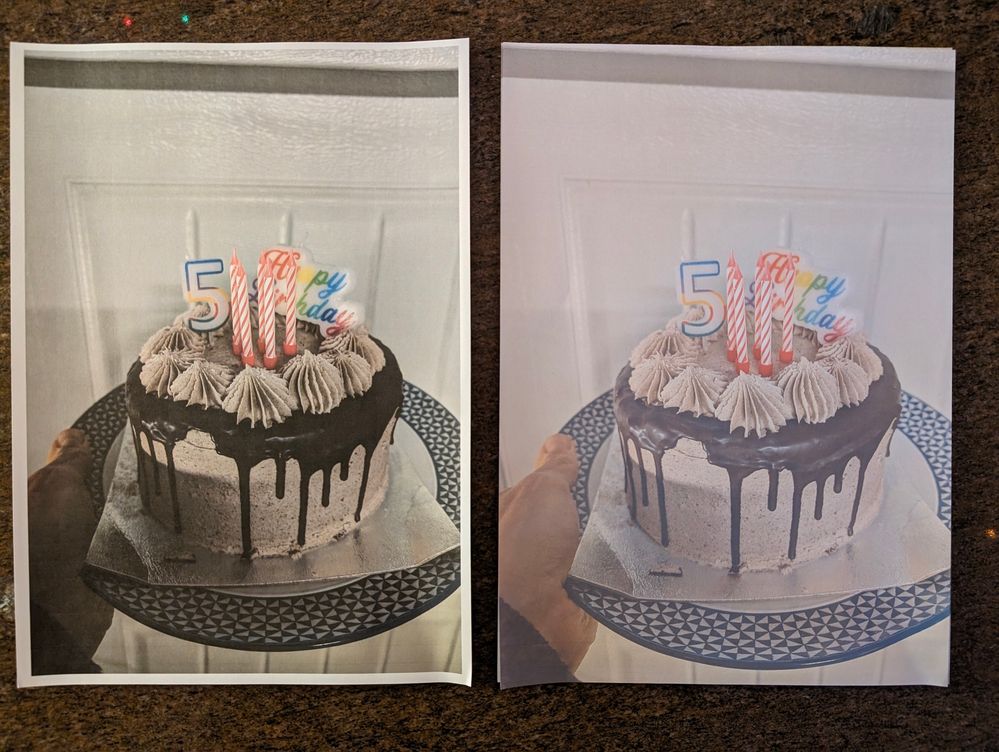
3 REPLIES 3
Options
- Mark as New
- Bookmark
- Subscribe
- Mute
- Subscribe to RSS Feed
- Permalink
- Report Inappropriate Content
11-29-2023 11:37 AM
Thanks for joining the conversation, RdoubleC!
So that the Community can help you better, we need to know exactly which Canon printer model you're using. That, and any other details you'd like to give will help the Community better understand your issue!
If this is a time-sensitive matter, click HERE search our knowledge base or find additional support options HERE.
Thanks and have a great day!
Options
- Mark as New
- Bookmark
- Subscribe
- Mute
- Subscribe to RSS Feed
- Permalink
- Report Inappropriate Content
11-29-2023 11:46 AM
Oops, it's a PIXMA G3570, added in the original post too.

Options
- Mark as New
- Bookmark
- Subscribe
- Mute
- Subscribe to RSS Feed
- Permalink
- Report Inappropriate Content
11-29-2023 11:49 AM
We appreciate the info, though we need to let you know that the PIXMA G3570 is not supported by our team here at Canon USA since that printer isn't available in this country. If you live outside the United States, please click HERE and select your country to find support in your part of the world. Your fellow Community members are still welcome to offer their advice.
Thanks for choosing Canon!

Announcements
07/22/2026: New firmware updates are available.
EOS R6 Mark III - Version 1.1.0
05/13/2026: New firmware updates are available.
EOS R5 Mark II - Version 1.3.0
EOS R6 Mark II - Version 1.7.0
04/28/2026: Service Notice: Caution Concerning use of Lithium Batteries
03/17/2026: New firmware updates are available.
SELPHY CP1500 - Version 1.0.7.0
02/23/2026: New firmware update is available for EOS C50- Version 1.0.3.1
01/23/2026: New firmware update is available for RF 24-105mm F4 IS USM- Version 2.0.7
01/20/2026: New firmware updates are available.
10/21/2025: Service Notice: To Users of the Compact Digital Camera PowerShot V1
10/15/2025: New firmware updates are available.
Speedlite EL-5 - Version 1.2.0
Speedlite EL-1 - Version 1.1.0
Speedlite Transmitter ST-E10 - Version 1.2.0
07/28/2025: Notice of Free Repair Service for the Mirrorless Camera EOS R50 (Black)
05/21/2025: New firmware update available for EOS C500 Mark II - Version 1.1.5.1
Related Content
- imageCLASS MF665Cdw prints solid blue pages, faded black text, other issues in Office Printers
- PIXMA G7020 faded printing in Desktop Inkjet Printers
- PIXMA MG3620 - prints only half the page and copies are faded – Nozzle Check attached in Desktop Inkjet Printers
- #MG5750 suddenly printing blank sheets. in Desktop Inkjet Printers
- PIXMA G3675 Pictures come out faded in Desktop Inkjet Printers

Ⓒ 2026
Canon U.S.A Inc. All Rights Reserved. Reproduction in whole or part without permission is prohibited.
