Turn on suggestions
Auto-suggest helps you quickly narrow down your search results by suggesting possible matches as you type.
- Canon Community
- Discussions & Help
- Printer
- Desktop Inkjet Printers
- MG6650 double vertical lines
Options
- Subscribe to RSS Feed
- Mark Topic as New
- Mark Topic as Read
- Float this Topic for Current User
- Bookmark
- Subscribe
- Mute
- Printer Friendly Page
MG6650 double vertical lines

Options
- Mark as New
- Bookmark
- Subscribe
- Mute
- Subscribe to RSS Feed
- Permalink
- Report Inappropriate Content
11-09-2017 01:01 AM
Hi
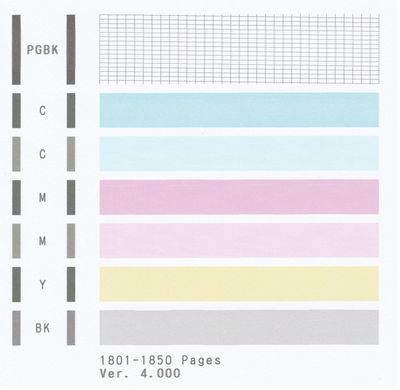
Could someone explain why my printer print pages with text sometimes like "bold" style?
And I saw that on print test printer makes double vertical lines...
3 REPLIES 3


Options
- Mark as New
- Bookmark
- Subscribe
- Mute
- Subscribe to RSS Feed
- Permalink
- Report Inappropriate Content
01-09-2018 10:10 AM
Hi dzik,
Please try cleaning the encoder. To do this, please follow the steps in the following Knowledgebase Article:
https://support.usa.canon.com/kb/index?page=content&id=ART164632
If the issue persists, it is recommended that Canon UK is contacted. To contact Canon UK, please use the following links:
(for email support) http://www.canon.co.uk/support/consumer_products/contact_support/
(for telephone support) http://www.canon.co.uk/support/consumer_products/telephone_numbers/
Options
- Mark as New
- Bookmark
- Subscribe
- Mute
- Subscribe to RSS Feed
- Permalink
- Report Inappropriate Content
08-12-2018 02:45 PM
I have the same problem vertical double lines, is there a solution ?
Options
- Mark as New
- Bookmark
- Subscribe
- Mute
- Subscribe to RSS Feed
- Permalink
- Report Inappropriate Content
12-09-2018 10:58 PM
Mg5520 same problem. Have cleaned and aligned heads. On test pattern the top and bottom two rows are ok but in between the vertical lines are doubled.

Announcements
07/22/2026: New firmware updates are available.
EOS R6 Mark III - Version 1.1.0
05/13/2026: New firmware updates are available.
EOS R5 Mark II - Version 1.3.0
EOS R6 Mark II - Version 1.7.0
04/28/2026: Service Notice: Caution Concerning use of Lithium Batteries
03/17/2026: New firmware updates are available.
SELPHY CP1500 - Version 1.0.7.0
02/23/2026: New firmware update is available for EOS C50- Version 1.0.3.1
01/23/2026: New firmware update is available for RF 24-105mm F4 IS USM- Version 2.0.7
01/20/2026: New firmware updates are available.
10/21/2025: Service Notice: To Users of the Compact Digital Camera PowerShot V1
10/15/2025: New firmware updates are available.
Speedlite EL-5 - Version 1.2.0
Speedlite EL-1 - Version 1.1.0
Speedlite Transmitter ST-E10 - Version 1.2.0
07/28/2025: Notice of Free Repair Service for the Mirrorless Camera EOS R50 (Black)
05/21/2025: New firmware update available for EOS C500 Mark II - Version 1.1.5.1
Related Content
- LBP674Cdw – White Streaking on Edge, Faded Printing After Warm-Up, No OEM Toner Left in Office Printers
- imagePROGRAF PRO-310 cannot change paper type, double lines and ghosting in Professional Photo Printers
- ImageCLASS MF424dw - vertical stripes when doing a double-sided scan in Office Printers
- PIXMA IP8720 Double vertical lines in Desktop Inkjet Printers
- PIXMA iP8720 Prints double lines for text in Desktop Inkjet Printers

Ⓒ 2026
Canon U.S.A Inc. All Rights Reserved. Reproduction in whole or part without permission is prohibited.
