Turn on suggestions
Auto-suggest helps you quickly narrow down your search results by suggesting possible matches as you type.
- Canon Community
- Discussions & Help
- Printer
- Desktop Inkjet Printers
- Error 5100 on MX922
Options
- Subscribe to RSS Feed
- Mark Topic as New
- Mark Topic as Read
- Float this Topic for Current User
- Bookmark
- Subscribe
- Mute
- Printer Friendly Page
Error 5100 on MX922

Options
- Mark as New
- Bookmark
- Subscribe
- Mute
- Subscribe to RSS Feed
- Permalink
- Report Inappropriate Content
04-08-2015 01:54 AM - edited 04-08-2015 01:56 AM
Hello,
This evening run into an error 5100 om my MX922. First tried to check if it is really a paper jam but nothing was found. Then tried to re-insert ink cartridges to no avail...
Here's the symptoms - once turned on, printer successfully goes thru self-init sequence. Scan works with no problem. Once I try to print anything (or make a copy or print from a template), it starts and then in 5 seconds it beeps and displays error 5100. Of course, I went to a kb article:
No success.
Updated to FW v.3, no success either.
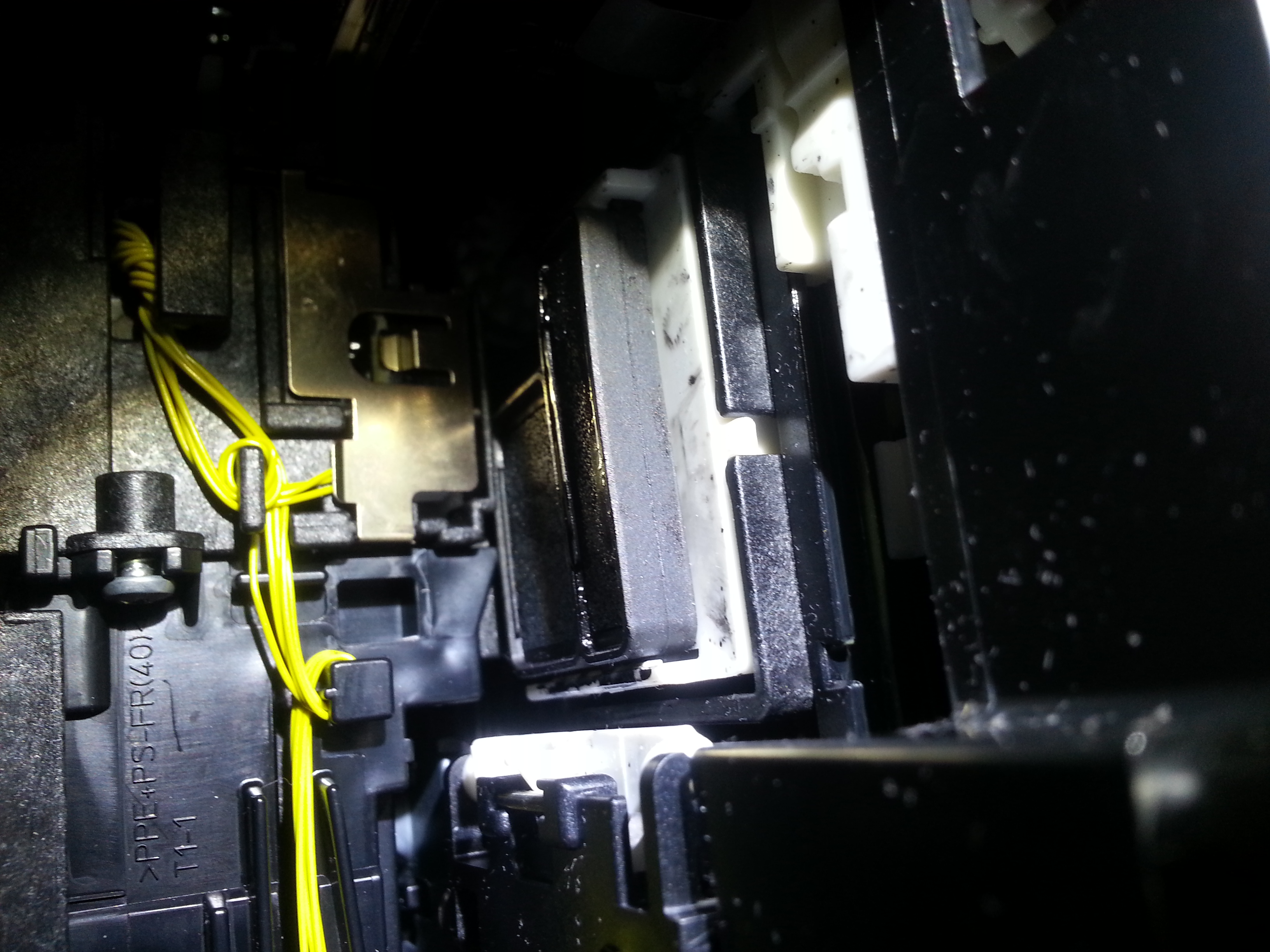
It looked to me like something is wrong around the print head. Then, to satisfy my curiosity I detached right side cover and discovered a reason - please see the photo.
Here's the reason:
The head (obviously, before each printing) goes thru a quick cleaning procedure and then slides to the left but the cleaning pouch (black rubber piece on a white plastic lift) stays in UP position and when head returns back it simply hits this constructions and immediately displays error 5100.
So the question - has anybody seen such a behaviour? Is it a catastrofic and printer needs to be thrown out or it can be fixed?
Thanks for any help.
2 REPLIES 2
Options
- Mark as New
- Bookmark
- Subscribe
- Mute
- Subscribe to RSS Feed
- Permalink
- Report Inappropriate Content
04-13-2015 07:25 AM
Hi pas922,
If removing and reseating the ink tanks and print head in the printer did not resolve the error, the printer will require servicing; please call or email us using one of the methods on the Contact Us page for information on servicing options available to you.
Did this answer your question? Please click the Accept as Solution button so that others may find the answer as well.
Options
- Mark as New
- Bookmark
- Subscribe
- Mute
- Subscribe to RSS Feed
- Permalink
- Report Inappropriate Content
09-10-2019 03:46 AM
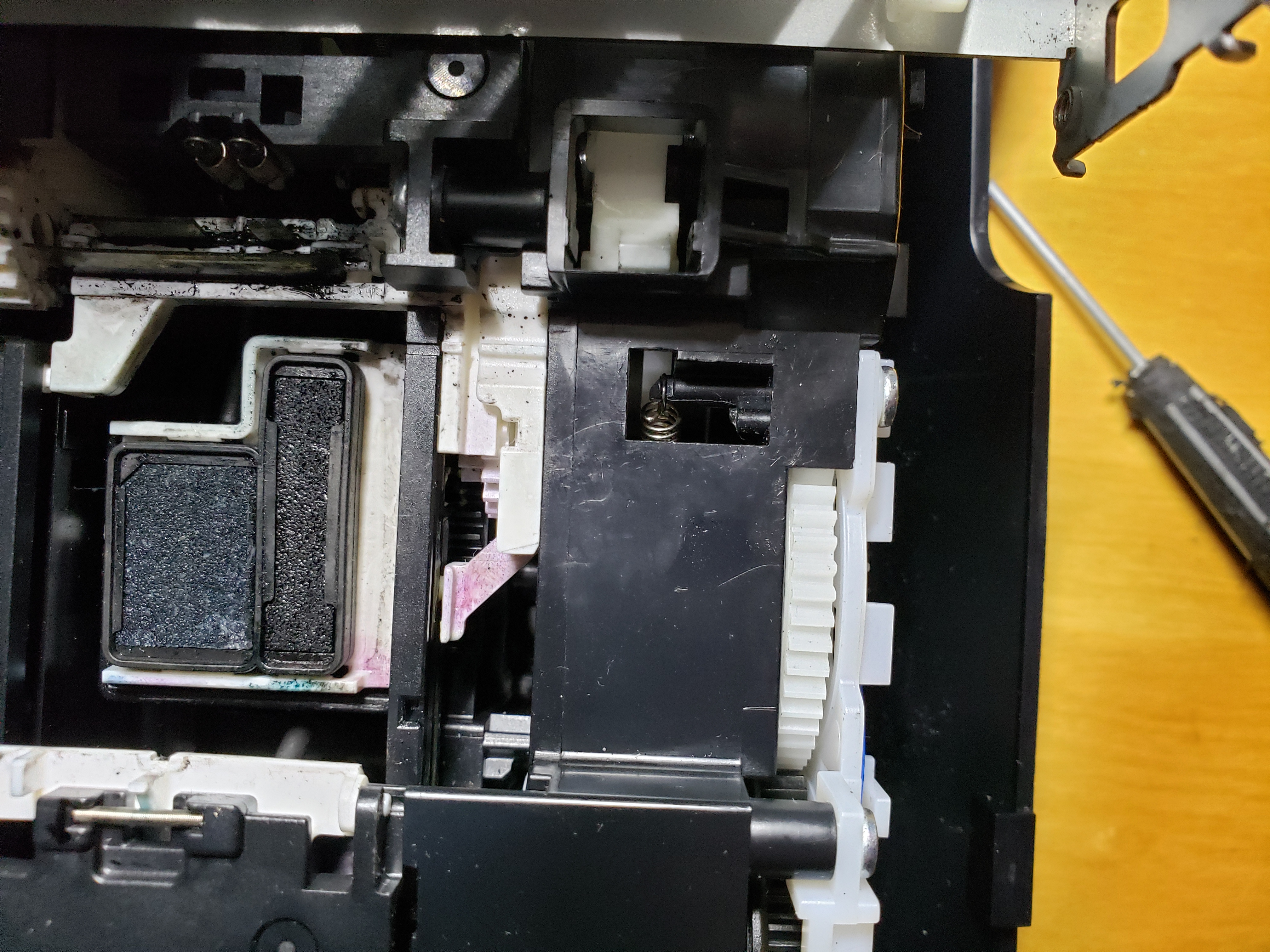
I had the same problem, where the printer would go through the start-up cycle, it is successful the first time, and if I opened the door to change ink cartridges, the printer cartridge carriage would move to the middle. If I closed the door, it would go through a 2nd successful cycle. If I opened the cartridge door again, it would move the printer carriage to the middle, but when I closed the door again, it would try to cycle, however, the carriage cleaning base would pop up too soon, and the carriage would get jammed against the print head cleaning base. There should be two springs in the opening you see here. Instead, it looks like one of the little black plastic fingers broke, and I found a little spring in the hole. I took the printer apart in an attempt to put the spring back into place to no avail. I suggest getting a new printer. These tiny little plastic fingers most likely will break in 5 years or so. I ended up taking most of the printer apart to attempt to fix. There are many gears involved so hard to tell if I can successfully get the printer back together. Super hard to reattach the spring, and what do I attach it to? I may try gluing on something to attach the spring to, but I have found I needed to dismantle this part of the printer in order to get into the tiny little hole this spring is in. I like the MX 922, other than it is obvious they did not build this to last more than 5 years or so.


Announcements
07/22/2026: New firmware updates are available.
EOS R6 Mark III - Version 1.1.0
05/13/2026: New firmware updates are available.
EOS R5 Mark II - Version 1.3.0
EOS R6 Mark II - Version 1.7.0
04/28/2026: Service Notice: Caution Concerning use of Lithium Batteries
03/17/2026: New firmware updates are available.
SELPHY CP1500 - Version 1.0.7.0
02/23/2026: New firmware update is available for EOS C50- Version 1.0.3.1
01/23/2026: New firmware update is available for RF 24-105mm F4 IS USM- Version 2.0.7
01/20/2026: New firmware updates are available.
10/21/2025: Service Notice: To Users of the Compact Digital Camera PowerShot V1
10/15/2025: New firmware updates are available.
Speedlite EL-5 - Version 1.2.0
Speedlite EL-1 - Version 1.1.0
Speedlite Transmitter ST-E10 - Version 1.2.0
07/28/2025: Notice of Free Repair Service for the Mirrorless Camera EOS R50 (Black)
05/21/2025: New firmware update available for EOS C500 Mark II - Version 1.1.5.1
Related Content
- MacBook M5 Pro Suddenly Stopped Recognizing Canon Pixma MX922 scanner - but printer works fine in Desktop Inkjet Printers
- PIXMA MX922 B200 error in Desktop Inkjet Printers
- PIXMA MX922 Printer Error 5C20 in Desktop Inkjet Printers
- PIXMA MX922 error B200 - where to get repair? Or is it worth it (machine 14 years old) in Desktop Inkjet Printers
- PIXMA MX922 Scanner Utilities won't install in Printer Software & Networking

Ⓒ 2026
Canon U.S.A Inc. All Rights Reserved. Reproduction in whole or part without permission is prohibited.
