Turn on suggestions
Auto-suggest helps you quickly narrow down your search results by suggesting possible matches as you type.
- Canon Community
- Discussions & Help
- Camera
- Camera Software
- Re: "An internal error has occurred." - Trying to ...
Options
- Subscribe to RSS Feed
- Mark Topic as New
- Mark Topic as Read
- Float this Topic for Current User
- Bookmark
- Subscribe
- Mute
- Printer Friendly Page
"An internal error has occurred." - Trying to connect to EOS Utility

Options
- Mark as New
- Bookmark
- Subscribe
- Mute
- Subscribe to RSS Feed
- Permalink
- Report Inappropriate Content
07-30-2020 08:47 PM
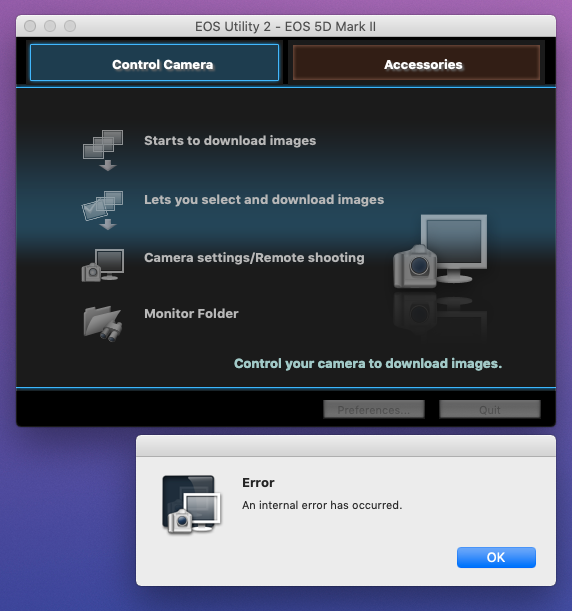
Hi folks. I have a Canon 5D Mark II. I tether it to my computer and use EOS Utility 2 for Remote shooting. I've not had a problem for years. Today when I opened EOS Utility and clicked "Camera settings/Remote shooting" I am getting an Error window that states simply: "An internal error has occured."
My computer is a Mac Pro (Late 2013) running Mojave (10.14).
The only thing I've done is change the internal hard drive. But used Carbon Copy Cloner and everything else is functioning smoothly.
Thanks much for any help!
6 REPLIES 6


Options
- Mark as New
- Bookmark
- Subscribe
- Mute
- Subscribe to RSS Feed
- Permalink
- Report Inappropriate Content
07-31-2020 01:42 AM
Hi there,
That's a pretty generic error so it would be hard to say for sure what i causing it, but the first thing I would check is if the USB communication works outside of EOS Utility. Can you try using Mac's Image Capture program to try importing a few images to your Mac?
1) Click on the Finder icon in your dock (the square smiley face with a line down the middle).
2) Select Applications.
3) Image Capture will be listed in here, double click it to open it.
4) Once Image Capture is open connect the camera and computer with the USB cable. At that point Image Capture should see the camera and begin showing the photos.
5) Once the photos are loaded in you can select the folder you want to save to at the bottom of the window and you can import with the Import button in the bottom right of the window.


Options
- Mark as New
- Bookmark
- Subscribe
- Mute
- Subscribe to RSS Feed
- Permalink
- Report Inappropriate Content
07-31-2020 03:32 AM
It is probably crashing because the EOS Utility is a 32-bit app, which are no longer supported ny Apple. I think all 32-bit apps have been retired or obsoleted by Apple.
Try downloading and installing updated copies of the EOS Utilities. I think the EOS Utility 3 has been updated to include manu cameras that formerly used the EOS Utility 2.
--------------------------------------------------------
"Enjoying photography since 1972."
"Enjoying photography since 1972."
Options
- Mark as New
- Bookmark
- Subscribe
- Mute
- Subscribe to RSS Feed
- Permalink
- Report Inappropriate Content
07-31-2020 11:09 AM
Thanks very much, Mark35mmF2. I didn't even know about the Image Capture app! I did open it and it was able to see my camera. So I don't think the USB cable is the issue. Also, I have EOS Utility set to open automatically when the camera is connected and it DOES lauch when I turn my camera on.
Really appreciate the reply. And, yeah, I wish that error message was a little more specific!
Options
- Mark as New
- Bookmark
- Subscribe
- Mute
- Subscribe to RSS Feed
- Permalink
- Report Inappropriate Content
07-31-2020 11:16 AM
Thanks much, Waddizzle. I did think that maybe it had to do with out-of-date software. So I installed the latest "Digital Photo Professional" (even though I don't really use that). When I click the Utilities tab I get a message saying "There is no utility for the OS version you selected" ...
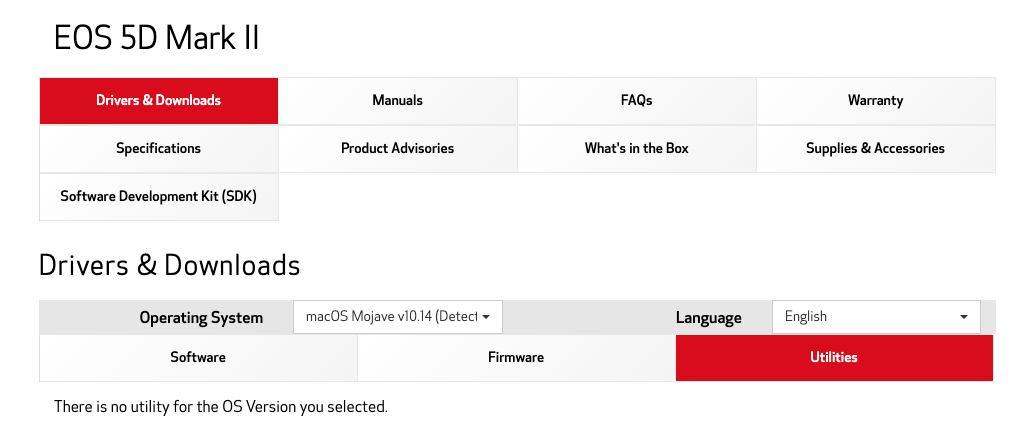
When I scroll down the list in the "Software" tab, the latest EOS Utility I see there is:
EOS Utility 2.14.31c for Mac OS X
I'd see there is a version 3 but I can't find where I can download it!
Options
- Mark as New
- Bookmark
- Subscribe
- Mute
- Subscribe to RSS Feed
- Permalink
- Report Inappropriate Content
07-31-2020 11:51 AM
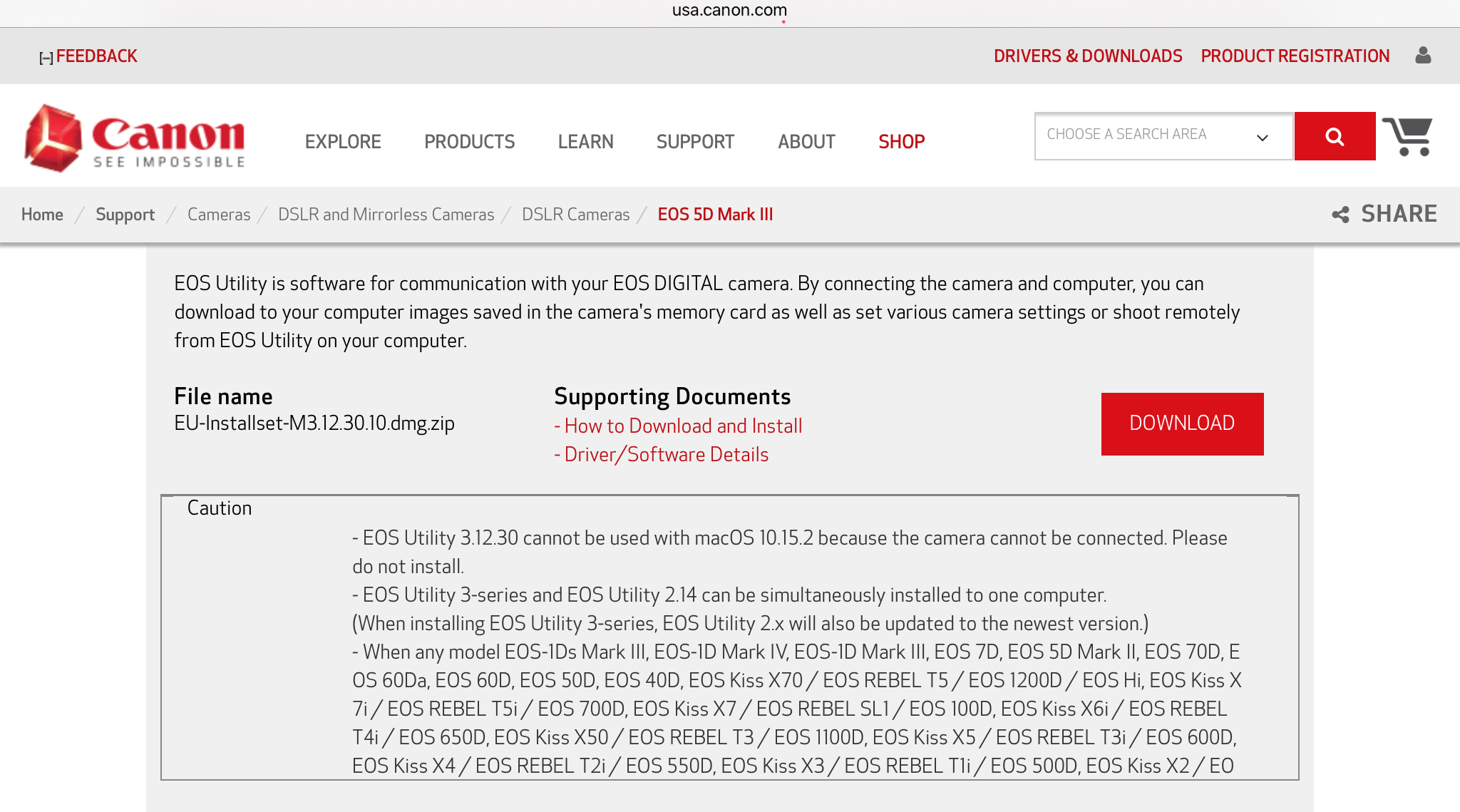
Try selecting the 5D Mark III, and install the EOS Utility 3. It seems installing EOS Utility 3 is supposed to updated EOS Utility 2 at the same time.
--------------------------------------------------------
"Enjoying photography since 1972."
"Enjoying photography since 1972."
Options
- Mark as New
- Bookmark
- Subscribe
- Mute
- Subscribe to RSS Feed
- Permalink
- Report Inappropriate Content
07-31-2020 12:02 PM
Waddizzle – THAT WORKED! Thanks so much, my friend. Really appreciate you helping me out.

Announcements
07/22/2026: New firmware updates are available.
EOS R6 Mark III - Version 1.1.0
05/13/2026: New firmware updates are available.
EOS R5 Mark II - Version 1.3.0
EOS R6 Mark II - Version 1.7.0
04/28/2026: Service Notice: Caution Concerning use of Lithium Batteries
03/17/2026: New firmware updates are available.
SELPHY CP1500 - Version 1.0.7.0
02/23/2026: New firmware update is available for EOS C50- Version 1.0.3.1
01/23/2026: New firmware update is available for RF 24-105mm F4 IS USM- Version 2.0.7
01/20/2026: New firmware updates are available.
10/21/2025: Service Notice: To Users of the Compact Digital Camera PowerShot V1
10/15/2025: New firmware updates are available.
Speedlite EL-5 - Version 1.2.0
Speedlite EL-1 - Version 1.1.0
Speedlite Transmitter ST-E10 - Version 1.2.0
07/28/2025: Notice of Free Repair Service for the Mirrorless Camera EOS R50 (Black)
05/21/2025: New firmware update available for EOS C500 Mark II - Version 1.1.5.1
Related Content
- Best way to transfer/back up photo and video files to external SSD in EOS DSLR & Mirrorless Cameras
- Canon EOS Utility download for 5D Mk III and IV in Camera Software
- EF 100-400 IS II dust gasket detached in EF & RF Lenses
- Image Transfer Utility 2 doesn't work if G7X M3 is plugged into USB power in Camera Software
- EOS Utility Launcher not detecting EOS R7 in Camera Software

Ⓒ 2026
Canon U.S.A Inc. All Rights Reserved. Reproduction in whole or part without permission is prohibited.
