Turn on suggestions
Auto-suggest helps you quickly narrow down your search results by suggesting possible matches as you type.
- Canon Community
- Discussions & Help
- Camera
- Camera Software
- Re: Unable to install DPP4 on iMac.
Options
- Subscribe to RSS Feed
- Mark Topic as New
- Mark Topic as Read
- Float this Topic for Current User
- Bookmark
- Subscribe
- Mute
- Printer Friendly Page

Options
- Mark as New
- Bookmark
- Subscribe
- Mute
- Subscribe to RSS Feed
- Permalink
- Report Inappropriate Content
01-02-2016 12:48 AM
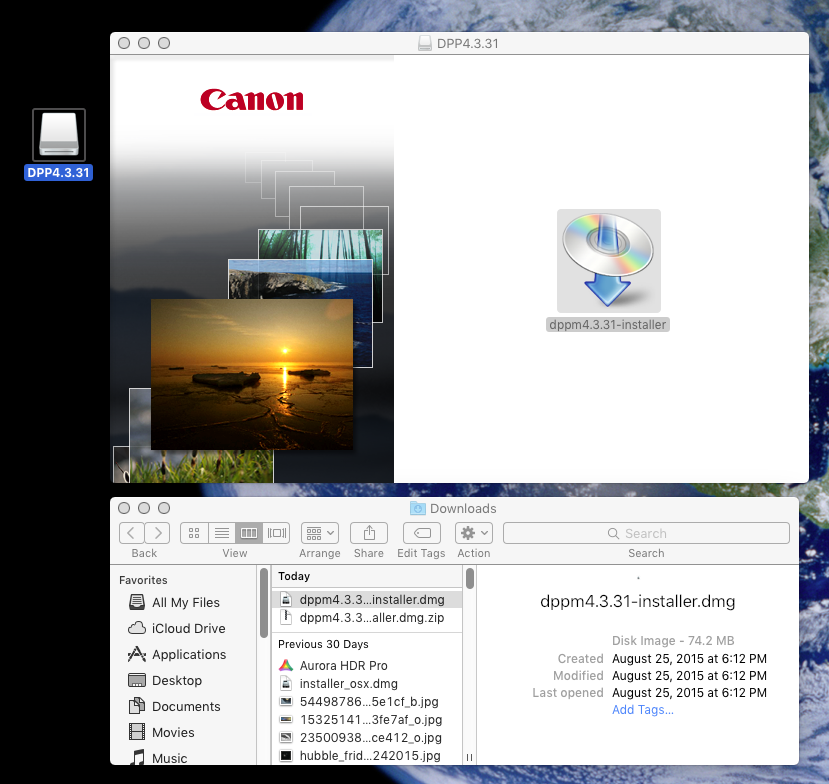
I can't get past basic download steps (below) installing an updated version of DPP... ver. 4.3.31 ?
Clicking/dbl-clicking that DPP4.3.31 drive does extract files... but to where I don't know because when I check the finder, there are no new files added anywhere and nothing opens.
I've tried the download three times now... is this something stupidly obvious?
Thanks for any help.
Solved! Go to Solution.
1 ACCEPTED SOLUTION
Accepted Solutions
Options
- Mark as New
- Bookmark
- Subscribe
- Mute
- Subscribe to RSS Feed
- Permalink
- Report Inappropriate Content
01-05-2016 10:57 PM
I created a new user account on my iMac and was able to get the install done. Thank you for your help!
6 REPLIES 6


Options
- Mark as New
- Bookmark
- Subscribe
- Mute
- Subscribe to RSS Feed
- Permalink
- Report Inappropriate Content
01-02-2016 06:57 AM
In Finder:
Applications -> Canon Utilities -> Digital Photo Professional 4
Should be there.
John Hoffman
Conway, NH
R6 Mark III, M200 (converted to infrared), RF lenses, Pixma PRO-100, Pixma TR8620a, Lr Classic
Conway, NH
R6 Mark III, M200 (converted to infrared), RF lenses, Pixma PRO-100, Pixma TR8620a, Lr Classic
Options
- Mark as New
- Bookmark
- Subscribe
- Mute
- Subscribe to RSS Feed
- Permalink
- Report Inappropriate Content
01-02-2016 01:23 PM
Thanks John but it's still 4.3.0.0 there...
Options
- Mark as New
- Bookmark
- Subscribe
- Mute
- Subscribe to RSS Feed
- Permalink
- Report Inappropriate Content
01-02-2016 02:07 PM
I never had this happen, so I am just throwing suggestions.
DO you perhaps have two user accounts?
John Hoffman
Conway, NH
R6 Mark III, M200 (converted to infrared), RF lenses, Pixma PRO-100, Pixma TR8620a, Lr Classic
Conway, NH
R6 Mark III, M200 (converted to infrared), RF lenses, Pixma PRO-100, Pixma TR8620a, Lr Classic
Options
- Mark as New
- Bookmark
- Subscribe
- Mute
- Subscribe to RSS Feed
- Permalink
- Report Inappropriate Content
01-02-2016 03:08 PM - edited 01-02-2016 03:08 PM
I appreciate any help you're throwing out, John! No other user accounts set up on my iMac... this is just so strange.
Options
- Mark as New
- Bookmark
- Subscribe
- Mute
- Subscribe to RSS Feed
- Permalink
- Report Inappropriate Content
01-02-2016 03:24 PM
You could try this to remove all traces of DPP.
1. delete DPP 4 by dragging folder to trash
2. delete these files:
Users (you) Library/Preferences/com.canon.Digital Photo Professional.plist
Users (you) Library/Preferences/com.canon.Digital Photo Professional Batch.plist
Then try to reinstall again.
John Hoffman
Conway, NH
R6 Mark III, M200 (converted to infrared), RF lenses, Pixma PRO-100, Pixma TR8620a, Lr Classic
Conway, NH
R6 Mark III, M200 (converted to infrared), RF lenses, Pixma PRO-100, Pixma TR8620a, Lr Classic
Options
- Mark as New
- Bookmark
- Subscribe
- Mute
- Subscribe to RSS Feed
- Permalink
- Report Inappropriate Content
01-05-2016 10:57 PM
I created a new user account on my iMac and was able to get the install done. Thank you for your help!


Announcements
07/22/2026: New firmware updates are available.
EOS R6 Mark III - Version 1.1.0
05/13/2026: New firmware updates are available.
EOS R5 Mark II - Version 1.3.0
EOS R6 Mark II - Version 1.7.0
04/28/2026: Service Notice: Caution Concerning use of Lithium Batteries
03/17/2026: New firmware updates are available.
SELPHY CP1500 - Version 1.0.7.0
02/23/2026: New firmware update is available for EOS C50- Version 1.0.3.1
01/23/2026: New firmware update is available for RF 24-105mm F4 IS USM- Version 2.0.7
01/20/2026: New firmware updates are available.
10/21/2025: Service Notice: To Users of the Compact Digital Camera PowerShot V1
10/15/2025: New firmware updates are available.
Speedlite EL-5 - Version 1.2.0
Speedlite EL-1 - Version 1.1.0
Speedlite Transmitter ST-E10 - Version 1.2.0
07/28/2025: Notice of Free Repair Service for the Mirrorless Camera EOS R50 (Black)
05/21/2025: New firmware update available for EOS C500 Mark II - Version 1.1.5.1
Related Content
- Trouble Transferring Firmware from Camera Connect to Camera in Camera Software
- EOS R7 Unable to install firmware update 1.8.0 in Camera Software
- image.canon downloader 2_1_02 won't install in Camera Software
- EOS Utility 2, download pics without subfolder? in Camera Software
- Two Canon RP cameras are no longer recognized while tethered to Lightroom or Capture One in Camera Software

Ⓒ 2026
Canon U.S.A Inc. All Rights Reserved. Reproduction in whole or part without permission is prohibited.
