Turn on suggestions
Auto-suggest helps you quickly narrow down your search results by suggesting possible matches as you type.
- Canon Community
- Discussions & Help
- Camera
- Camera Software
- Re: Trouble Connecting Canon EOS R5 (Latest firmwa...
Options
- Subscribe to RSS Feed
- Mark Topic as New
- Mark Topic as Read
- Float this Topic for Current User
- Bookmark
- Subscribe
- Mute
- Printer Friendly Page

Anonymous
Not applicable
Options
- Mark as New
- Bookmark
- Subscribe
- Mute
- Subscribe to RSS Feed
- Permalink
- Report Inappropriate Content
09-26-2023 08:55 AM - edited 09-26-2023 09:06 AM
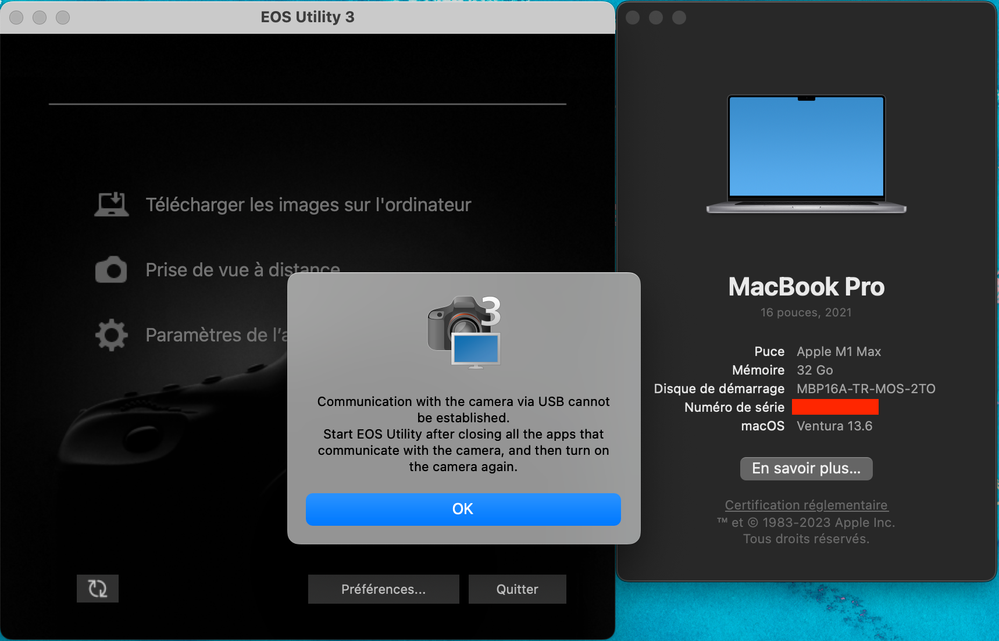
I am having issues connecting my Canon EOS R5 (Latest firmware 1.9.0) to my Mac on latest macOS 13.6 via the EOS Utility 3.17.2.1 (latest)
I have the latest software and have gone through the user manual.
I have uninstalled canon Software and reinstalled without any improvement...
The message I keep getting is:
"Communication with the camera via USB cannot be established.
Start EOS Utility after closing all the apps that communicate with the camera, and then turn on the camera again."
I am unaware of any apps that I have that would be trying to communicate with my camera in the background. Anyone know what's going on? Thanks in advance.
Solved! Go to Solution.
13 REPLIES 13

Options
- Mark as New
- Bookmark
- Subscribe
- Mute
- Subscribe to RSS Feed
- Permalink
- Report Inappropriate Content
11-02-2023 09:26 AM
This method should work without having to resort to a Force quit (which may cause issues):
I eventually determined that Preview was running even though it wasn't displayed in the Dock. Once you realize that this could be an issue, the workaround in quite straightforward:
- Launch Preview using Finder
- Explicitly Quit Preview (Preview>Quit Preview)
- Start EOS Utility 3 (I'm using Version 3.17.2.1)
- Make sure that the USB-C cable is properly connected between the Mac mini and EOS R5
- Turn on the camera
- Pie Lover

Options
- Mark as New
- Bookmark
- Subscribe
- Mute
- Subscribe to RSS Feed
- Permalink
- Report Inappropriate Content
02-24-2024 02:48 PM
@Blueberry_Lover,
Thanks for the tip about Preview. This was exactly the issue I was having. Preview was open and the EOS Utility could not connect to my camera. Closing Preview let it connect immediately.
Who would have thought that Preview was connecting to the camera?
I had successfully connected to the camera from my MacBook Air previously, but this was the first time connecting from my MacBook Pro, so I was really confused as to why it didn't work.
Thanks again!
EOS R5 C with Dual Fisheye lens for VR content creation
Options
- Mark as New
- Bookmark
- Subscribe
- Mute
- Subscribe to RSS Feed
- Permalink
- Report Inappropriate Content
02-24-2024 07:34 PM
My pleasure. It seems like Canon isn't updating their tools to track the macOS releases and updates. I've experienced problems with DPP crashes (with Apple HEIC files) and EOS Utility 3 downloads. For the latter, the automatic download option stopped working a while ago so I use the select and download option instead.
- Pie Lover
Options
- Mark as New
- Bookmark
- Subscribe
- Mute
- Subscribe to RSS Feed
- Permalink
- Report Inappropriate Content
12-28-2024 02:39 AM
I have been struggling for WEEKS with this issue, using my Canon RP. Usually, only restarting my Mac Studio would resolve the issue momentarily.
I uninstalled the EOS Webcam Utility (which should be considered a crime that this company charges us to use this useless junk) and immediately I was able to connect to the EOS Utility.
THANK YOU.

- « Previous
-
- 1
- 2
- Next »
- « Previous
-
- 1
- 2
- Next »
Announcements
07/22/2026: New firmware updates are available.
EOS R6 Mark III - Version 1.1.0
05/13/2026: New firmware updates are available.
EOS R5 Mark II - Version 1.3.0
EOS R6 Mark II - Version 1.7.0
04/28/2026: Service Notice: Caution Concerning use of Lithium Batteries
03/17/2026: New firmware updates are available.
SELPHY CP1500 - Version 1.0.7.0
02/23/2026: New firmware update is available for EOS C50- Version 1.0.3.1
01/23/2026: New firmware update is available for RF 24-105mm F4 IS USM- Version 2.0.7
01/20/2026: New firmware updates are available.
10/21/2025: Service Notice: To Users of the Compact Digital Camera PowerShot V1
10/15/2025: New firmware updates are available.
Speedlite EL-5 - Version 1.2.0
Speedlite EL-1 - Version 1.1.0
Speedlite Transmitter ST-E10 - Version 1.2.0
07/28/2025: Notice of Free Repair Service for the Mirrorless Camera EOS R50 (Black)
05/21/2025: New firmware update available for EOS C500 Mark II - Version 1.1.5.1
Related Content
- Can't update firmware on EOS R50 in EOS DSLR & Mirrorless Cameras
- EOS R7 getting ERR 12 when trying to connect to MacBook Pro (macOS Tahoe 26.5.2). EOS Utility 3 in Camera Software
- EOS Rebel and Product Advisory: Vulnerability Remediation for EOS Network Setting Tool in EOS DSLR & Mirrorless Cameras
- EOS R6 Mark II – Firmware 1.7.0 – Bug: 5GHz hotspot invisible on Samsung Android (DFS channel issue) in EOS DSLR & Mirrorless Cameras
- Trouble Transferring Firmware from Camera Connect to Camera in Camera Software

Ⓒ 2026
Canon U.S.A Inc. All Rights Reserved. Reproduction in whole or part without permission is prohibited.
