cancel
Showing results for 
Show  only  | Search instead for 
Did you mean: 

Remote capture with EOS Utility 3 and DPP4 creates a duplicate image

plantphotos
Apprentice

Hello, 

We are using EOS Utility 3 and DPP4 to take images with a EOS 5D Mark IV connected to a Mac. We started having an issue where the 1. 1. First image of the day - no image appears in DPP

2. Retake the previous image - correct image appears in DPP

3. Move on to the next image - duplicate of previous image appears in DPP

4. Retake the previous image - correct image appears in DPP

5. Steps 3 and 4 repeat for each image. 

Has anyone else experienced this problem? Did we accidentally change a setting somewhere? We also noticed that in EOS Utility 3, the destination folder is appearing as an empty yellow box:
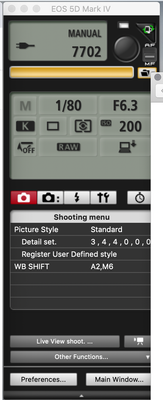
 Screen Shot 2021-12-08 at 1.59.30 PM.png

Thanks for your help!

1 REPLY 1

Waddizzle
Legend
Legend

If you are using DPP4 for image capture, then how are you launching the EOS Utility 3?  

You should let DPP4 launch it in its “Remote Shooting” mode.  DPP4 uses/borrows the GUI from the EOSU to capture images.  It does not actually launch the EOSU.

--------------------------------------------------------
"Enjoying photography since 1972."
Holiday
Announcements

12/18/2025: New firmware updates are available.

EOS C400 - Version 1.0.4.1

EOS C80 - Version 1.0.4.1

XF605 - Version 1.0.7.1


12/15/2025: New firmware update available for EOS C50 - Version 1.0.1.1

11/20/2025: New firmware updates are available.

EOS R6 Mark III - Version 1.0.1

EOS R3 - Version 2.0.0

EOS R1 - Version 1.2.0

EOS R5 Mark II - Version 1.2.0

EOS R5 - Version 2.2.1

PowerShot G7 X Mark III - Version 1.4.0

PowerShot SX740 HS - Version 1.0.2


10/21/2025: Service Notice: To Users of the Compact Digital Camera PowerShot V1

10/15/2025: New firmware updates are available.

Speedlite EL-5 - Version 1.2.0

Speedlite EL-1 - Version 1.1.0

Speedlite Transmitter ST-E10 - Version 1.2.0


07/28/2025: Notice of Free Repair Service for the Mirrorless Camera EOS R50 (Black)

7/17/2025: New firmware updates are available.

EOS R7 - Version 1.7.1

EOS R10 - Version 1.7.0

EOS R8 - Version 1.5.0

EOS R50 - Version 1.4.0

Powershot V10 - Version 1.4.0

Powershot V1 - Version 1.1.0

EOS R50V - Version 1.1.1


05/21/2025: New firmware update available for EOS C500 Mark II - Version 1.1.5.1

02/20/2025: New firmware updates are available.

RF70-200mm F2.8 L IS USM Z - Version 1.0.6

RF24-105mm F2.8 L IS USM Z - Version 1.0.9

RF100-300mm F2.8 L IS USM - Version 1.0.8

RF50mm F1.4 L VCM - Version 1.0.2

RF24mm F1.4 L VCM - Version 1.0.3


01/22/2024: Canon Supports Disaster Relief Efforts in California
01/14/2025: Steps to resolve still image problem when using certain SanDisk SD cards with the Canon EOS R5 Mark II
