Turn on suggestions
Auto-suggest helps you quickly narrow down your search results by suggesting possible matches as you type.
- Canon Community
- Discussions & Help
- Camera
- Camera Software
- Re: RE EOS Utility
Options
- Subscribe to RSS Feed
- Mark Topic as New
- Mark Topic as Read
- Float this Topic for Current User
- Bookmark
- Subscribe
- Mute
- Printer Friendly Page
RE EOS Utility

Options
- Mark as New
- Bookmark
- Subscribe
- Mute
- Subscribe to RSS Feed
- Permalink
- Report Inappropriate Content
02-16-2019 07:04 AM - edited 02-16-2019 07:09 AM
Hi
I am now on my third canon DSLR after my last two were stolen including my nifty fifty,
Canon EF 70-300 mm f/4-5.6 IS II USM Lens etc. Anyway I now have another Canon 77D and purchased a second had (not used) EFS 18 - 135mm Nano USM lens, which I love, however, I havent got a card reader and when get connect my camera (wifi/bluetooth turned off) EOS Utility starts in wifi mode
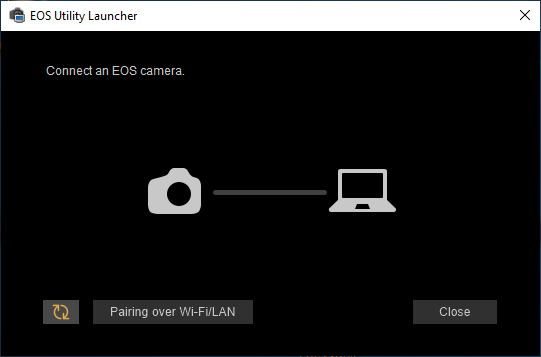
Windows recognises my camera, My question is how to get out of wifi mode?
Thanks in advanve
Adrian Suri
14 REPLIES 14


Options
- Mark as New
- Bookmark
- Subscribe
- Mute
- Subscribe to RSS Feed
- Permalink
- Report Inappropriate Content
02-16-2019 12:14 PM
I do have a shortcut for EOSU3 in my dock, but EOSU3 starts automatically if I connect my camera to the computer and power on the camera.
To the OP - you said your camera is detected by Windows, correct?
You can just open the DCIM folder and download the images from there.My cards are empty so there are none, but they would be in the 100EOSXX folder.

John Hoffman
Conway, NH
R6 Mark III, M200 (converted to infrared), RF lenses, Pixma PRO-100, Pixma TR8620a, Lr Classic
Conway, NH
R6 Mark III, M200 (converted to infrared), RF lenses, Pixma PRO-100, Pixma TR8620a, Lr Classic
Options
- Mark as New
- Bookmark
- Subscribe
- Mute
- Subscribe to RSS Feed
- Permalink
- Report Inappropriate Content
02-16-2019 01:09 PM
Hi
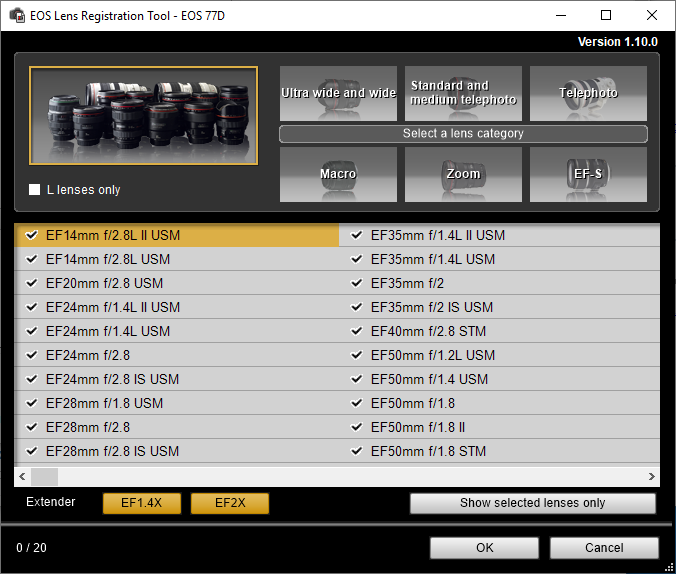
thanks, and that's correct, and I am able to use cannon's EOS Lense registration tool which doesn't work unless the camera is connected
Options
- Mark as New
- Bookmark
- Subscribe
- Mute
- Subscribe to RSS Feed
- Permalink
- Report Inappropriate Content
02-16-2019 01:15 PM
I'm going to my sons house see if his computer works with it

Options
- Mark as New
- Bookmark
- Subscribe
- Mute
- Subscribe to RSS Feed
- Permalink
- Report Inappropriate Content
02-16-2019 01:30 PM
@adriansuri wrote:I'm going to my sons house see if his computer works with it
Take a look at this recent thread.
https://community.usa.canon.com/t5/Software/EOS-utility-3-does-not-find-my-5D-IV/m-p/265510#M6890
All you need to do is manually start the application for the first time. That’s it. That’s all you need to do.
--------------------------------------------------------
"Enjoying photography since 1972."
"Enjoying photography since 1972."
Options
- Mark as New
- Bookmark
- Subscribe
- Mute
- Subscribe to RSS Feed
- Permalink
- Report Inappropriate Content
02-17-2019 11:29 AM
I feel a little embarased now, you were correct the icon I was using was "C:\Program Files (x86)\Canon\EOS Utility\EOS Utility.exe" which didn't work but as you suggested EOS Utility 3 does
Thanks for all the help
Kind Regards
Adrian Parkash Suri

- « Previous
-
- 1
- 2
- Next »
- « Previous
-
- 1
- 2
- Next »
Announcements
07/22/2026: New firmware updates are available.
EOS R6 Mark III - Version 1.1.0
05/13/2026: New firmware updates are available.
EOS R5 Mark II - Version 1.3.0
EOS R6 Mark II - Version 1.7.0
04/28/2026: Service Notice: Caution Concerning use of Lithium Batteries
03/17/2026: New firmware updates are available.
SELPHY CP1500 - Version 1.0.7.0
02/23/2026: New firmware update is available for EOS C50- Version 1.0.3.1
01/23/2026: New firmware update is available for RF 24-105mm F4 IS USM- Version 2.0.7
01/20/2026: New firmware updates are available.
10/21/2025: Service Notice: To Users of the Compact Digital Camera PowerShot V1
10/15/2025: New firmware updates are available.
Speedlite EL-5 - Version 1.2.0
Speedlite EL-1 - Version 1.1.0
Speedlite Transmitter ST-E10 - Version 1.2.0
07/28/2025: Notice of Free Repair Service for the Mirrorless Camera EOS R50 (Black)
05/21/2025: New firmware update available for EOS C500 Mark II - Version 1.1.5.1
Related Content
- Best way to transfer/back up photo and video files to external SSD in EOS DSLR & Mirrorless Cameras
- Canon EOS Utility download for 5D Mk III and IV in Camera Software
- Image Transfer Utility 2 doesn't work if G7X M3 is plugged into USB power in Camera Software
- EOS Utility Launcher not detecting EOS R7 in Camera Software
- How to synch Canon DPP with photo files on Windows 11, without using Onedrive in Camera Software

Ⓒ 2026
Canon U.S.A Inc. All Rights Reserved. Reproduction in whole or part without permission is prohibited.
