01-29-2022 12:13 PM
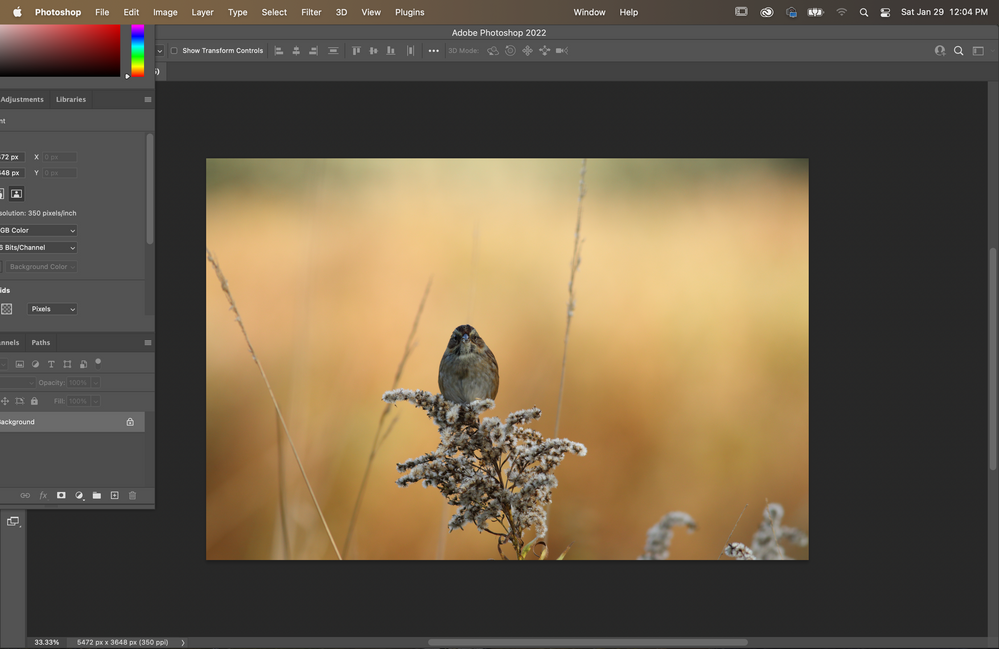
I slight annoying thing that I can't seem to figure out how to fix is when I transfer an image from DPP to Photoshop, essentially when photoshop opens like this
as you can see the layers menu gets crammed in the upper left of the screen, not a big deal obviously but would be nice if it opened in a default manner
01-29-2022 05:27 PM
That doesn't happen to me, so I think it is related to how you may have your Ps preferences configured.
Try selecting the Photographer workspace and see if that helps.
11/20/2025: New firmware updates are available.
EOS R6 Mark III - Version 1.0.1
EOS R5 Mark II - Version 1.2.0
PowerShot G7 X Mark III - Version 1.4.0
PowerShot SX740 HS - Version 1.0.2
10/15/2025: New firmware updates are available.
Speedlite EL-5 - Version 1.2.0
Speedlite EL-1 - Version 1.1.0
Speedlite Transmitter ST-E10 - Version 1.2.0
07/24/2025: New firmware updates are available.
07/23/2025: New firmware updates are available.
7/17/2025: New firmware updates are available.
02/20/2025: New firmware updates are available.
RF70-200mm F2.8 L IS USM Z - Version 1.0.6
RF24-105mm F2.8 L IS USM Z - Version 1.0.9
RF100-300mm F2.8 L IS USM - Version 1.0.8
RF50mm F1.4 L VCM - Version 1.0.2
RF24mm F1.4 L VCM - Version 1.0.3
Canon U.S.A Inc. All Rights Reserved. Reproduction in whole or part without permission is prohibited.