Turn on suggestions
Auto-suggest helps you quickly narrow down your search results by suggesting possible matches as you type.
- Canon Community
- Discussions & Help
- Camera
- Camera Software
- Re: Image Transfer Utility "has stopped working"
Options
- Subscribe to RSS Feed
- Mark Topic as New
- Mark Topic as Read
- Float this Topic for Current User
- Bookmark
- Subscribe
- Mute
- Printer Friendly Page

Options
- Mark as New
- Bookmark
- Subscribe
- Mute
- Subscribe to RSS Feed
- Permalink
- Report Inappropriate Content
11-05-2017 10:28 AM
Hello,
It's been a week or so now that everytime I try to launch my "Image Transfer Utility", it crashes at launch and Windows gives me the message :
Canon Utilities Image Transfer Utility has stopped working
This means I can't transfer my pictures to my computer. My OS is Windows 7 64 bits. My camera is a PowerShot SX610 HS.
Could you please help me solve this issue ?
Solved! Go to Solution.
1 ACCEPTED SOLUTION
Accepted Solutions
Options
- Mark as New
- Bookmark
- Subscribe
- Mute
- Subscribe to RSS Feed
- Permalink
- Report Inappropriate Content
11-29-2017 09:56 AM
Hi Richard,
I found the solution myself.
The Utility has a bug that makes it crash whenever it tries to download pictures to a folder that doesn't exist.
In my case I had set a folder in drive "J" as import folder. After probably unplugging and plugging some HDDs the J drive no longer existed. So each time the Utility connected to the Internet, it tried to download my photos to a folder that it couldn't find, and, as a wrong, twisted result... crashed.
I didn't even have time to access the Utility options and change the import folder settings. So what did I do ? I deactivated my Internet connection. The Utility couldn't connect and no longer crashed, this way I could access its settings and change the import folder.
Then I reactivated my Internet connection and the Utility worked again properly.
This is clearly a Bug that needs fixing.
8 REPLIES 8
Options
- Mark as New
- Bookmark
- Subscribe
- Mute
- Subscribe to RSS Feed
- Permalink
- Report Inappropriate Content
11-08-2017 03:15 PM
Plug in your camera card to the computer card reader.
You need to upgrade the windows OS.
Options
- Mark as New
- Bookmark
- Subscribe
- Mute
- Subscribe to RSS Feed
- Permalink
- Report Inappropriate Content
11-08-2017 05:26 PM
Hi, do you mean the program became incompatible with Windows 7 in the last few weeks ?
Problem is I don't have a card reader... I know I could get one, but still I loved the transfer feature and would be glad to see it working again.
Options
- Mark as New
- Bookmark
- Subscribe
- Mute
- Subscribe to RSS Feed
- Permalink
- Report Inappropriate Content
11-09-2017 09:02 AM
The camera card software is not compatible with windows 7 OS.
Options
- Mark as New
- Bookmark
- Subscribe
- Mute
- Subscribe to RSS Feed
- Permalink
- Report Inappropriate Content
11-09-2017 09:12 AM
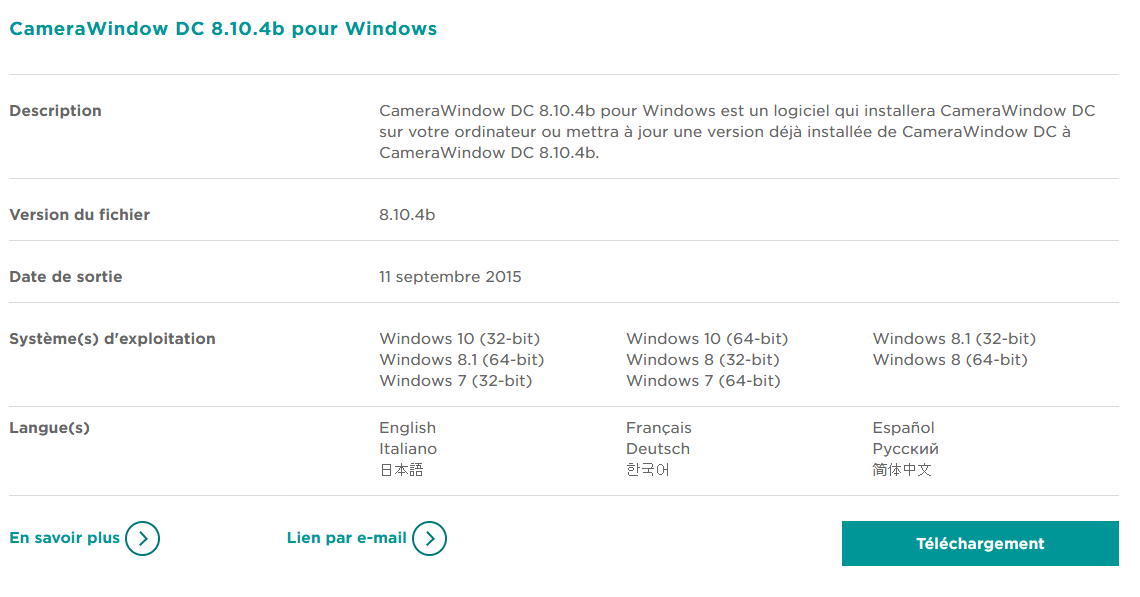
This screencapture says it is ?


Options
- Mark as New
- Bookmark
- Subscribe
- Mute
- Subscribe to RSS Feed
- Permalink
- Report Inappropriate Content
11-16-2017 05:15 PM
Hi Pedrof,
Thanks for posting.
If you're still encountering this issue, since you were last able to send images from your camera:
- Have you added any hardware to your computer?
- We're mainly looking for digital imaging software such as (but not limited to) scanners, multifunction machines, web cams, etc.
- Have you added or updated any digital imaging software?
- In this case, we're looking for software that may be associated with devices, like those mentioned above. Other software my be digital editors, which may have an image transfer function.
Did this answer your question? Please click the Accept as Solution button so that others may find the answer as well.
Options
- Mark as New
- Bookmark
- Subscribe
- Mute
- Subscribe to RSS Feed
- Permalink
- Report Inappropriate Content
11-17-2017 03:09 AM
Hi Richard,
Thanks for answering my message.
I confirm I am still encoutering this issue.
I haven't added any hardware to my computer since I was last able to use Image Transfer Utility.
I haven't added or updated a digital imaging software either.
What shoud I try next ?
Options
- Mark as New
- Bookmark
- Subscribe
- Mute
- Subscribe to RSS Feed
- Permalink
- Report Inappropriate Content
11-18-2017 08:16 PM
Hi Pedrof,
You're welcome.
In this case, since you have access to the Canon CameraWindow software, online, I recommend removing the "Canon CameraWindow" and "Image Transfer Utility".
When you reinstall the Canon CameraWindow, it will reinstall the Image Transfer Utility.
For steps required for this process (for the CameraWindow), please click here. That's for an older version of CameraWindow. The steps for removing the Image Transfer Utility will be similar.
If you encounter difficulty, please contact our technical support team. For contact options, please use this URL: http://Canon.us/ContactCF
Did this answer your question? Please click the Accept as Solution button so that others may find the answer as well.
Options
- Mark as New
- Bookmark
- Subscribe
- Mute
- Subscribe to RSS Feed
- Permalink
- Report Inappropriate Content
11-29-2017 09:56 AM
Hi Richard,
I found the solution myself.
The Utility has a bug that makes it crash whenever it tries to download pictures to a folder that doesn't exist.
In my case I had set a folder in drive "J" as import folder. After probably unplugging and plugging some HDDs the J drive no longer existed. So each time the Utility connected to the Internet, it tried to download my photos to a folder that it couldn't find, and, as a wrong, twisted result... crashed.
I didn't even have time to access the Utility options and change the import folder settings. So what did I do ? I deactivated my Internet connection. The Utility couldn't connect and no longer crashed, this way I could access its settings and change the import folder.
Then I reactivated my Internet connection and the Utility worked again properly.
This is clearly a Bug that needs fixing.


Announcements
07/22/2026: New firmware updates are available.
EOS R6 Mark III - Version 1.1.0
05/13/2026: New firmware updates are available.
EOS R5 Mark II - Version 1.3.0
EOS R6 Mark II - Version 1.7.0
04/28/2026: Service Notice: Caution Concerning use of Lithium Batteries
03/17/2026: New firmware updates are available.
SELPHY CP1500 - Version 1.0.7.0
02/23/2026: New firmware update is available for EOS C50- Version 1.0.3.1
01/23/2026: New firmware update is available for RF 24-105mm F4 IS USM- Version 2.0.7
01/20/2026: New firmware updates are available.
10/21/2025: Service Notice: To Users of the Compact Digital Camera PowerShot V1
10/15/2025: New firmware updates are available.
Speedlite EL-5 - Version 1.2.0
Speedlite EL-1 - Version 1.1.0
Speedlite Transmitter ST-E10 - Version 1.2.0
07/28/2025: Notice of Free Repair Service for the Mirrorless Camera EOS R50 (Black)
05/21/2025: New firmware update available for EOS C500 Mark II - Version 1.1.5.1
Related Content
- Canon EF 75-300mm will not focus in AF in EF & RF Lenses
- PowerShot A590 IS how to transfer photos in Point & Shoot Digital Cameras
- EOS R5 Mark II with 6 Stop ND filter: Example images and situations? in EOS DSLR & Mirrorless Cameras
- Best way to transfer/back up photo and video files to external SSD in EOS DSLR & Mirrorless Cameras
- Canon 24-70mm F2.8 II stopped focusing in EF & RF Lenses

Ⓒ 2026
Canon U.S.A Inc. All Rights Reserved. Reproduction in whole or part without permission is prohibited.
