Turn on suggestions
Auto-suggest helps you quickly narrow down your search results by suggesting possible matches as you type.
- Canon Community
- Discussions & Help
- Camera
- Camera Software
- Re: Help finding really old EOS 20D camera driver ...
Options
- Subscribe to RSS Feed
- Mark Topic as New
- Mark Topic as Read
- Float this Topic for Current User
- Bookmark
- Subscribe
- Mute
- Printer Friendly Page
Help finding really old EOS 20D camera driver software for download

Options
- Mark as New
- Bookmark
- Subscribe
- Mute
- Subscribe to RSS Feed
- Permalink
- Report Inappropriate Content
08-19-2023 06:35 PM
Hi - I'm new to the community and hoping someone will be able to help me. My daughter is taking up photography, and I'm bringing my very old EOS 20D out of retirement for her to use to see if the interest sticks, before investing in a new Canon for her. I'm trying to get the 20D to connect to her Mac, but have no driver software. I can't seem to find it for download anywhere on the Canon site (only see image editing stuff). Would be so appreciative if anyone could direct me where to find driver downloads. Thank you!
5 REPLIES 5

Anonymous
Not applicable
Options
- Mark as New
- Bookmark
- Subscribe
- Mute
- Subscribe to RSS Feed
- Permalink
- Report Inappropriate Content
08-19-2023 07:13 PM
You shouldn't need any software to transfer pictures from the camera to the computer. You should be able to connect the camera via USB cable and use the mac's file explorer software to copy the images from the camera's memory card to the computer. A better solution would be to remove the memory card from the camera and use a card reader to copy the images to the computer. That is how I do it.
Options
- Mark as New
- Bookmark
- Subscribe
- Mute
- Subscribe to RSS Feed
- Permalink
- Report Inappropriate Content
08-19-2023 09:42 PM
Thanks, I tried both ways and it gives an error trying to access the card while in the camera. And it isn't connecting to my card reader either, leading me to think I need some sort of driver software for both devices to connect to this Mac. New Mac...old camera and old card reader. I found a low cost new card reader that claims to plug and play on the Mac so I'm going to get it, and hope that solves it! Thanks for the reply.
Options
- Mark as New
- Bookmark
- Subscribe
- Mute
- Subscribe to RSS Feed
- Permalink
- Report Inappropriate Content
08-19-2023 10:06 PM
You're welcome. It should work with the new card reader. If you want to re-visit the USB cable to camera file transfer, I have heard that on the newer mac OS there is a setting to allow USB port connections to devices. I don't have a mac computer, so I can't give specifics on how to do that.


Options
- Mark as New
- Bookmark
- Subscribe
- Mute
- Subscribe to RSS Feed
- Permalink
- Report Inappropriate Content
08-20-2023 02:37 AM
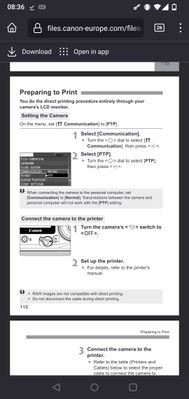
What if you change Communication from Normal to PTP or PTP to Normal?
Options
- Mark as New
- Bookmark
- Subscribe
- Mute
- Subscribe to RSS Feed
- Permalink
- Report Inappropriate Content
08-20-2023 12:31 PM
Good catch. Some of the older cameras have that selection.

Announcements
07/22/2026: New firmware updates are available.
EOS R6 Mark III - Version 1.1.0
05/13/2026: New firmware updates are available.
EOS R5 Mark II - Version 1.3.0
EOS R6 Mark II - Version 1.7.0
04/28/2026: Service Notice: Caution Concerning use of Lithium Batteries
03/17/2026: New firmware updates are available.
SELPHY CP1500 - Version 1.0.7.0
02/23/2026: New firmware update is available for EOS C50- Version 1.0.3.1
01/23/2026: New firmware update is available for RF 24-105mm F4 IS USM- Version 2.0.7
01/20/2026: New firmware updates are available.
10/21/2025: Service Notice: To Users of the Compact Digital Camera PowerShot V1
10/15/2025: New firmware updates are available.
Speedlite EL-5 - Version 1.2.0
Speedlite EL-1 - Version 1.1.0
Speedlite Transmitter ST-E10 - Version 1.2.0
07/28/2025: Notice of Free Repair Service for the Mirrorless Camera EOS R50 (Black)
05/21/2025: New firmware update available for EOS C500 Mark II - Version 1.1.5.1
Related Content
- Canon EOS Utility download for 5D Mk III and IV in Camera Software
- EOS R6 Mark III Firmware Version 1.1.0 available for download in Camera Software
- EDSDK download link expired in Camera Software
- How to connect PowerShot SX530 HS to iMac Tahoe 26 via Wi-Fi in Point & Shoot Digital Cameras
- EOS R5 Mark II minor Firmware Update, Version 1.3.1 in Camera Software

Ⓒ 2026
Canon U.S.A Inc. All Rights Reserved. Reproduction in whole or part without permission is prohibited.
