Turn on suggestions
Auto-suggest helps you quickly narrow down your search results by suggesting possible matches as you type.
- Canon Community
- Discussions & Help
- Camera
- Camera Software
- Re: EOS VR Utility will not activate.
Options
- Subscribe to RSS Feed
- Mark Topic as New
- Mark Topic as Read
- Float this Topic for Current User
- Bookmark
- Subscribe
- Mute
- Printer Friendly Page
EOS VR Utility will not activate.

Options
- Mark as New
- Bookmark
- Subscribe
- Mute
- Subscribe to RSS Feed
- Permalink
- Report Inappropriate Content
09-06-2023 03:46 PM
I'm running on a Mac Studio, M1 Max Version, on Ventura.
I've purchased both the EOS VR Utility, and the Premier Plugin.
Every time I use the Utility app, I have to go through the same validation process to check my subscription.
I get the confirmation -
"Functions are enabled. Restart the application."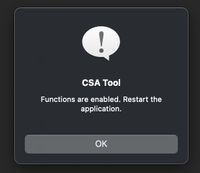
I still cannot export a clip over 2 minutes.
I've tried restarting the VR Utility, I've tried restarting the CSA Tool, I've not restarted a thing and left the CSA tool confirmation window open. Nothing seems to stick.
Still the app makes me go through the sign in process every time, and still no export over 2 minutes.
Any suggestions?
Thanks,
Dan
13 REPLIES 13


Options
- Mark as New
- Bookmark
- Subscribe
- Mute
- Subscribe to RSS Feed
- Permalink
- Report Inappropriate Content
12-27-2023 05:40 PM
Hello sacramentojoe,
For info on what to do after shooting, check out the VR Utility Instruction Manual at https://cam.start.canon/en/S009/manual/html/index.html
For info on using with Adobe Premier Pro, check out the EOS VR Plugin for Adobe Premiere Pro Instruction Manual at https://cam.start.canon/en/S010/manual/html/index.html
You can also call our phone support team for further assistance. Phone support is available Monday through Friday between 9:00 am to 9:00 pm ET and Saturday between 9:00 am to 7:00 pm ET. They can be reached at 1-800-652-2666 if you would like to give them a call.
Options
- Mark as New
- Bookmark
- Subscribe
- Mute
- Subscribe to RSS Feed
- Permalink
- Report Inappropriate Content
01-04-2025 05:24 PM
Same nightmare here. Macbook Pro M1 Sonoma. Safari does not even open for licensing, so I went to chrome, but I cannot get the software to work. Both Eos VR Utility and Premiere Pro Plugin appear as active plans and purchased, but they don't license the apps.
Options
- Mark as New
- Bookmark
- Subscribe
- Mute
- Subscribe to RSS Feed
- Permalink
- Report Inappropriate Content
04-08-2025 10:48 PM
I have the same problem
Options
- Mark as New
- Bookmark
- Subscribe
- Mute
- Subscribe to RSS Feed
- Permalink
- Report Inappropriate Content
04-08-2025 10:48 PM
Still not workin

- « Previous
-
- 1
- 2
- Next »
- « Previous
-
- 1
- 2
- Next »

Announcements
07/22/2026: New firmware updates are available.
EOS R6 Mark III - Version 1.1.0
05/13/2026: New firmware updates are available.
EOS R5 Mark II - Version 1.3.0
EOS R6 Mark II - Version 1.7.0
04/28/2026: Service Notice: Caution Concerning use of Lithium Batteries
03/17/2026: New firmware updates are available.
SELPHY CP1500 - Version 1.0.7.0
02/23/2026: New firmware update is available for EOS C50- Version 1.0.3.1
01/23/2026: New firmware update is available for RF 24-105mm F4 IS USM- Version 2.0.7
01/20/2026: New firmware updates are available.
10/21/2025: Service Notice: To Users of the Compact Digital Camera PowerShot V1
10/15/2025: New firmware updates are available.
Speedlite EL-5 - Version 1.2.0
Speedlite EL-1 - Version 1.1.0
Speedlite Transmitter ST-E10 - Version 1.2.0
07/28/2025: Notice of Free Repair Service for the Mirrorless Camera EOS R50 (Black)
05/21/2025: New firmware update available for EOS C500 Mark II - Version 1.1.5.1
Related Content
- Best way to transfer/back up photo and video files to external SSD in EOS DSLR & Mirrorless Cameras
- Canon EOS Utility download for 5D Mk III and IV in Camera Software
- Image Transfer Utility 2 doesn't work if G7X M3 is plugged into USB power in Camera Software
- EOS Utility Launcher not detecting EOS R7 in Camera Software
- How to synch Canon DPP with photo files on Windows 11, without using Onedrive in Camera Software

Ⓒ 2026
Canon U.S.A Inc. All Rights Reserved. Reproduction in whole or part without permission is prohibited.
