Turn on suggestions
Auto-suggest helps you quickly narrow down your search results by suggesting possible matches as you type.
- Canon Community
- Discussions & Help
- Camera
- Camera Software
- Re: EOS Utility?
Options
- Subscribe to RSS Feed
- Mark Topic as New
- Mark Topic as Read
- Float this Topic for Current User
- Bookmark
- Subscribe
- Mute
- Printer Friendly Page
EOS Utility?


Options
- Mark as New
- Bookmark
- Subscribe
- Mute
- Subscribe to RSS Feed
- Permalink
- Report Inappropriate Content
01-31-2021 09:21 AM
Took a few minutes last night to browse through DPP4. Noticed something about EOS Utility. Searched and read through the info in it. Worth downloading? How does it tie into DPP4? TIA.
John
Canon EOS T7; EF-S 18-55mm IS; EF 28-135mm IS; EF 75-300mm; Sigma 150-600mm DG
Canon EOS T7; EF-S 18-55mm IS; EF 28-135mm IS; EF 75-300mm; Sigma 150-600mm DG
6 REPLIES 6

Options
- Mark as New
- Bookmark
- Subscribe
- Mute
- Subscribe to RSS Feed
- Permalink
- Report Inappropriate Content
01-31-2021 09:59 AM
I don't use it. MacOs handles all my downloading needs. It is mainly useful for tethering.

Options
- Mark as New
- Bookmark
- Subscribe
- Mute
- Subscribe to RSS Feed
- Permalink
- Report Inappropriate Content
01-31-2021 11:12 AM - edited 01-31-2021 12:00 PM
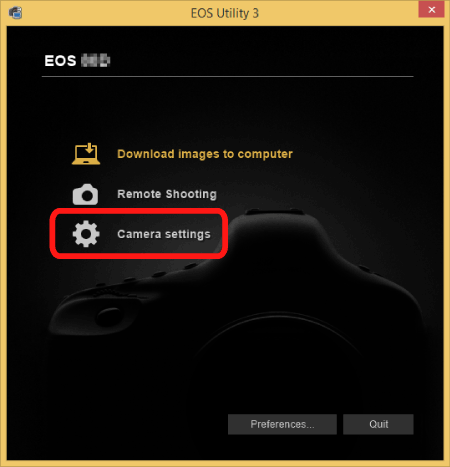
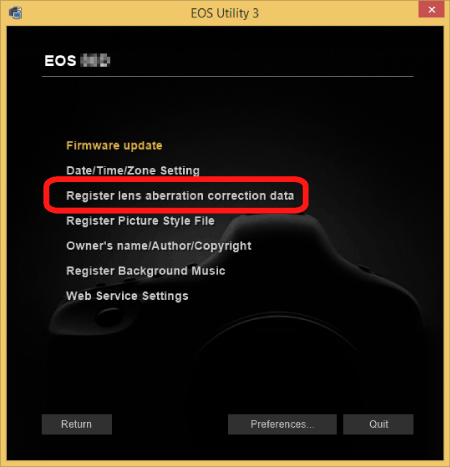
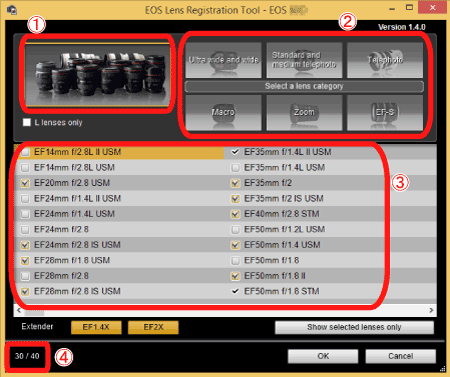
If you shoot Jpeg's, the EOS Utility is an important tool to have because it has a function for "Camera Settings" which includes the "Lens registration Tool". It is the only way you can add lens correction data to your camera when a new lens is released. You can only have a maximum of 40 lenses registered, so it is also important to be able edit which lens data you want to store on the camera.
"Camera Settings" can also be used for registering copyright information to the camera.
Save your lens aberration data using the EOS Utility
Mike Sowsun
Options
- Mark as New
- Bookmark
- Subscribe
- Mute
- Subscribe to RSS Feed
- Permalink
- Report Inappropriate Content
01-31-2021 12:23 PM
Thanks. Seems like it won't necessarily fit my needs. BTW, what is tethering? Seen the term but no familiat with it. Thanks for your replies.
John
Canon EOS T7; EF-S 18-55mm IS; EF 28-135mm IS; EF 75-300mm; Sigma 150-600mm DG
Canon EOS T7; EF-S 18-55mm IS; EF 28-135mm IS; EF 75-300mm; Sigma 150-600mm DG

Options
- Mark as New
- Bookmark
- Subscribe
- Mute
- Subscribe to RSS Feed
- Permalink
- Report Inappropriate Content
01-31-2021 12:38 PM
Tethering is where you connect your camera to a computer (or even iPad/tablet) and take images via software running on that computer/tablet.
I've never done this myself, but I believe you can tether via Adobe Lightroom. Another quite popular tethering piece of software is Capture One.
--
Ricky
Camera: EOS R5 II, RF 50mm f/1.2L, RF 135mm f/1.8L
Lighting: Profoto Lights & Modifiers
Ricky
Camera: EOS R5 II, RF 50mm f/1.2L, RF 135mm f/1.8L
Lighting: Profoto Lights & Modifiers
Options
- Mark as New
- Bookmark
- Subscribe
- Mute
- Subscribe to RSS Feed
- Permalink
- Report Inappropriate Content
01-31-2021 01:04 PM - edited 01-31-2021 01:05 PM
@Tintype_18 wrote:Thanks. Seems like it won't necessarily fit my needs.
Do you ever shoot Jpeg? Or do you only shoot RAW?
Mike Sowsun
Options
- Mark as New
- Bookmark
- Subscribe
- Mute
- Subscribe to RSS Feed
- Permalink
- Report Inappropriate Content
01-31-2021 01:56 PM
re-eos, thanks. I download photos with a chip reader in the USB port. Only thing is I downloaded two photos in RAW/jpg to experiement with DPP4 and RAW but can't locate them! jpg came out OK.
Mike, I have shot photos in jpg but my camera has RAW, jpg and a combo of RAW/jpg. On recommendation of several in the community, they say I need learn to edit RAW with DPP4 f or publications.
Thanks to all.
John
Canon EOS T7; EF-S 18-55mm IS; EF 28-135mm IS; EF 75-300mm; Sigma 150-600mm DG
Canon EOS T7; EF-S 18-55mm IS; EF 28-135mm IS; EF 75-300mm; Sigma 150-600mm DG


Announcements
07/22/2026: New firmware updates are available.
EOS R6 Mark III - Version 1.1.0
05/13/2026: New firmware updates are available.
EOS R5 Mark II - Version 1.3.0
EOS R6 Mark II - Version 1.7.0
04/28/2026: Service Notice: Caution Concerning use of Lithium Batteries
03/17/2026: New firmware updates are available.
SELPHY CP1500 - Version 1.0.7.0
02/23/2026: New firmware update is available for EOS C50- Version 1.0.3.1
01/23/2026: New firmware update is available for RF 24-105mm F4 IS USM- Version 2.0.7
01/20/2026: New firmware updates are available.
10/21/2025: Service Notice: To Users of the Compact Digital Camera PowerShot V1
10/15/2025: New firmware updates are available.
Speedlite EL-5 - Version 1.2.0
Speedlite EL-1 - Version 1.1.0
Speedlite Transmitter ST-E10 - Version 1.2.0
07/28/2025: Notice of Free Repair Service for the Mirrorless Camera EOS R50 (Black)
05/21/2025: New firmware update available for EOS C500 Mark II - Version 1.1.5.1
Related Content
- EOS Utility 3 live view in Camera Software
- Best way to transfer/back up photo and video files to external SSD in EOS DSLR & Mirrorless Cameras
- Canon EOS Utility download for 5D Mk III and IV in Camera Software
- Image Transfer Utility 2 doesn't work if G7X M3 is plugged into USB power in Camera Software
- EOS Utility Launcher not detecting EOS R7 in Camera Software

Ⓒ 2026
Canon U.S.A Inc. All Rights Reserved. Reproduction in whole or part without permission is prohibited.
