Turn on suggestions
Auto-suggest helps you quickly narrow down your search results by suggesting possible matches as you type.
- Canon Community
- Discussions & Help
- Camera
- Camera Software
- Re: EOS Utility Live View Blurry
Options
- Subscribe to RSS Feed
- Mark Topic as New
- Mark Topic as Read
- Float this Topic for Current User
- Bookmark
- Subscribe
- Mute
- Printer Friendly Page
EOS Utility Live View Blurry

Options
- Mark as New
- Bookmark
- Subscribe
- Mute
- Subscribe to RSS Feed
- Permalink
- Report Inappropriate Content
12-26-2019 10:16 AM
Hi everyone,
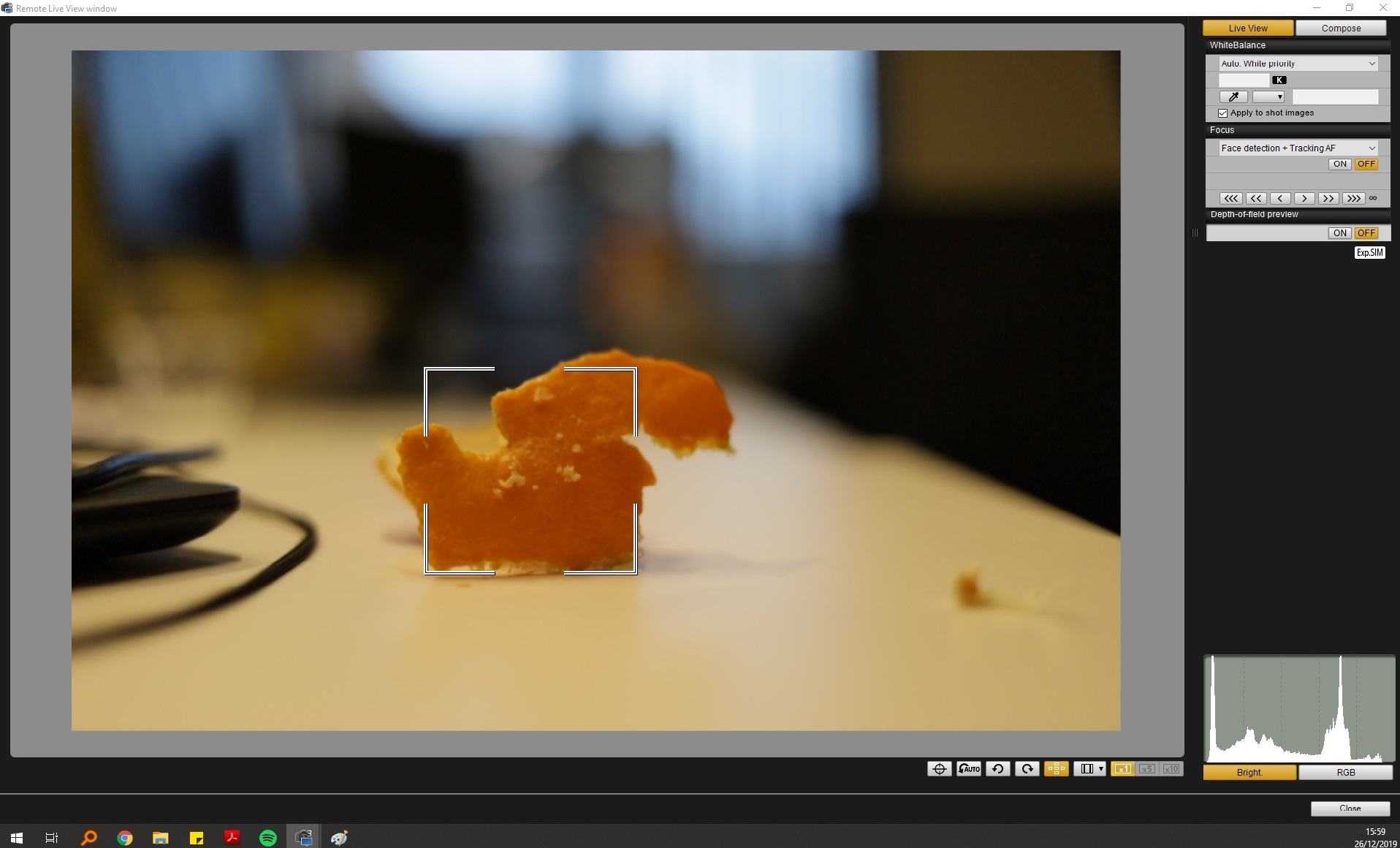
I've recently bought a Canon EOS 6D mark ii with a Canon EF 35mm F2.0 lens. I've tethered the camera and tried out the Live View option in EOS Utility 3. This works but I am presented with a horribly blurry live view. However, when I take the picture (used autofocus to quickly focus), the image is sharp. Is there a way to enhance the quality of the live view, or am I doomed to live with crappy live view in Utility?
Kind regards,
13 REPLIES 13
Options
- Mark as New
- Bookmark
- Subscribe
- Mute
- Subscribe to RSS Feed
- Permalink
- Report Inappropriate Content
04-23-2020 10:18 AM
Hi Sirtristesse,
I'm experiencing the same and have yet to find any good information. Any update? I was hoping you'd have found some useful and knowledgable responses, but I'm disappointed to see the opposite.
Options
- Mark as New
- Bookmark
- Subscribe
- Mute
- Subscribe to RSS Feed
- Permalink
- Report Inappropriate Content
05-05-2020 01:21 PM
This issue is simple, the resolution of the live view over USB is very low, this has become more evident now that Canon has put out EOS webcam utility, which presumably uses a similar live view resolution. From this page about a new special firmware for stop motion, it seems that the EOS R's live view normal resolution is 960 x 640 which is very low for manual focusing on a big screen. It may be a limitation of the hardware of these cameras, because with that firmware, increasing the resolution to 1920x1280 on the EOS R kills the HDMI output.
With the webcam utility, using an EOS R over USB 3.1 Gen 1 (5Gbps), the test here indicates that the stream resolution is just 576p (1024 x 576), the fps capped at 30 fps, and throughput about 15-16 megabytes per second. This is very well within USB 2.0 capabilities as well.
Options
- Mark as New
- Bookmark
- Subscribe
- Mute
- Subscribe to RSS Feed
- Permalink
- Report Inappropriate Content
06-15-2020 09:50 AM
I can confirm my video on my GX7 Mark III is 1024x576 from the Beta webcam utility. I'm not happy at all with the quality. This beta webcam software allows you to use your high dollar camera like a $100 web cam. No thanks. My Logitech c922 looks better at 1920x1080.
Come on Canon... Sony is whooping you on this front.

Options
- Mark as New
- Bookmark
- Subscribe
- Mute
- Subscribe to RSS Feed
- Permalink
- Report Inappropriate Content
03-01-2023 12:24 PM
Answer! Posting for future users in need of help.
I had the exact same issue with the rebel t7. When the camera is connected to my laptop via USB the image was blurry and would not focus. The solution was to put the camera in video mode then half press the capture button to focus it. Hope this helps somebody out there!

- « Previous
-
- 1
- 2
- Next »
- « Previous
-
- 1
- 2
- Next »
Announcements
07/22/2026: New firmware updates are available.
EOS R6 Mark III - Version 1.1.0
05/13/2026: New firmware updates are available.
EOS R5 Mark II - Version 1.3.0
EOS R6 Mark II - Version 1.7.0
04/28/2026: Service Notice: Caution Concerning use of Lithium Batteries
03/17/2026: New firmware updates are available.
SELPHY CP1500 - Version 1.0.7.0
02/23/2026: New firmware update is available for EOS C50- Version 1.0.3.1
01/23/2026: New firmware update is available for RF 24-105mm F4 IS USM- Version 2.0.7
01/20/2026: New firmware updates are available.
10/21/2025: Service Notice: To Users of the Compact Digital Camera PowerShot V1
10/15/2025: New firmware updates are available.
Speedlite EL-5 - Version 1.2.0
Speedlite EL-1 - Version 1.1.0
Speedlite Transmitter ST-E10 - Version 1.2.0
07/28/2025: Notice of Free Repair Service for the Mirrorless Camera EOS R50 (Black)
05/21/2025: New firmware update available for EOS C500 Mark II - Version 1.1.5.1
Related Content
- EOS VR Utility How to stitch footage for editing in Camera Software
- EOS R5 Mark II firmware 1.30 notes in Camera Software
- Can the Canon EOS VR Utility be enhanced to support outputting corrected fisheye images? in Camera Software
- EOS Utility 3 seldom works (Canon EOS R6 Mk II) in Camera Software
- problems with eos r100 camera zoom and auto focus are not working. in EOS DSLR & Mirrorless Cameras

Ⓒ 2026
Canon U.S.A Inc. All Rights Reserved. Reproduction in whole or part without permission is prohibited.
