Turn on suggestions
Auto-suggest helps you quickly narrow down your search results by suggesting possible matches as you type.
- Canon Community
- Discussions & Help
- Camera
- Camera Software
- Re: EOS Utility Can't save photos on the network d...
Options
- Subscribe to RSS Feed
- Mark Topic as New
- Mark Topic as Read
- Float this Topic for Current User
- Bookmark
- Subscribe
- Mute
- Printer Friendly Page
EOS Utility Can't save photos on the network drive

Options
- Mark as New
- Bookmark
- Subscribe
- Mute
- Subscribe to RSS Feed
- Permalink
- Report Inappropriate Content
03-23-2022 03:40 PM
I was trying to take photos and save them directly on the network drive (Windows) but got an error "No more shot is available". At the same time, I was able to download photos on the network drive.
If anyone has an answer or any solution would really appreciate it!
Thank you!
7 REPLIES 7


Options
- Mark as New
- Bookmark
- Subscribe
- Mute
- Subscribe to RSS Feed
- Permalink
- Report Inappropriate Content
03-24-2022 08:43 AM
Hi there,
I wonder if this has anything specific to do with the network drive or network access from EOS Utility. Are you able to set a local drive as the destination and save the images that way or does the same message appear?

Options
- Mark as New
- Bookmark
- Subscribe
- Mute
- Subscribe to RSS Feed
- Permalink
- Report Inappropriate Content
03-24-2022 07:14 PM
Does the EOS utility use a URL or does it require a drive to be mapped to a specific point on the network?
cheers, TREVOR
The mark of good photographer is less what they hold in their hand, it's more what they hold in their head;
"All the variety, all the charm, all the beauty of life is made up of light and shadow", Leo Tolstoy;
"Skill in photography is acquired by practice and not by purchase" Percy W. Harris
Options
- Mark as New
- Bookmark
- Subscribe
- Mute
- Subscribe to RSS Feed
- Permalink
- Report Inappropriate Content
04-21-2022 02:22 PM
Hi,
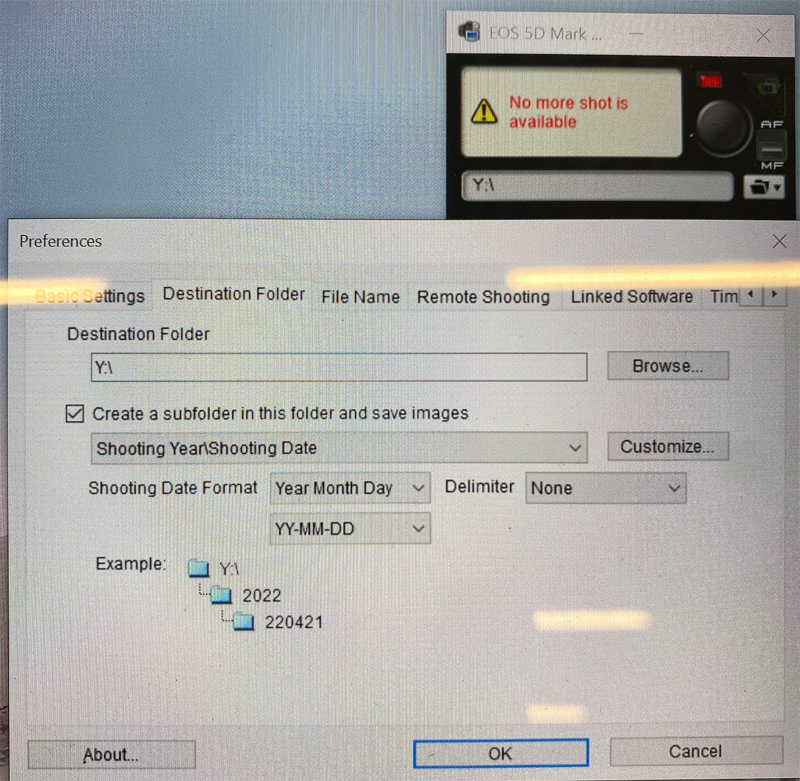
Thank you for the response! I can select and download photos through EOS Utility v.3 on the network drive (mapped as a local drive). But, if I try to take a photo remotely through the EOS Utility I'm getting "No more shot is available". If I set a local drive as a destination I don't have any problems.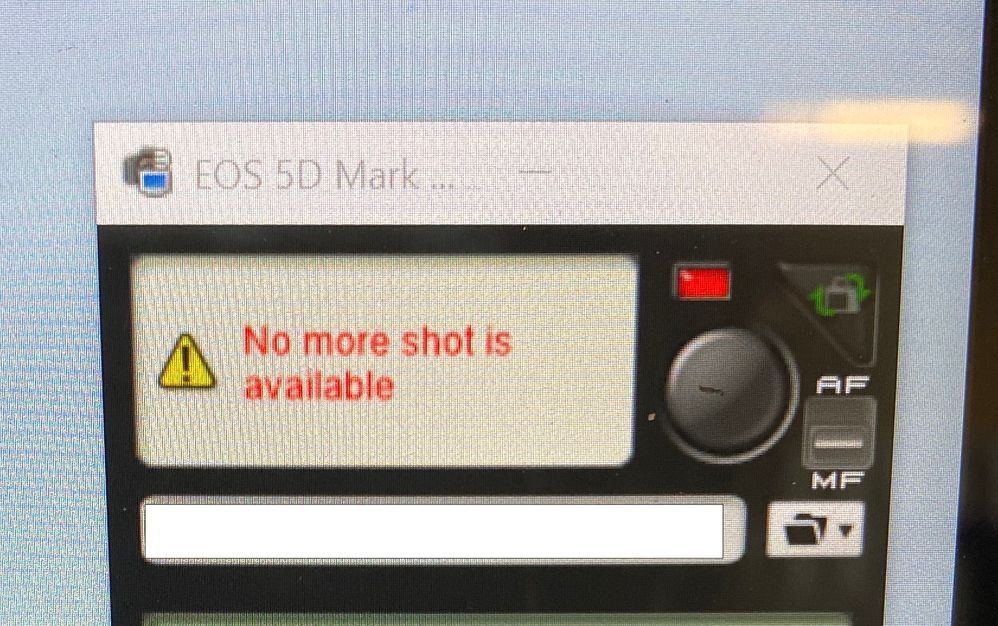
Options
- Mark as New
- Bookmark
- Subscribe
- Mute
- Subscribe to RSS Feed
- Permalink
- Report Inappropriate Content
04-21-2022 02:32 PM
It does require a specific point on the network, as far as I understand.

Options
- Mark as New
- Bookmark
- Subscribe
- Mute
- Subscribe to RSS Feed
- Permalink
- Report Inappropriate Content
04-21-2022 03:25 PM
I suspect this is a networks security issue from the windows end - this kind of error suggest to me you have a rights denial. You may need to go into the File Manager and set the specific sharing rights for the network folder and the share FOR THAT FOLDER so that they are available to read/write/delete.
cheers, TREVOR
The mark of good photographer is less what they hold in their hand, it's more what they hold in their head;
"All the variety, all the charm, all the beauty of life is made up of light and shadow", Leo Tolstoy;
"Skill in photography is acquired by practice and not by purchase" Percy W. Harris
Options
- Mark as New
- Bookmark
- Subscribe
- Mute
- Subscribe to RSS Feed
- Permalink
- Report Inappropriate Content
08-17-2022 07:19 PM
I suspect that this is something that was pushed as an update by Microsoft. I had 4 computers running Win10 with EOS utility with tethered camera shooting that were saving for years to a mapped drive in QNAP server. They all gave me the same error as described here a few months ago and I'm unable to figure out what the problem is. All permissions are fine as far as I can determine. This is a serious problem for our office. Rolling back updates did not solve the problem, Updating QNAP did not solve the problem. It only occurs with the EOS utility. Anyone has any ideas?

Options
- Mark as New
- Bookmark
- Subscribe
- Mute
- Subscribe to RSS Feed
- Permalink
- Report Inappropriate Content
04-09-2024 06:00 PM - edited 04-09-2024 06:01 PM
I know this topic is a bit old, but I just ran into this today and got it to work. You have to trick Windows and the Canon EOS. Here is what I did:
Map a network drive that is before the folder where you want the photos to land. (map this: \\nas\public not this: \\nas\public\Pictures\Canon)
Create a symbolic link to a folder in your local Pictures folder which will link it to the network folder:
mklink /D C:\Users\username\Pictures\Canon Q:\Pictures\Canon
Point EOS Canon sofware to the local folder: C:\Users\username\Pictures\Canon
Note: you will have to type in EOS the path to the local folder, because when you browse and click it, it will suddenly become the network drive which is what makes EOS choke. I hope this helps someone. I know I'll need it in two years or so when the computer gets replaced and I have to do this again.

Announcements
07/22/2026: New firmware updates are available.
EOS R6 Mark III - Version 1.1.0
05/13/2026: New firmware updates are available.
EOS R5 Mark II - Version 1.3.0
EOS R6 Mark II - Version 1.7.0
04/28/2026: Service Notice: Caution Concerning use of Lithium Batteries
03/17/2026: New firmware updates are available.
SELPHY CP1500 - Version 1.0.7.0
02/23/2026: New firmware update is available for EOS C50- Version 1.0.3.1
01/23/2026: New firmware update is available for RF 24-105mm F4 IS USM- Version 2.0.7
01/20/2026: New firmware updates are available.
10/21/2025: Service Notice: To Users of the Compact Digital Camera PowerShot V1
10/15/2025: New firmware updates are available.
Speedlite EL-5 - Version 1.2.0
Speedlite EL-1 - Version 1.1.0
Speedlite Transmitter ST-E10 - Version 1.2.0
07/28/2025: Notice of Free Repair Service for the Mirrorless Camera EOS R50 (Black)
05/21/2025: New firmware update available for EOS C500 Mark II - Version 1.1.5.1
Related Content
- How to synch Canon DPP with photo files on Windows 11, without using Onedrive in Camera Software
- Can't update firmware on EOS R50 in EOS DSLR & Mirrorless Cameras
- EOS 1300D Camera Connect app, turn off the LCD screen error message in EOS DSLR & Mirrorless Cameras
- Can’t see photos on Canon Camera Connect app in Camera Software
- How to connect PowerShot SX530 HS to iMac Tahoe 26 via Wi-Fi in Point & Shoot Digital Cameras

Ⓒ 2026
Canon U.S.A Inc. All Rights Reserved. Reproduction in whole or part without permission is prohibited.
