Turn on suggestions
Auto-suggest helps you quickly narrow down your search results by suggesting possible matches as you type.
- Canon Community
- Discussions & Help
- Camera
- Camera Software
- DPP "Cannot start RAW movie tool" on R5 CRM
Options
- Subscribe to RSS Feed
- Mark Topic as New
- Mark Topic as Read
- Float this Topic for Current User
- Bookmark
- Subscribe
- Mute
- Printer Friendly Page

Options
- Mark as New
- Bookmark
- Subscribe
- Mute
- Subscribe to RSS Feed
- Permalink
- Report Inappropriate Content
07-26-2023 04:59 PM
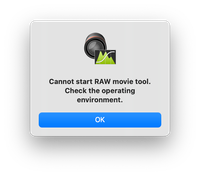
I want to open a Canon RAW video from EOS R5 in Digital Photo Professional 4 but I'm getting a "Cannot start RAW movie tool. Check the operating environment." error message.
I'm running DPP 4.17.30 on macOS Ventura 13.4.1 on a 16gig M1 Mac Mini, but I am getting this message on an (admittedly underpowered) Windows 10 HP i3 8gig laptop as well.
Another thread referenced environment requirements, but it would be good to know what specs does my machine fail in actuality, and if RAW movie tool is supported on Apple Silicon at all.
Solved! Go to Solution.
17 REPLIES 17
Options
- Mark as New
- Bookmark
- Subscribe
- Mute
- Subscribe to RSS Feed
- Permalink
- Report Inappropriate Content
03-31-2024 06:42 PM
My M2 Max 16" MacBook Pro with 32 GB gives the same error.


Options
- Mark as New
- Bookmark
- Subscribe
- Mute
- Subscribe to RSS Feed
- Permalink
- Report Inappropriate Content
03-31-2024 08:21 PM
The notes for DPP 4.18 do not state that Apple Silicon is supported for Raw Movie Tool and the Windows environment is very high end.
John Hoffman
Conway, NH
R6 Mark III, M200 (converted to infrared), RF lenses, Pixma PRO-100, Pixma TR8620a, Lr Classic
Conway, NH
R6 Mark III, M200 (converted to infrared), RF lenses, Pixma PRO-100, Pixma TR8620a, Lr Classic
Options
- Mark as New
- Bookmark
- Subscribe
- Mute
- Subscribe to RSS Feed
- Permalink
- Report Inappropriate Content
03-31-2024 08:48 PM
Trying to get this reply in the right place.
My 2020 27" 5K iMac, 3.8 GHz 8-Core Intel Core i7, AMD Radeon Pro 5700 XT 16 GB, 40 GB 2133 MHz DDR4 will run the Raw Movie Tool on Ventura. I believe that's the highest specification video card for that generation of Mac. I'm not really well versed in the different hardware specifications. I bought it as a refurb in 2021 and it's a great machine for everything else I do.
Options
- Mark as New
- Bookmark
- Subscribe
- Mute
- Subscribe to RSS Feed
- Permalink
- Report Inappropriate Content
04-03-2024 05:07 PM - edited 04-03-2024 05:12 PM
@IthacaNY wrote:My M2 Max 16" MacBook Pro with 32 GB gives the same error.
While this is disappointing it is the most valuable answer to me, basically meaning that even getting a Mac Studio (32gb), which I considered, will not let me run this software.
Options
- Mark as New
- Bookmark
- Subscribe
- Mute
- Subscribe to RSS Feed
- Permalink
- Report Inappropriate Content
04-03-2024 05:10 PM - edited 04-03-2024 05:13 PM
@IthacaNY wrote:My 2020 27" 5K iMac, 3.8 GHz 8-Core Intel Core i7, AMD Radeon Pro 5700 XT 16 GB, 40 GB 2133 MHz DDR4 will run the Raw Movie Tool on Ventura. I believe that's the highest specification video card for that generation of Mac. I'm not really well versed in the different hardware specifications. I bought it as a refurb in 2021 and it's a great machine for everything else I do.
Your intel iMac meets/exceeds the requirements listed, with both over 32gb of ram and separate vram, so it better run Raw Movie Tool 😉
Options
- Mark as New
- Bookmark
- Subscribe
- Mute
- Subscribe to RSS Feed
- Permalink
- Report Inappropriate Content
04-03-2024 05:15 PM
@fullest_rasps wrote:
@IthacaNY wrote:My 2020 27" 5K iMac, 3.8 GHz 8-Core Intel Core i7, AMD Radeon Pro 5700 XT 16 GB, 40 GB 2133 MHz DDR4 will run the Raw Movie Tool on Ventura. I believe that's the highest specification video card for that generation of Mac. I'm not really well versed in the different hardware specifications. I bought it as a refurb in 2021 and it's a great machine for everything else I do.
Your intel iMac meets/exceeds the requirements listed, with both over 32gb of ram and separate vram, so it better run Raw Movie Tool 😉

John Hoffman
Conway, NH
R6 Mark III, M200 (converted to infrared), RF lenses, Pixma PRO-100, Pixma TR8620a, Lr Classic
Conway, NH
R6 Mark III, M200 (converted to infrared), RF lenses, Pixma PRO-100, Pixma TR8620a, Lr Classic
Options
- Mark as New
- Bookmark
- Subscribe
- Mute
- Subscribe to RSS Feed
- Permalink
- Report Inappropriate Content
04-03-2024 05:15 PM
Yes, I would have thought that my M2 16" MacBook Pro would have been a high enough spec machine to be able to run it. I guess I never saw the requirements page for the software. Ironic that my older 2020 iMac can. That is turning out to be a great purchase. It wasn't inexpensive, even as a 1 year old refurb.
Options
- Mark as New
- Bookmark
- Subscribe
- Mute
- Subscribe to RSS Feed
- Permalink
- Report Inappropriate Content
04-03-2024 05:18 PM
@jrhoffman75 wrote:The notes for DPP 4.18 do not state that Apple Silicon is supported for Raw Movie Tool
This is a very good point.

- « Previous
-
- 1
- 2
- Next »
- « Previous
-
- 1
- 2
- Next »
Announcements
07/22/2026: New firmware updates are available.
EOS R6 Mark III - Version 1.1.0
05/13/2026: New firmware updates are available.
EOS R5 Mark II - Version 1.3.0
EOS R6 Mark II - Version 1.7.0
04/28/2026: Service Notice: Caution Concerning use of Lithium Batteries
03/17/2026: New firmware updates are available.
SELPHY CP1500 - Version 1.0.7.0
02/23/2026: New firmware update is available for EOS C50- Version 1.0.3.1
01/23/2026: New firmware update is available for RF 24-105mm F4 IS USM- Version 2.0.7
01/20/2026: New firmware updates are available.
10/21/2025: Service Notice: To Users of the Compact Digital Camera PowerShot V1
10/15/2025: New firmware updates are available.
Speedlite EL-5 - Version 1.2.0
Speedlite EL-1 - Version 1.1.0
Speedlite Transmitter ST-E10 - Version 1.2.0
07/28/2025: Notice of Free Repair Service for the Mirrorless Camera EOS R50 (Black)
05/21/2025: New firmware update available for EOS C500 Mark II - Version 1.1.5.1
Related Content
- Can't open videos recorded with T6i in EOS DSLR & Mirrorless Cameras
- EOS R6 Mark III Firmware Version 1.1.0 available for download in Camera Software
- Canon EOS R10: Lagging in manual movie mode when shutter speed under 25 in EOS DSLR & Mirrorless Cameras
- EOS R5 Mark II minor Firmware Update, Version 1.3.1 in Camera Software
- EOS R6 Mark II Exposure compensation not working with Remote Control BR-E2 in EOS DSLR & Mirrorless Cameras

Ⓒ 2026
Canon U.S.A Inc. All Rights Reserved. Reproduction in whole or part without permission is prohibited.
