Turn on suggestions
Auto-suggest helps you quickly narrow down your search results by suggesting possible matches as you type.
- Canon Community
- Discussions & Help
- Camera
- Camera Software
- Re: Computer doesn’t recognize r3 update as a vali...
Options
- Subscribe to RSS Feed
- Mark Topic as New
- Mark Topic as Read
- Float this Topic for Current User
- Bookmark
- Subscribe
- Mute
- Printer Friendly Page

Options
- Mark as New
- Bookmark
- Subscribe
- Mute
- Subscribe to RSS Feed
- Permalink
- Report Inappropriate Content
04-01-2023 09:53 AM
I’m sure it’s an easy answer but I don’t know it. I can’t download the 1.4 version of the firmware for the R3. Keep getting an error message on my Mac that the file is not a valid file…thoughts anyone?
Solved! Go to Solution.
1 ACCEPTED SOLUTION
Accepted Solutions


Options
- Mark as New
- Bookmark
- Subscribe
- Mute
- Subscribe to RSS Feed
- Permalink
- Report Inappropriate Content
04-01-2023 10:29 AM - edited 04-01-2023 10:35 AM
@Waddizzle is correct about the Mac statistics.
If your file is not "appearing" to open or mount, please open Finder preferences and ensure the "Hard Disk" option is enabled. This allows the folder to mount on your desktop.
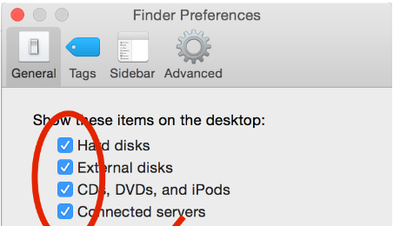
There is a difference between invalid or corrupt file and "I cannot find it". If you aren't seeing it, try the "hard disk" recommendation. If the file is showing as invalid or corrupt, try downloading from a different location.
~Rick
Bay Area - CA
~R5 C (1.1.3.1), ~RF Trinity, ~RF 100 Macro, ~RF 100~400, ~RF 100~500, ~RF 200-800, ~RF 1.4x TC, BG-R10, 430EX III-RT ~DxO PhotoLab Elite ~DaVinci Resolve Studio ~ImageClass MF644Cdw MF656Cdw ~Pixel 10 ~CarePaks Are Worth It
5 REPLIES 5

Options
- Mark as New
- Bookmark
- Subscribe
- Mute
- Subscribe to RSS Feed
- Permalink
- Report Inappropriate Content
04-01-2023 10:10 AM
Where are you trying to save the file?
Have you been able to download previous updates in the past? If not, can you download any of the previous updates now?
--------------------------------------------------------
"Enjoying photography since 1972."
"Enjoying photography since 1972."
Options
- Mark as New
- Bookmark
- Subscribe
- Mute
- Subscribe to RSS Feed
- Permalink
- Report Inappropriate Content
04-01-2023 10:13 AM - edited 04-01-2023 10:14 AM
The overwhelming majority of computer issues being posted to these forums are Mac related. Try looking at the solution in this recent thread. The forum member posted about a similar problem with an R5.
[EDIT] Please do not post questions regarding your issue on the other thread. Post your questions and comments about your issue here. I posted the link to the other thread as a reference.
--------------------------------------------------------
"Enjoying photography since 1972."
"Enjoying photography since 1972."
Options
- Mark as New
- Bookmark
- Subscribe
- Mute
- Subscribe to RSS Feed
- Permalink
- Report Inappropriate Content
04-01-2023 10:29 AM - edited 04-01-2023 10:35 AM
@Waddizzle is correct about the Mac statistics.
If your file is not "appearing" to open or mount, please open Finder preferences and ensure the "Hard Disk" option is enabled. This allows the folder to mount on your desktop.
There is a difference between invalid or corrupt file and "I cannot find it". If you aren't seeing it, try the "hard disk" recommendation. If the file is showing as invalid or corrupt, try downloading from a different location.
~Rick
Bay Area - CA
~R5 C (1.1.3.1), ~RF Trinity, ~RF 100 Macro, ~RF 100~400, ~RF 100~500, ~RF 200-800, ~RF 1.4x TC, BG-R10, 430EX III-RT ~DxO PhotoLab Elite ~DaVinci Resolve Studio ~ImageClass MF644Cdw MF656Cdw ~Pixel 10 ~CarePaks Are Worth It
Options
- Mark as New
- Bookmark
- Subscribe
- Mute
- Subscribe to RSS Feed
- Permalink
- Report Inappropriate Content
04-01-2023 11:30 AM
This did it thank you all food
Options
- Mark as New
- Bookmark
- Subscribe
- Mute
- Subscribe to RSS Feed
- Permalink
- Report Inappropriate Content
04-01-2023 11:31 AM
Lol all good

Announcements
07/22/2026: New firmware updates are available.
EOS R6 Mark III - Version 1.1.0
05/13/2026: New firmware updates are available.
EOS R5 Mark II - Version 1.3.0
EOS R6 Mark II - Version 1.7.0
04/28/2026: Service Notice: Caution Concerning use of Lithium Batteries
03/17/2026: New firmware updates are available.
SELPHY CP1500 - Version 1.0.7.0
02/23/2026: New firmware update is available for EOS C50- Version 1.0.3.1
01/23/2026: New firmware update is available for RF 24-105mm F4 IS USM- Version 2.0.7
01/20/2026: New firmware updates are available.
10/21/2025: Service Notice: To Users of the Compact Digital Camera PowerShot V1
10/15/2025: New firmware updates are available.
Speedlite EL-5 - Version 1.2.0
Speedlite EL-1 - Version 1.1.0
Speedlite Transmitter ST-E10 - Version 1.2.0
07/28/2025: Notice of Free Repair Service for the Mirrorless Camera EOS R50 (Black)
05/21/2025: New firmware update available for EOS C500 Mark II - Version 1.1.5.1
Related Content
- EOS Rebel T5 software update needed in Camera Software
- Color vertical linea in visor R8 in EOS DSLR & Mirrorless Cameras
- EOS Rebel and Product Advisory: Vulnerability Remediation for EOS Network Setting Tool in EOS DSLR & Mirrorless Cameras
- EOS R5 Mark II How to update to firmware 1.0.3 in EOS DSLR & Mirrorless Cameras
- EOS R5 Mark II firmware 1.30 notes in Camera Software

Ⓒ 2026
Canon U.S.A Inc. All Rights Reserved. Reproduction in whole or part without permission is prohibited.
