Turn on suggestions
Auto-suggest helps you quickly narrow down your search results by suggesting possible matches as you type.
- Canon Community
- Discussions & Help
- Camera
- Camera Software
- Re: Canon Camera Connect App not connecting to my ...
Options
- Subscribe to RSS Feed
- Mark Topic as New
- Mark Topic as Read
- Float this Topic for Current User
- Bookmark
- Subscribe
- Mute
- Printer Friendly Page
Canon Camera Connect App not connecting to my EOS SL2

Options
- Mark as New
- Bookmark
- Subscribe
- Mute
- Subscribe to RSS Feed
- Permalink
- Report Inappropriate Content
01-03-2021 04:09 PM - edited 01-03-2021 06:03 PM
Hello,
This Canon App is probably one of the worst pieces of software I've ever used. I've tried for hours, using both Wi-Fi and Bluetooth to connect and cannot get it to work.
I have a Rebel EOS SL2 camera and a Samsung J7 Android phone. I have a fresh version of the camera app.
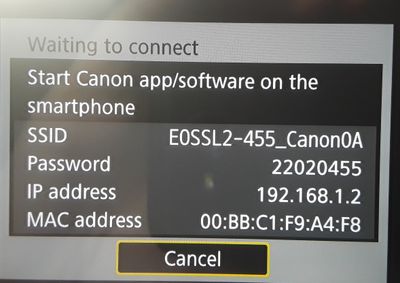
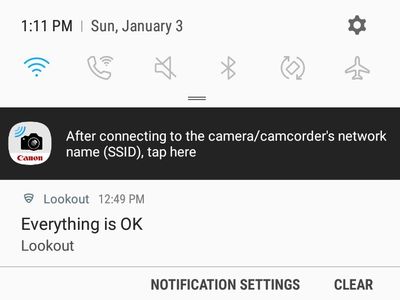
When I enter the SSID Wi-Fi password, it says "Waiting to connect" on the camera (see image below) and the phone app just says "when done, return to this page." (see images below) It seems like it's connected, I return to the page, but there is no "Next" button. I'm just stuck.
Enclosed are screenshots from my phone and the app.
I have tried uninstalling and re-installing the camera app. I have tried resetting the camera's wi-fi settings, etc.
Please help, the instructions and troubleshooting provided by Canon are just awful. I have also scoured this discussion board and don't see anything helpful.

3 REPLIES 3


Options
- Mark as New
- Bookmark
- Subscribe
- Mute
- Subscribe to RSS Feed
- Permalink
- Report Inappropriate Content
01-03-2021 05:29 PM
You should not need any passwords or SSIDs to connect via Bluetooth.
--------------------------------------------------------
"Enjoying photography since 1972."
"Enjoying photography since 1972."
Options
- Mark as New
- Bookmark
- Subscribe
- Mute
- Subscribe to RSS Feed
- Permalink
- Report Inappropriate Content
01-03-2021 05:52 PM - edited 01-03-2021 05:58 PM
I'm just showing the Wi-Fi example, not Bluetooth. And passwords aren't the issue with Wi-Fi. It connected for me ONE TIME randomly, but never again.
My understanding is that you need to use Wi-Fi in order to control the camera remotely, right?
Options
- Mark as New
- Bookmark
- Subscribe
- Mute
- Subscribe to RSS Feed
- Permalink
- Report Inappropriate Content
01-03-2021 09:00 PM
@propswest wrote:I'm just showing the Wi-Fi example, not Bluetooth. And passwords aren't the issue with Wi-Fi. It connected for me ONE TIME randomly, but never again.
My understanding is that you need to use Wi-Fi in order to control the camera remotely, right?
You can control the camera with either Bluetooth or Wi-Fi. The primary difference is range, or distance to the host device.
--------------------------------------------------------
"Enjoying photography since 1972."
"Enjoying photography since 1972."

Announcements
07/22/2026: New firmware updates are available.
EOS R6 Mark III - Version 1.1.0
05/13/2026: New firmware updates are available.
EOS R5 Mark II - Version 1.3.0
EOS R6 Mark II - Version 1.7.0
04/28/2026: Service Notice: Caution Concerning use of Lithium Batteries
03/17/2026: New firmware updates are available.
SELPHY CP1500 - Version 1.0.7.0
02/23/2026: New firmware update is available for EOS C50- Version 1.0.3.1
01/23/2026: New firmware update is available for RF 24-105mm F4 IS USM- Version 2.0.7
01/20/2026: New firmware updates are available.
10/21/2025: Service Notice: To Users of the Compact Digital Camera PowerShot V1
10/15/2025: New firmware updates are available.
Speedlite EL-5 - Version 1.2.0
Speedlite EL-1 - Version 1.1.0
Speedlite Transmitter ST-E10 - Version 1.2.0
07/28/2025: Notice of Free Repair Service for the Mirrorless Camera EOS R50 (Black)
05/21/2025: New firmware update available for EOS C500 Mark II - Version 1.1.5.1
Related Content
- EOS R50 Failed Bluetooth Connection in EOS DSLR & Mirrorless Cameras
- Where to download Canon Camera Connect v3 for Windows 11 in Camera Software
- Cannot batch-select / select all photos by date in Camera Connect App (IXUS 255 HS & iPhone 12) in Camera Software
- R6 Mark II WiFi Connectivity Issues when pushing to SFTP in EOS DSLR & Mirrorless Cameras
- EOS R5 Mark II firmware won't update in EOS DSLR & Mirrorless Cameras

Ⓒ 2026
Canon U.S.A Inc. All Rights Reserved. Reproduction in whole or part without permission is prohibited.
