Turn on suggestions
Auto-suggest helps you quickly narrow down your search results by suggesting possible matches as you type.
- Canon Community
- Discussions & Help
- Camera
- Camera Accessories
- Re: Noisy External Microphone with EOS 90D
Options
- Subscribe to RSS Feed
- Mark Topic as New
- Mark Topic as Read
- Float this Topic for Current User
- Bookmark
- Subscribe
- Mute
- Printer Friendly Page
Noisy External Microphone with EOS 90D

Options
- Mark as New
- Bookmark
- Subscribe
- Mute
- Subscribe to RSS Feed
- Permalink
- Report Inappropriate Content
09-20-2023
06:59 AM
- last edited on
09-20-2023
08:09 AM
by
 Danny
Danny
I have a external microphone that I want to use with the Canon 90d for video. I have plugged this into the mic input but it seems noisy when shooting in Auto mode. Is there a setting that needs to be changed for this to work?
5 REPLIES 5


Options
- Mark as New
- Bookmark
- Subscribe
- Mute
- Subscribe to RSS Feed
- Permalink
- Report Inappropriate Content
09-20-2023 08:11 AM - edited 09-20-2023 08:12 AM
Greetings ,
Please let us know the exact brand and model of microphone that you're plugging in and using for sound in your videos.
Can you please describe the "noise". Is there a hum, hiss, crackling, etc.
~Rick
Bay Area - CA
~R5 C (1.1.2.1), ~RF Trinity, ~RF 100 Macro, ~RF 100~400, ~RF 100~500, ~RF 200-800, ~RF 1.4x TC, BG-R10, 430EX III-RT ~DxO PhotoLab Elite ~DaVinci Resolve Studio ~ImageClass MF644Cdw MF656Cdw ~Pixel 10 ~CarePaks Are Worth It
Options
- Mark as New
- Bookmark
- Subscribe
- Mute
- Subscribe to RSS Feed
- Permalink
- Report Inappropriate Content
09-20-2023 08:31 AM
It is a Canon DM-E100 mic. It is more of a hiss. Can the levels be adjusted in Auto mode?
Options
- Mark as New
- Bookmark
- Subscribe
- Mute
- Subscribe to RSS Feed
- Permalink
- Report Inappropriate Content
09-20-2023 09:34 AM - edited 09-20-2023 09:38 AM
Greetings,
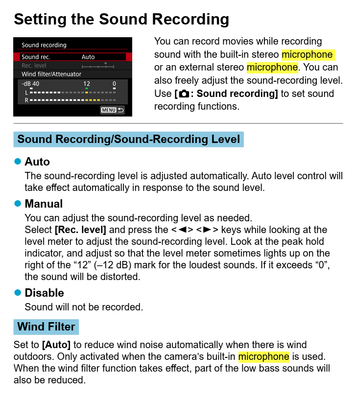
The levels cannot be adjusted in Auto mode, you have to use manual to adjust the mics gain. What you want is for the audio to register on the meter in the upper range (-10-12 dB), and not have the recording level hit "0" when the audio is at its loudest. Close is fine, but if it pegs at zero, clipping or distortion might occur. Try manual mode and see what happens.
~Rick
Bay Area - CA
~R5 C (1.1.2.1), ~RF Trinity, ~RF 100 Macro, ~RF 100~400, ~RF 100~500, ~RF 200-800, ~RF 1.4x TC, BG-R10, 430EX III-RT ~DxO PhotoLab Elite ~DaVinci Resolve Studio ~ImageClass MF644Cdw MF656Cdw ~Pixel 10 ~CarePaks Are Worth It

Anonymous
Not applicable
Options
- Mark as New
- Bookmark
- Subscribe
- Mute
- Subscribe to RSS Feed
- Permalink
- Report Inappropriate Content
09-20-2023 09:36 AM
In the custom functions menu C.Fn III.5 Audio compression, try setting it to disable and see if that helps.
Options
- Mark as New
- Bookmark
- Subscribe
- Mute
- Subscribe to RSS Feed
- Permalink
- Report Inappropriate Content
09-22-2023 09:21 AM
I will try this in manual mode instead. Thanks


Announcements
05/13/2026: New firmware updates are available.
EOS R5 Mark II - Version 1.3.0
EOS R6 Mark II - Version 1.7.0
04/28/2026: Service Notice: Caution Concerning use of Lithium Batteries
03/17/2026: New firmware updates are available.
SELPHY CP1500 - Version 1.0.7.0
02/23/2026: New firmware update is available for EOS C50- Version 1.0.3.1
01/23/2026: New firmware update is available for RF 24-105mm F4 IS USM- Version 2.0.7
01/20/2026: New firmware updates are available.
12/22/2025: New firmware update is available for EOS R6 Mark III- Version 1.0.2
10/21/2025: Service Notice: To Users of the Compact Digital Camera PowerShot V1
10/15/2025: New firmware updates are available.
Speedlite EL-5 - Version 1.2.0
Speedlite EL-1 - Version 1.1.0
Speedlite Transmitter ST-E10 - Version 1.2.0
07/28/2025: Notice of Free Repair Service for the Mirrorless Camera EOS R50 (Black)
05/21/2025: New firmware update available for EOS C500 Mark II - Version 1.1.5.1
Related Content
- DM-E100 Mic: Video has loud static — Please help! in Camera Accessories
- New EOS R50 V User Confused about 4-channel audio options in EOS DSLR & Mirrorless Cameras
- EOS R50 External microphone compatibility and power needs in EOS DSLR & Mirrorless Cameras
- EOS R5 Mark II - issue with external microphone (suddenly) in EOS DSLR & Mirrorless Cameras
- EOS R100 No audio from external microphone in EOS DSLR & Mirrorless Cameras

Ⓒ 2026
Canon U.S.A Inc. All Rights Reserved. Reproduction in whole or part without permission is prohibited.
