Turn on suggestions
Auto-suggest helps you quickly narrow down your search results by suggesting possible matches as you type.
- Canon Community
- Discussions & Help
- Video
- Camcorders
- VIXIA HF G50 Autofocus Problems
Options
- Subscribe to RSS Feed
- Mark Topic as New
- Mark Topic as Read
- Float this Topic for Current User
- Bookmark
- Subscribe
- Mute
- Printer Friendly Page

Options
- Mark as New
- Bookmark
- Subscribe
- Mute
- Subscribe to RSS Feed
- Permalink
- Report Inappropriate Content
06-05-2023
08:06 AM
- last edited on
06-06-2023
08:22 AM
by
 Danny
Danny
I have a G50 that i used at an airshow yesterday. i had it on auto focus and it kept trying to focus on nothing in the sky which cause a lot of blurry images once i found the subject i want to video. i looked in the settings and can not find a infinity setting which would keep the focus at one setting to stop what i call hunting / searching . any thoughts? Also the image stabilization is terrible.
Solved! Go to Solution.
1 ACCEPTED SOLUTION
Accepted Solutions
Options
- Mark as New
- Bookmark
- Subscribe
- Mute
- Subscribe to RSS Feed
- Permalink
- Report Inappropriate Content
06-15-2023 08:49 AM
yes , i figured that after looking into it further . by pressing the AF/MF button and then turning the focus ring i was able to get it to infinity .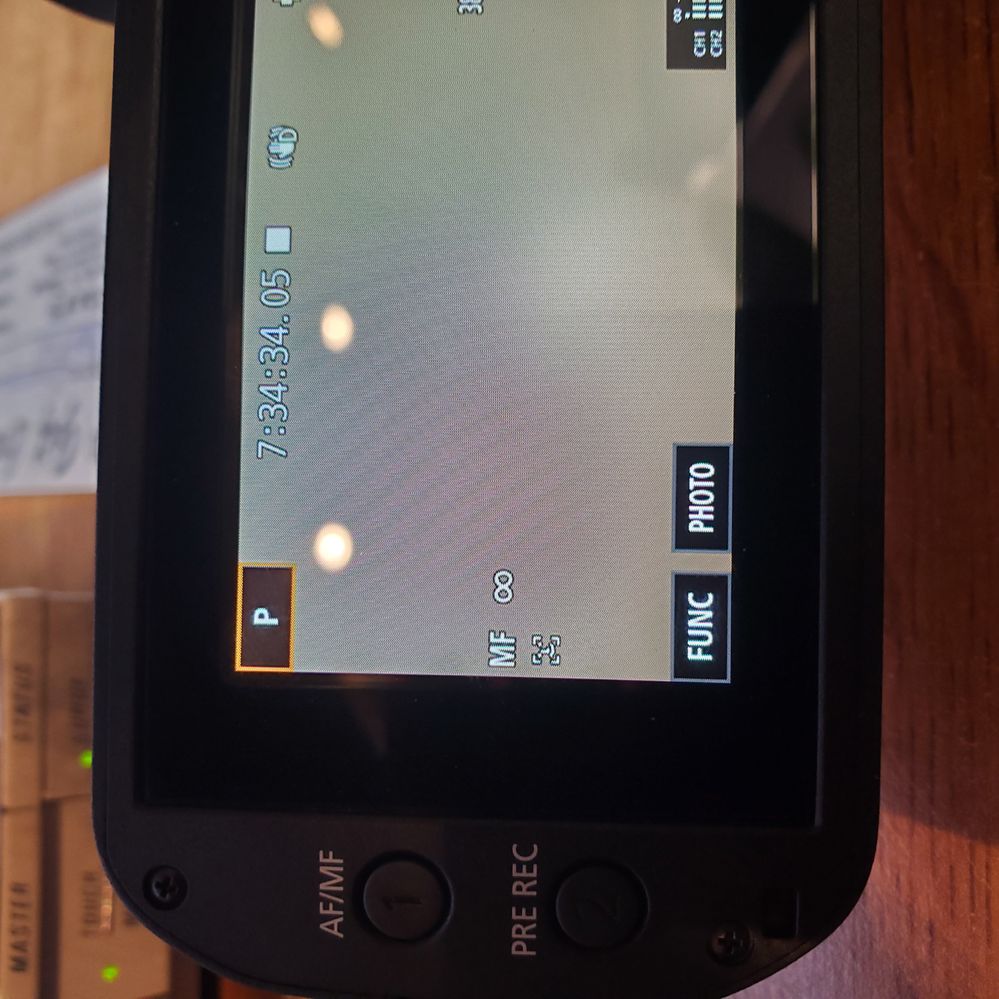
4 REPLIES 4

Options
- Mark as New
- Bookmark
- Subscribe
- Mute
- Subscribe to RSS Feed
- Permalink
- Report Inappropriate Content
06-07-2023 08:03 PM
Greetings rcflyer,
The camera does not have a function to lock in an infinity focus where it would then allow for it to auto focus on an object that comes into frame. You may try adjusting the AF Mode on the camera and choose Instant AF (I.AF) to see if this may help the camera lock on to a subject faster when it comes into frame. Page 57 of the user guide will provide the information on how to change this setting on the camcorder:
https://gdlp01.c-wss.com/gds/0/0300034200/04/vixiahfg50-im4-en.pdf
For image stabilization, the camcorder will work to stabilize the image while handholding the camcorder but please note there are limits to how much it can stabilize, depending on the amount of motion as well as how far the lens is zoomed. The farther the lens is zoomed in, the harder it is to keep the image stable.
Options
- Mark as New
- Bookmark
- Subscribe
- Mute
- Subscribe to RSS Feed
- Permalink
- Report Inappropriate Content
06-08-2023 01:02 PM
i get the stabilization thing. i just hate having to wait till the camera decides to focus. by the time it does , the event is close to being over. i think i'll try turning off the auto focus and just using manual .


Options
- Mark as New
- Bookmark
- Subscribe
- Mute
- Subscribe to RSS Feed
- Permalink
- Report Inappropriate Content
06-15-2023 07:10 AM
You will need to use manual focus for things like this. The camera probably uses contrast for the auto focus. Just pointing it at the sky gives it nothing to focus on so it will hunt until it sees something to focus on.
__________________________________________________________________________________________
EOS C100 mk2 with a Canon EF-S 18-135mm IS STM, and a Sigma EF mount 10mm-20mm EX DC HSM wide angle - Zoom H2Essential - Dell 8700 i7-4790 3.6Ghz, 24GB Ram, Win 10, Nvidia GTX 1060 6GB - DaVinci Resolve Studio 20.3 - Blackmagic Speed Editor - Presonus Faderport 1.
EOS C100 mk2 with a Canon EF-S 18-135mm IS STM, and a Sigma EF mount 10mm-20mm EX DC HSM wide angle - Zoom H2Essential - Dell 8700 i7-4790 3.6Ghz, 24GB Ram, Win 10, Nvidia GTX 1060 6GB - DaVinci Resolve Studio 20.3 - Blackmagic Speed Editor - Presonus Faderport 1.
Options
- Mark as New
- Bookmark
- Subscribe
- Mute
- Subscribe to RSS Feed
- Permalink
- Report Inappropriate Content
06-15-2023 08:49 AM
yes , i figured that after looking into it further . by pressing the AF/MF button and then turning the focus ring i was able to get it to infinity .


Announcements
07/22/2026: New firmware updates are available.
EOS R6 Mark III - Version 1.1.0
05/13/2026: New firmware updates are available.
EOS R5 Mark II - Version 1.3.0
EOS R6 Mark II - Version 1.7.0
04/28/2026: Service Notice: Caution Concerning use of Lithium Batteries
03/17/2026: New firmware updates are available.
SELPHY CP1500 - Version 1.0.7.0
02/23/2026: New firmware update is available for EOS C50- Version 1.0.3.1
01/23/2026: New firmware update is available for RF 24-105mm F4 IS USM- Version 2.0.7
01/20/2026: New firmware updates are available.
10/21/2025: Service Notice: To Users of the Compact Digital Camera PowerShot V1
10/15/2025: New firmware updates are available.
Speedlite EL-5 - Version 1.2.0
Speedlite EL-1 - Version 1.1.0
Speedlite Transmitter ST-E10 - Version 1.2.0
07/28/2025: Notice of Free Repair Service for the Mirrorless Camera EOS R50 (Black)
05/21/2025: New firmware update available for EOS C500 Mark II - Version 1.1.5.1

Ⓒ 2026
Canon U.S.A Inc. All Rights Reserved. Reproduction in whole or part without permission is prohibited.
