Turn on suggestions
Auto-suggest helps you quickly narrow down your search results by suggesting possible matches as you type.
- Canon Community
- Discussions & Help
- Video
- Camcorders
- Re: Time code
Options
- Subscribe to RSS Feed
- Mark Topic as New
- Mark Topic as Read
- Float this Topic for Current User
- Bookmark
- Subscribe
- Mute
- Printer Friendly Page
Time code

Options
- Mark as New
- Bookmark
- Subscribe
- Mute
- Subscribe to RSS Feed
- Permalink
- Report Inappropriate Content
10-17-2019 06:04 PM
I've turned time code on but cannot turn it off. How do I do that? The instructions in the manual don't seem to work.
6 REPLIES 6


Options
- Mark as New
- Bookmark
- Subscribe
- Mute
- Subscribe to RSS Feed
- Permalink
- Report Inappropriate Content
10-17-2019 06:09 PM
Well for a start, what camera are we talking about?
__________________________________________________________________________________________
EOS C100 mk2 with a Canon EF-S 18-135mm IS STM, and a Sigma EF mount 10mm-20mm EX DC HSM wide angle - Zoom H2Essential - Dell 8700 i7-4790 3.6Ghz, 24GB Ram, Win 10, Nvidia GTX 1060 6GB - DaVinci Resolve Studio 20.3 - Blackmagic Speed Editor - Presonus Faderport 1.
EOS C100 mk2 with a Canon EF-S 18-135mm IS STM, and a Sigma EF mount 10mm-20mm EX DC HSM wide angle - Zoom H2Essential - Dell 8700 i7-4790 3.6Ghz, 24GB Ram, Win 10, Nvidia GTX 1060 6GB - DaVinci Resolve Studio 20.3 - Blackmagic Speed Editor - Presonus Faderport 1.
Options
- Mark as New
- Bookmark
- Subscribe
- Mute
- Subscribe to RSS Feed
- Permalink
- Report Inappropriate Content
10-17-2019 06:10 PM
Good point. Vixia HF G40
Options
- Mark as New
- Bookmark
- Subscribe
- Mute
- Subscribe to RSS Feed
- Permalink
- Report Inappropriate Content
10-17-2019 06:20 PM
Any particular reason why you want to turn it off?
__________________________________________________________________________________________
EOS C100 mk2 with a Canon EF-S 18-135mm IS STM, and a Sigma EF mount 10mm-20mm EX DC HSM wide angle - Zoom H2Essential - Dell 8700 i7-4790 3.6Ghz, 24GB Ram, Win 10, Nvidia GTX 1060 6GB - DaVinci Resolve Studio 20.3 - Blackmagic Speed Editor - Presonus Faderport 1.
EOS C100 mk2 with a Canon EF-S 18-135mm IS STM, and a Sigma EF mount 10mm-20mm EX DC HSM wide angle - Zoom H2Essential - Dell 8700 i7-4790 3.6Ghz, 24GB Ram, Win 10, Nvidia GTX 1060 6GB - DaVinci Resolve Studio 20.3 - Blackmagic Speed Editor - Presonus Faderport 1.
Options
- Mark as New
- Bookmark
- Subscribe
- Mute
- Subscribe to RSS Feed
- Permalink
- Report Inappropriate Content
10-17-2019 06:29 PM - edited 10-17-2019 06:30 PM
Just refreshing my memory with my G40. There is no option to turn it off.. I have mine set to "Record Run" so it only increments when recording. Timecode is a useful tool when editing.
__________________________________________________________________________________________
EOS C100 mk2 with a Canon EF-S 18-135mm IS STM, and a Sigma EF mount 10mm-20mm EX DC HSM wide angle - Zoom H2Essential - Dell 8700 i7-4790 3.6Ghz, 24GB Ram, Win 10, Nvidia GTX 1060 6GB - DaVinci Resolve Studio 20.3 - Blackmagic Speed Editor - Presonus Faderport 1.
EOS C100 mk2 with a Canon EF-S 18-135mm IS STM, and a Sigma EF mount 10mm-20mm EX DC HSM wide angle - Zoom H2Essential - Dell 8700 i7-4790 3.6Ghz, 24GB Ram, Win 10, Nvidia GTX 1060 6GB - DaVinci Resolve Studio 20.3 - Blackmagic Speed Editor - Presonus Faderport 1.
Options
- Mark as New
- Bookmark
- Subscribe
- Mute
- Subscribe to RSS Feed
- Permalink
- Report Inappropriate Content
10-17-2019 06:32 PM
Maybe it's always been there and I haven't noticed it.
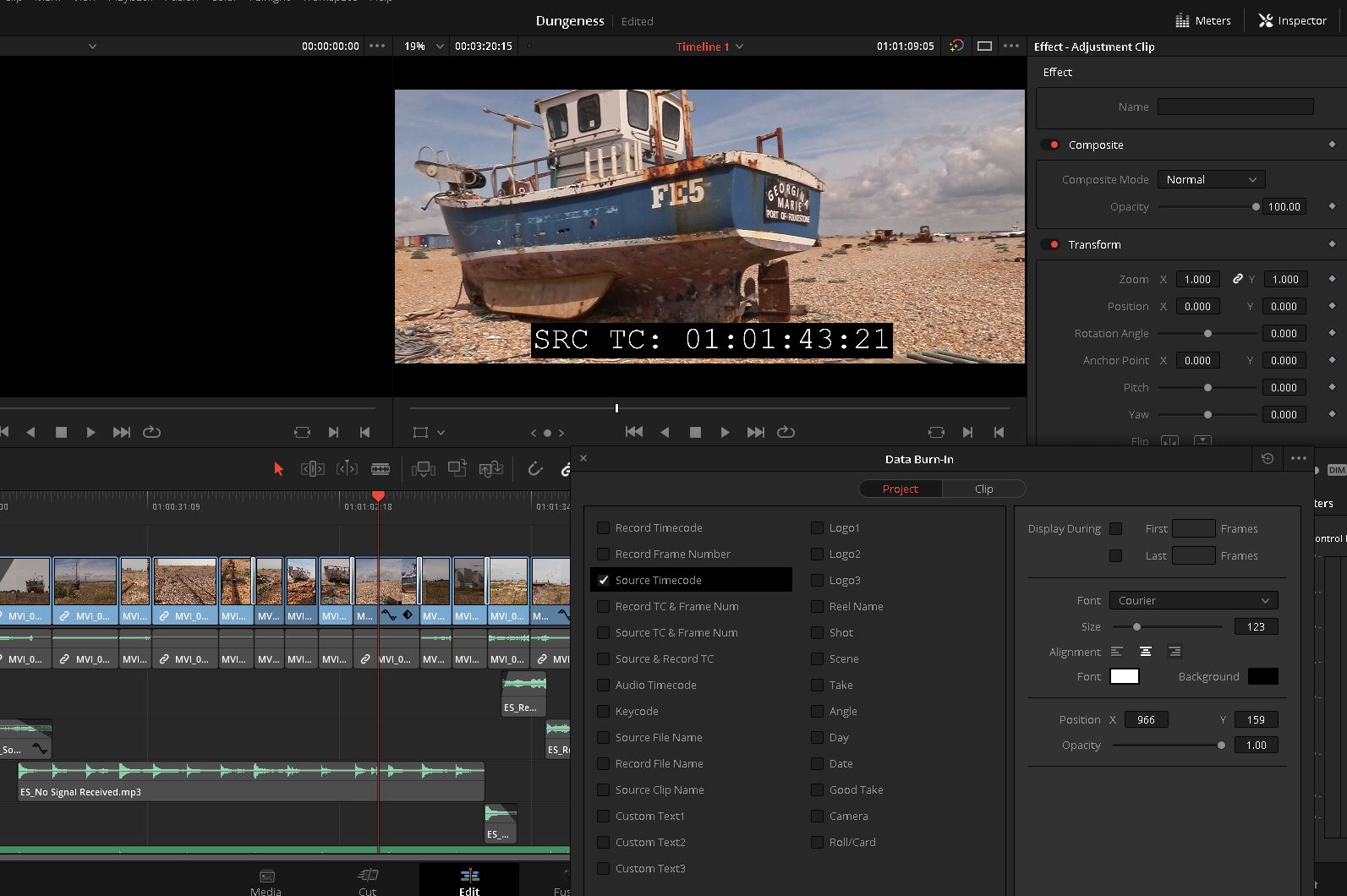
Different slant on the time code. I'm about to do some legal video work and a time code needs to displayed on the video output/DC card. How do I get the camera to include the time code in the output to the SD card.
Options
- Mark as New
- Bookmark
- Subscribe
- Mute
- Subscribe to RSS Feed
- Permalink
- Report Inappropriate Content
10-17-2019 06:35 PM - edited 10-17-2019 06:38 PM
The timecode is embedded in the video signal so it is already on your SD card. Most decent video editing software can display it and embed it into the picture when rendering. This is in Resolve.
__________________________________________________________________________________________
EOS C100 mk2 with a Canon EF-S 18-135mm IS STM, and a Sigma EF mount 10mm-20mm EX DC HSM wide angle - Zoom H2Essential - Dell 8700 i7-4790 3.6Ghz, 24GB Ram, Win 10, Nvidia GTX 1060 6GB - DaVinci Resolve Studio 20.3 - Blackmagic Speed Editor - Presonus Faderport 1.
EOS C100 mk2 with a Canon EF-S 18-135mm IS STM, and a Sigma EF mount 10mm-20mm EX DC HSM wide angle - Zoom H2Essential - Dell 8700 i7-4790 3.6Ghz, 24GB Ram, Win 10, Nvidia GTX 1060 6GB - DaVinci Resolve Studio 20.3 - Blackmagic Speed Editor - Presonus Faderport 1.


Announcements
07/22/2026: New firmware updates are available.
EOS R6 Mark III - Version 1.1.0
05/13/2026: New firmware updates are available.
EOS R5 Mark II - Version 1.3.0
EOS R6 Mark II - Version 1.7.0
04/28/2026: Service Notice: Caution Concerning use of Lithium Batteries
03/17/2026: New firmware updates are available.
SELPHY CP1500 - Version 1.0.7.0
02/23/2026: New firmware update is available for EOS C50- Version 1.0.3.1
01/23/2026: New firmware update is available for RF 24-105mm F4 IS USM- Version 2.0.7
01/20/2026: New firmware updates are available.
10/21/2025: Service Notice: To Users of the Compact Digital Camera PowerShot V1
10/15/2025: New firmware updates are available.
Speedlite EL-5 - Version 1.2.0
Speedlite EL-1 - Version 1.1.0
Speedlite Transmitter ST-E10 - Version 1.2.0
07/28/2025: Notice of Free Repair Service for the Mirrorless Camera EOS R50 (Black)
05/21/2025: New firmware update available for EOS C500 Mark II - Version 1.1.5.1
Related Content
- C400 "CFexpress File name error" at clip 999. In-camera workaround without formatting? in Professional Video
- EOS R5C internal rattling sound (No IBIS) after shutter replacement in Professional Video
- R5C customers are getting no love from Canon. Why? in Professional Video
- VIXIA HF G40 automatically zooms out when I zoom in in Camcorders
- CRD - dumped footage on external drive - how to preserve date / time metadata in Professional Video

Ⓒ 2026
Canon U.S.A Inc. All Rights Reserved. Reproduction in whole or part without permission is prohibited.
