Turn on suggestions
Auto-suggest helps you quickly narrow down your search results by suggesting possible matches as you type.
- Canon Community
- Discussions & Help
- Video
- Camcorders
- ImageBrowser EX
Options
- Subscribe to RSS Feed
- Mark Topic as New
- Mark Topic as Read
- Float this Topic for Current User
- Bookmark
- Subscribe
- Mute
- Printer Friendly Page
ImageBrowser EX

Options
- Mark as New
- Bookmark
- Subscribe
- Mute
- Subscribe to RSS Feed
- Permalink
- Report Inappropriate Content
01-15-2014 03:51 PM
Am I the only one having this problem? My question is about the "ImageBrowser EX" and
"MovieEdit Task" software that came with my HF R300 camcorder.The software works perfectly fine on
my windows XP desktop.But it does not work on my windows 8 laptop.I have the same version from the
same Canon installation cd on both computers and updated the versions to see if that would fix it.I
updated to ImageBrowser EX:1.4.0.5. and MovieEdit Task:4.2.0.5....
updating did not fix the problem.There's only one problem and the problem is this....On my windows 8 laptop,
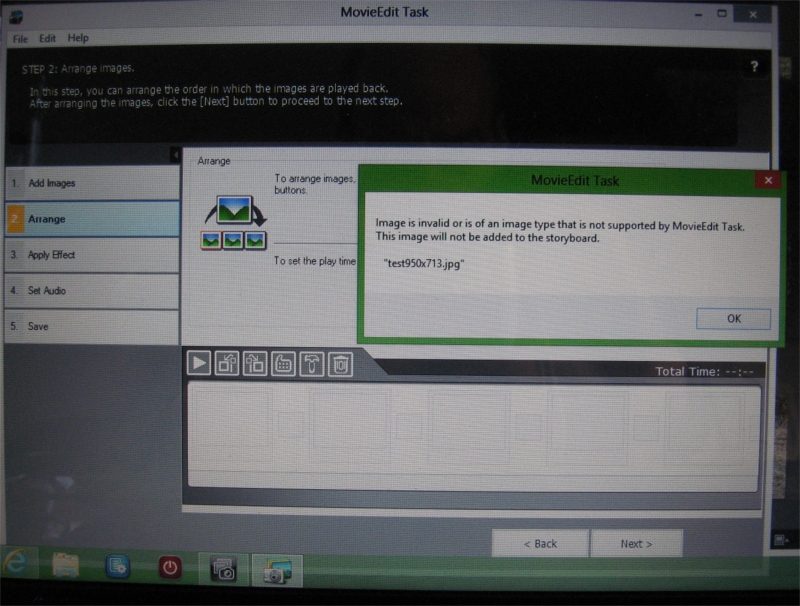
"MovieEdit Task" adds movies perfectly fine,but it will not add still images,and I'm talking about everyday,simple,
plain old images in ".jpg" or ".bmp" format,images that all my other picture programs will open easily.When I click
"Add Image",and then choose a simple .jpg image from a folder on my desktop,or from anywhere,it says this:"Image is invalid or is of an image type
that is not supported by MovieEdit Task.
This image will not be added to the storyboard".I've spent hours trying different things
like re-naming or re-sizing the images b-4 I try to add them. And I un-installed and re-installed the software...Again,this doesnt happen on my XP desktop,
the software works perfectly fine on my XP desktop, and I'm using the exact same pictures on my XP desktop as
I use on my windows 8 laptop..........Thank you
2 REPLIES 2


Options
- Mark as New
- Bookmark
- Subscribe
- Mute
- Subscribe to RSS Feed
- Permalink
- Report Inappropriate Content
01-20-2014 11:02 PM
Hi Stonum,
For assistance with this, please contact us. Click here for contact options.
Did this answer your question? Please click the Accept as Solution button so that others may find the answer as well.
Options
- Mark as New
- Bookmark
- Subscribe
- Mute
- Subscribe to RSS Feed
- Permalink
- Report Inappropriate Content
01-24-2014 05:25 PM
I took a look at the newest version of windows movie maker on my laptop and discovered they have really made some improvements in the latest version. And it imports images into my video project. So thats my fix for now......I'll use movie maker until I figure out my imagebrowser problem.
I made a funny video(using a totally different program than the ones discussed here) on youtube.It's an animated version of that popular youtube "devil baby" video(which I know some people don't find funny).......But mines just a goofy cartoon.It's kinda funny......... http://www.youtube.com/watch?v=JdG-ZPpASGo

Announcements
07/22/2026: New firmware updates are available.
EOS R6 Mark III - Version 1.1.0
05/13/2026: New firmware updates are available.
EOS R5 Mark II - Version 1.3.0
EOS R6 Mark II - Version 1.7.0
04/28/2026: Service Notice: Caution Concerning use of Lithium Batteries
03/17/2026: New firmware updates are available.
SELPHY CP1500 - Version 1.0.7.0
02/23/2026: New firmware update is available for EOS C50- Version 1.0.3.1
01/23/2026: New firmware update is available for RF 24-105mm F4 IS USM- Version 2.0.7
01/20/2026: New firmware updates are available.
10/21/2025: Service Notice: To Users of the Compact Digital Camera PowerShot V1
10/15/2025: New firmware updates are available.
Speedlite EL-5 - Version 1.2.0
Speedlite EL-1 - Version 1.1.0
Speedlite Transmitter ST-E10 - Version 1.2.0
07/28/2025: Notice of Free Repair Service for the Mirrorless Camera EOS R50 (Black)
05/21/2025: New firmware update available for EOS C500 Mark II - Version 1.1.5.1

Ⓒ 2026
Canon U.S.A Inc. All Rights Reserved. Reproduction in whole or part without permission is prohibited.
