Turn on suggestions
Auto-suggest helps you quickly narrow down your search results by suggesting possible matches as you type.
- Canon Community
- Discussions & Help
- Video
- Professional Video
- Re: Recording Time on CFast 2.0 on XC10
Options
- Subscribe to RSS Feed
- Mark Topic as New
- Mark Topic as Read
- Float this Topic for Current User
- Bookmark
- Subscribe
- Mute
- Printer Friendly Page
Recording Time on CFast 2.0 on XC10

Options
- Mark as New
- Bookmark
- Subscribe
- Mute
- Subscribe to RSS Feed
- Permalink
- Report Inappropriate Content
02-25-2016 11:43 PM
I cannot seem to find how long the recording time is for a 32 GB CFast 2.0 Card at 4K ~200mbps and ~300 mbps. Anyone help on this matter? Also, how long with the battery last?
What, me worry?
3 REPLIES 3
Options
- Mark as New
- Bookmark
- Subscribe
- Mute
- Subscribe to RSS Feed
- Permalink
- Report Inappropriate Content
02-26-2016 05:32 PM
By the lack of response, I'm guessing that there isn't anyone that actually knows the answer to this question. 🙂 Bummer. I personally think this is an awesome camera (video/photo) and if I can't find the answer, I guess I'll skip this camera and move on to the Sony which is the alternate but am hopeful that I get the answer to these questions that are relavant to the purchase decision.
What, me worry?

Options
- Mark as New
- Bookmark
- Subscribe
- Mute
- Subscribe to RSS Feed
- Permalink
- Report Inappropriate Content
02-28-2016 10:02 PM
Hello Drdimento,
There are a series of reference charts and specifications within the the XC10 user manual which details these specifications. I've taken the liberty of creating an excerpt from each page for you and posting both here.
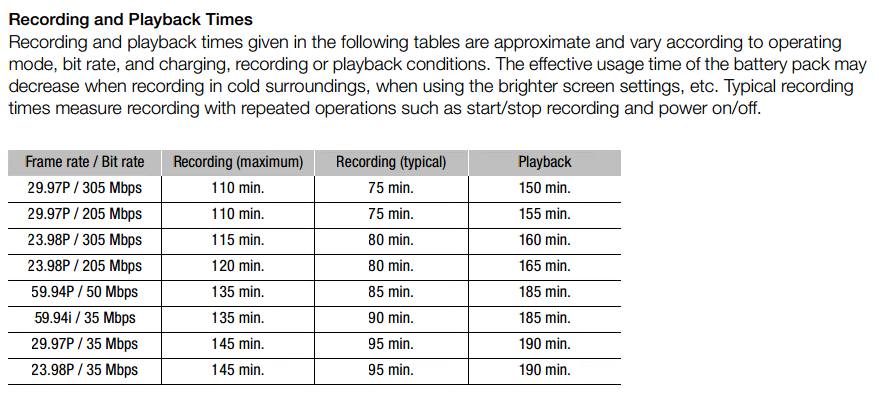
This Recording and Playback Times chart details how long the battery will last when shooting and what:
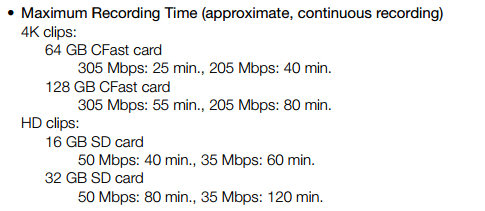
The (approximate) maximum recording times are detailed as follows- for a 32 GB card it's approx. half the value given:
Did this answer your question? Please click the Accept as Solution button so that others may find the answer as well.
Options
- Mark as New
- Bookmark
- Subscribe
- Mute
- Subscribe to RSS Feed
- Permalink
- Report Inappropriate Content
02-28-2016 10:36 PM - edited 02-28-2016 10:59 PM
Wow! Those data in the chart are for a 64GB I take it then? That's not much video for a card. Wow! Even for the HD I get more than that record time on a 32GB with a Canon XA20 and those images are awesome. Wow! I may have found the one reason to not get an XC10. I sure want to go with one just because of the video/photo uniqueness and that way I can sell off all my photo equipment as I move to Video Priority and just do stills as a support function to my video business. But, Wow, I'd have to have a bunch of those 64gb and/or 128gb cards and those things ARE NOT CHEAP !!! I mean 352 bux outta my pocket for a card is like Wow. I can buy a SSD for my imac for that. 🙂
Do you have an XC10? Is the images THAT GOOD? Or is the camera THAT AWESOME?
EDIT: I may still go with this camera since it is priced similar to the newer XA30, opting to recored only HD or occassionally 4K or UHD whichever it is. After all, I would hope that the lens would be better and I really like the idea of CLog and the larger sensor that I would hope would be better in low light, and the ND filters. What I don't like is the 10x zoom and the need to have an external device for XLR as that is the only way i go. 🙂
What, me worry?

Announcements
07/22/2026: New firmware updates are available.
EOS R6 Mark III - Version 1.1.0
05/13/2026: New firmware updates are available.
EOS R5 Mark II - Version 1.3.0
EOS R6 Mark II - Version 1.7.0
04/28/2026: Service Notice: Caution Concerning use of Lithium Batteries
03/17/2026: New firmware updates are available.
SELPHY CP1500 - Version 1.0.7.0
02/23/2026: New firmware update is available for EOS C50- Version 1.0.3.1
01/23/2026: New firmware update is available for RF 24-105mm F4 IS USM- Version 2.0.7
01/20/2026: New firmware updates are available.
10/21/2025: Service Notice: To Users of the Compact Digital Camera PowerShot V1
10/15/2025: New firmware updates are available.
Speedlite EL-5 - Version 1.2.0
Speedlite EL-1 - Version 1.1.0
Speedlite Transmitter ST-E10 - Version 1.2.0
07/28/2025: Notice of Free Repair Service for the Mirrorless Camera EOS R50 (Black)
05/21/2025: New firmware update available for EOS C500 Mark II - Version 1.1.5.1

Ⓒ 2026
Canon U.S.A Inc. All Rights Reserved. Reproduction in whole or part without permission is prohibited.
