Turn on suggestions
Auto-suggest helps you quickly narrow down your search results by suggesting possible matches as you type.
- Canon Community
- Discussions & Help
- Video
- Professional Video
- EOS C70 output problem
Options
- Subscribe to RSS Feed
- Mark Topic as New
- Mark Topic as Read
- Float this Topic for Current User
- Bookmark
- Subscribe
- Mute
- Printer Friendly Page
EOS C70 output problem

Options
- Mark as New
- Bookmark
- Subscribe
- Mute
- Subscribe to RSS Feed
- Permalink
- Report Inappropriate Content
07-13-2022 04:12 AM
I have a problem with the output signal via HDMI and the stored data only at C-log2 and C-log3.
Prerequisites: All devices and programs are on the current firmware. If the LUT were measured, the WFM would look different!
When I connect my smallHD to the C70, I see a complete difference in the WFM: In the highlights and shadows, the WFM is cut off at various points.
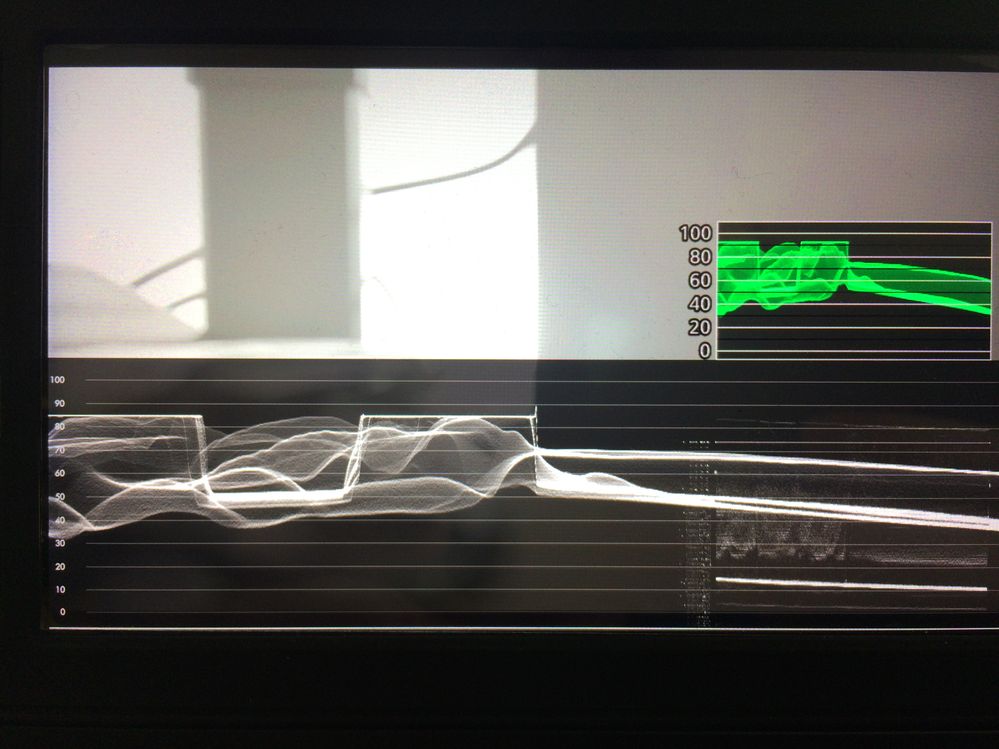
When I open the associated file in Davinci, the WFM looks like this:
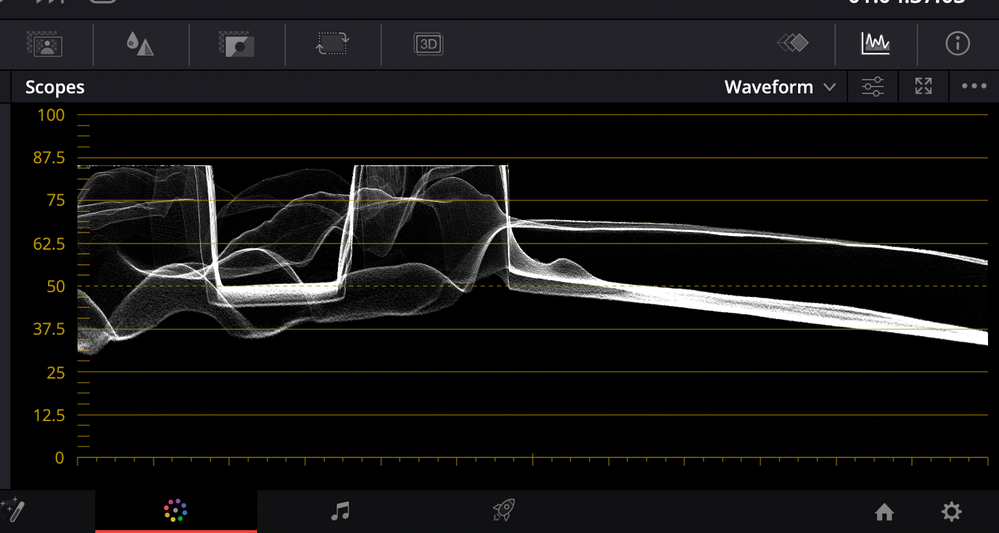
Summary overexposure
| WFM samllHD | WFM Davinci | WFM C70 |
| 85IRE | 85IRE | approx. 92IRE |
And in the shadows there is also a clear difference. The picture is unfortunately not quite clear, but I hope for you meaningful enough.
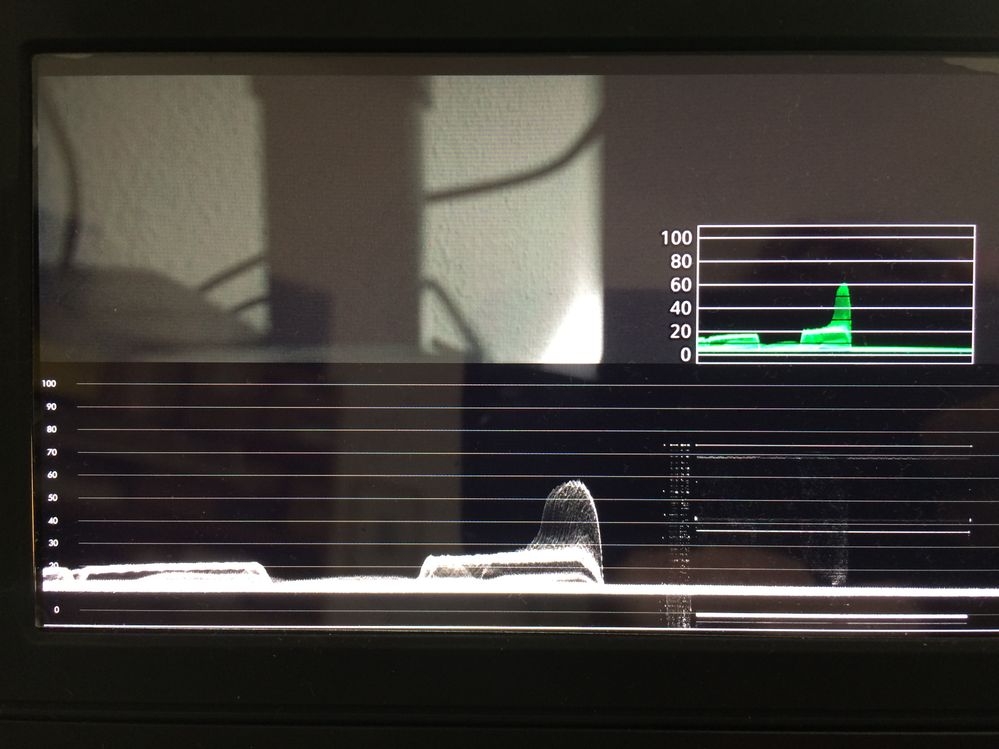
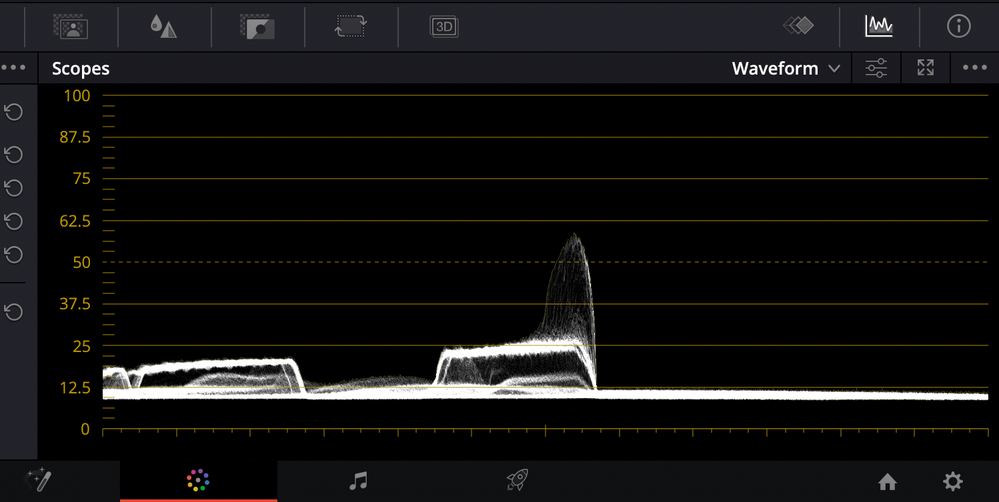
Summary underexposure
| WFM samllHD | WFM Davinci | WFM C70 |
| approx. 9IRE | approx. 9IRE | approx. 3IRE |
Then there is also the fact that the mids are not identical. Please compare in figure 3 the brightest part of the picture around the 60IRE. There is also a shift. When I turn on False Color on the C70 and on the smallHD, the mids are clearly not in the same place.
Can someone please check this on their C70 to see if it's the same there?
I also did the test with an Atomos Ninja. It is not meaningful for me as a reference monitor, because it displays the same as the C70. So it's best to compare the WFM from the C70 with the one from Davinci!
I trust Davinci more than I trust the C70.
I would be very happy if someone can help me. I am a bit at a loss.
3 REPLIES 3


Options
- Mark as New
- Bookmark
- Subscribe
- Mute
- Subscribe to RSS Feed
- Permalink
- Report Inappropriate Content
07-13-2022 10:37 AM
Have forwarded this thread to rs-eos (ricky) to see if he has anything to add.
~Rick
Bay Area - CA
~R5 C (1.1.3.1), ~RF Trinity, ~RF 100 Macro, ~RF 100~400, ~RF 100~500, ~RF 200-800, ~RF 1.4x TC, BG-R10, 430EX III-RT ~DxO PhotoLab Elite ~DaVinci Resolve Studio ~ImageClass MF644Cdw MF656Cdw ~Pixel 10 ~CarePaks Are Worth It
Options
- Mark as New
- Bookmark
- Subscribe
- Mute
- Subscribe to RSS Feed
- Permalink
- Report Inappropriate Content
07-13-2022 11:02 AM
Thank you!

Options
- Mark as New
- Bookmark
- Subscribe
- Mute
- Subscribe to RSS Feed
- Permalink
- Report Inappropriate Content
07-13-2022 01:43 PM
I saw this thread, but I don't use any external recorders. Thus have not used the HDMI output.
Having said that, no that I looked again, I believe CLog2 vs CLog3 does have different values to where it wants 50% gray to be. I only use CLog2, so on the internal waveform, I try to get as close to that as possible. Or, to use false color.
--
Ricky
Camera: EOS R5 II, RF 50mm f/1.2L, RF 135mm f/1.8L
Lighting: Profoto Lights & Modifiers
Ricky
Camera: EOS R5 II, RF 50mm f/1.2L, RF 135mm f/1.8L
Lighting: Profoto Lights & Modifiers

Announcements
07/22/2026: New firmware updates are available.
EOS R6 Mark III - Version 1.1.0
05/13/2026: New firmware updates are available.
EOS R5 Mark II - Version 1.3.0
EOS R6 Mark II - Version 1.7.0
04/28/2026: Service Notice: Caution Concerning use of Lithium Batteries
03/17/2026: New firmware updates are available.
SELPHY CP1500 - Version 1.0.7.0
02/23/2026: New firmware update is available for EOS C50- Version 1.0.3.1
01/23/2026: New firmware update is available for RF 24-105mm F4 IS USM- Version 2.0.7
01/20/2026: New firmware updates are available.
10/21/2025: Service Notice: To Users of the Compact Digital Camera PowerShot V1
10/15/2025: New firmware updates are available.
Speedlite EL-5 - Version 1.2.0
Speedlite EL-1 - Version 1.1.0
Speedlite Transmitter ST-E10 - Version 1.2.0
07/28/2025: Notice of Free Repair Service for the Mirrorless Camera EOS R50 (Black)
05/21/2025: New firmware update available for EOS C500 Mark II - Version 1.1.5.1
Related Content
- R5 C won't power on with PD connected, even with a full battery in Professional Video
- ZR300 won't load tapes in Camcorders
- Power Bank 8.4V for Vixia HF M31 camcorder in Video Accessories
- Unsatisfactory autofocusing with EOS C400 in Professional Video
- VIXIA HF G70 HDMI out in camera mode? in Camcorders

Ⓒ 2026
Canon U.S.A Inc. All Rights Reserved. Reproduction in whole or part without permission is prohibited.
