Turn on suggestions
Auto-suggest helps you quickly narrow down your search results by suggesting possible matches as you type.
- Canon Community
- Discussions & Help
- Printer
- Professional Photo Printers
- Re: imagePROGRAF PRO-300 WHITE LINE on print
Options
- Subscribe to RSS Feed
- Mark Topic as New
- Mark Topic as Read
- Float this Topic for Current User
- Bookmark
- Subscribe
- Mute
- Printer Friendly Page

Options
- Mark as New
- Bookmark
- Subscribe
- Mute
- Subscribe to RSS Feed
- Permalink
- Report Inappropriate Content
05-05-2023
09:35 AM
- last edited on
05-05-2023
09:44 AM
by
 Danny
Danny
Hello,
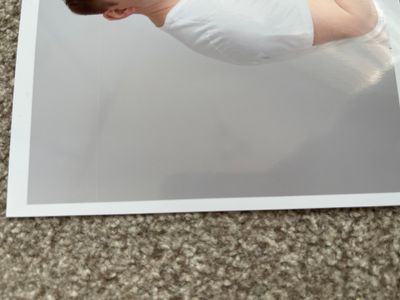
I have problem with prints, on some dark colours prints appear white faint line, always in the same point, across the whole picture.
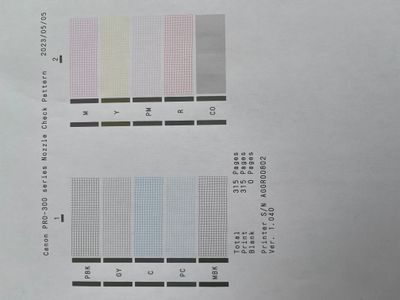
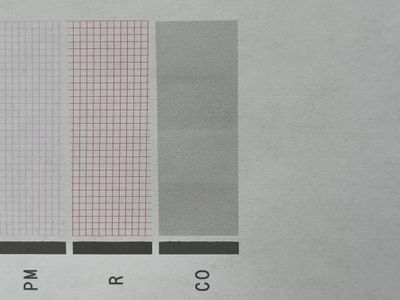
print head cleaned already few times. All inks replaced three months ago. Nozzle check pattern shows that CO colour doesn’t have horizontal white lines as should have, how can I fix this?
Solved! Go to Solution.
1 ACCEPTED SOLUTION
Accepted Solutions
Options
- Mark as New
- Bookmark
- Subscribe
- Mute
- Subscribe to RSS Feed
- Permalink
- Report Inappropriate Content
05-09-2023 09:40 AM
I was just about to update the post. I decided to look inside and analyze the technical condition. There was light soiling on the timing strip. This could be caused by a paper jam and my inability to pull it out. I cleaned it with a cotton swab soaked in glass cleaner. The problem is gone.
5 REPLIES 5

Options
- Mark as New
- Bookmark
- Subscribe
- Mute
- Subscribe to RSS Feed
- Permalink
- Report Inappropriate Content
05-08-2023 01:51 PM
Hi,
So we can best assist you, please let us know what version of Windows or MacOS you are running and if you are printing directly from the photo or using print software.
We look forward to your reply.
Options
- Mark as New
- Bookmark
- Subscribe
- Mute
- Subscribe to RSS Feed
- Permalink
- Report Inappropriate Content
05-09-2023 09:40 AM
I was just about to update the post. I decided to look inside and analyze the technical condition. There was light soiling on the timing strip. This could be caused by a paper jam and my inability to pull it out. I cleaned it with a cotton swab soaked in glass cleaner. The problem is gone.
Options
- Mark as New
- Bookmark
- Subscribe
- Mute
- Subscribe to RSS Feed
- Permalink
- Report Inappropriate Content
05-09-2023 09:41 AM
The problem is solved, it was dirt on the timing strip.
Options
- Mark as New
- Bookmark
- Subscribe
- Mute
- Subscribe to RSS Feed
- Permalink
- Report Inappropriate Content
04-19-2025 12:31 PM
I have what looks like the exact same problem. Where does one find this "timing strip?"

Options
- Mark as New
- Bookmark
- Subscribe
- Mute
- Subscribe to RSS Feed
- Permalink
- Report Inappropriate Content
04-21-2025 12:27 PM
Hi dewaynec,
Please follow the steps provide on the page linked below to clean the encoder of your imagePROGRAF PRO-300:
Cleaning the Encoder (Timing) Strip - imagePROGRAF PRO-300
If you continue to have difficulties, please contact one of Canon's Technical Support Representatives via phone or chat. To contact a Technical Support Representative, please use the link below to log into your My Canon account:
https://mycanon.usa.canon.com
Once logged in, click on your imagePROGRAF PRO-300 and then click on the Product Support button. When that page loads, click on either the Phone Support button or the Chat Support button to access support.
Did this answer your question? If so, please click the Accept as Solution button below so that others may find the answer as well.


Announcements
07/22/2026: New firmware updates are available.
EOS R6 Mark III - Version 1.1.0
05/13/2026: New firmware updates are available.
EOS R5 Mark II - Version 1.3.0
EOS R6 Mark II - Version 1.7.0
04/28/2026: Service Notice: Caution Concerning use of Lithium Batteries
03/17/2026: New firmware updates are available.
SELPHY CP1500 - Version 1.0.7.0
02/23/2026: New firmware update is available for EOS C50- Version 1.0.3.1
01/23/2026: New firmware update is available for RF 24-105mm F4 IS USM- Version 2.0.7
01/20/2026: New firmware updates are available.
10/21/2025: Service Notice: To Users of the Compact Digital Camera PowerShot V1
10/15/2025: New firmware updates are available.
Speedlite EL-5 - Version 1.2.0
Speedlite EL-1 - Version 1.1.0
Speedlite Transmitter ST-E10 - Version 1.2.0
07/28/2025: Notice of Free Repair Service for the Mirrorless Camera EOS R50 (Black)
05/21/2025: New firmware update available for EOS C500 Mark II - Version 1.1.5.1
Related Content
- imagePROGRAF PRO-300 Blue printing instead of black in Professional Photo Printers
- Can't print due to imagePROGRAF PRO-2100 thinking I'm out of ink, support code 1730 in Production Printing
- imageprograf pro-2000 only printing small images? in Production Printing
- Are imagePROGRAF PRO-1000 print heads interchangeable? in Professional Photo Printers
- Does the imagePROGRAF PRO-1000 keep track of prints? in Professional Photo Printers

Ⓒ 2026
Canon U.S.A Inc. All Rights Reserved. Reproduction in whole or part without permission is prohibited.
