Turn on suggestions
Auto-suggest helps you quickly narrow down your search results by suggesting possible matches as you type.
- Canon Community
- Discussions & Help
- Printer
- Professional Photo Printers
- Re: Error code 1000 when trying to print from manu...
Options
- Subscribe to RSS Feed
- Mark Topic as New
- Mark Topic as Read
- Float this Topic for Current User
- Bookmark
- Subscribe
- Mute
- Printer Friendly Page
imagePROGRAF PRO-300 Error code 1000 when trying to print from manual feed tray

Options
- Mark as New
- Bookmark
- Subscribe
- Mute
- Subscribe to RSS Feed
- Permalink
- Report Inappropriate Content
10-02-2022
07:37 PM
- last edited on
10-04-2022
09:23 AM
by
 Danny
Danny
I'm using the ImageProGraf Pro-300, and I've been trying to print from the manual feed tray, but I keep getting the error message "There is no paper in the Top Feed." Of course there is no paper there — the paper is in the manual feed tray. I made sure the print settings on the printer know that it's manual feed, and in the software, I set the option to "auto" because there was no manual feed tray option. In addition, I reinstalled all my firmware, print driver, etc.
I would appreciate your suggestions! I'm working on a Mac.
3 REPLIES 3

Options
- Mark as New
- Bookmark
- Subscribe
- Mute
- Subscribe to RSS Feed
- Permalink
- Report Inappropriate Content
10-03-2022 04:00 PM
Hi AlisB,
What version of OSX is installed on your Mac?
What application are you printing from?
In the application that you are using, if you click on File and Print, are you able to select Quality & Media as in the image below?
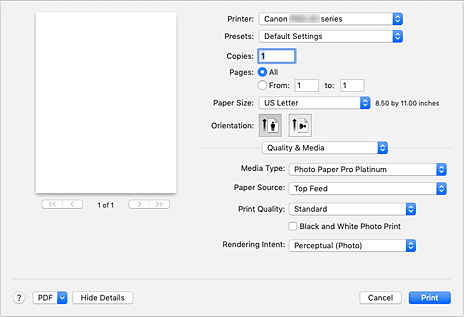
Please choose Manual feed from the Paper Source drop down and then click Print.
Are you able to print once performing this?
Options
- Mark as New
- Bookmark
- Subscribe
- Mute
- Subscribe to RSS Feed
- Permalink
- Report Inappropriate Content
10-03-2022 04:34 PM
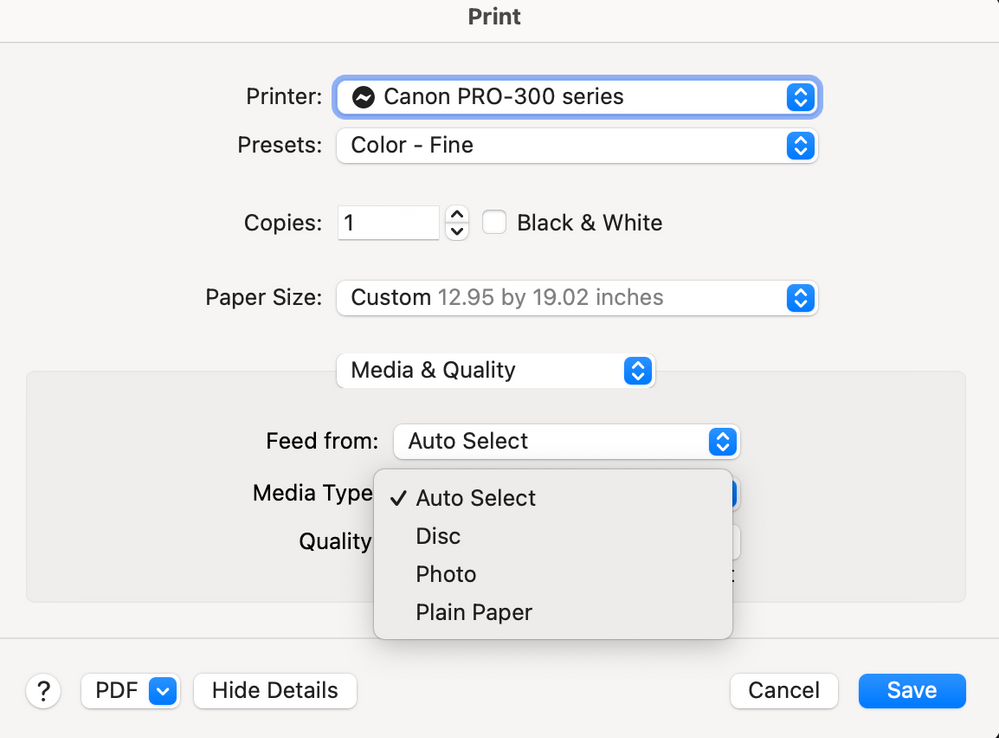
Thank you, Patrick! I'm using OS Monterrey v 12.1 printing from Photoshop. The new Canon software does not give me the option to select "Manuel Feed" from the dropdown. My only choices are below. 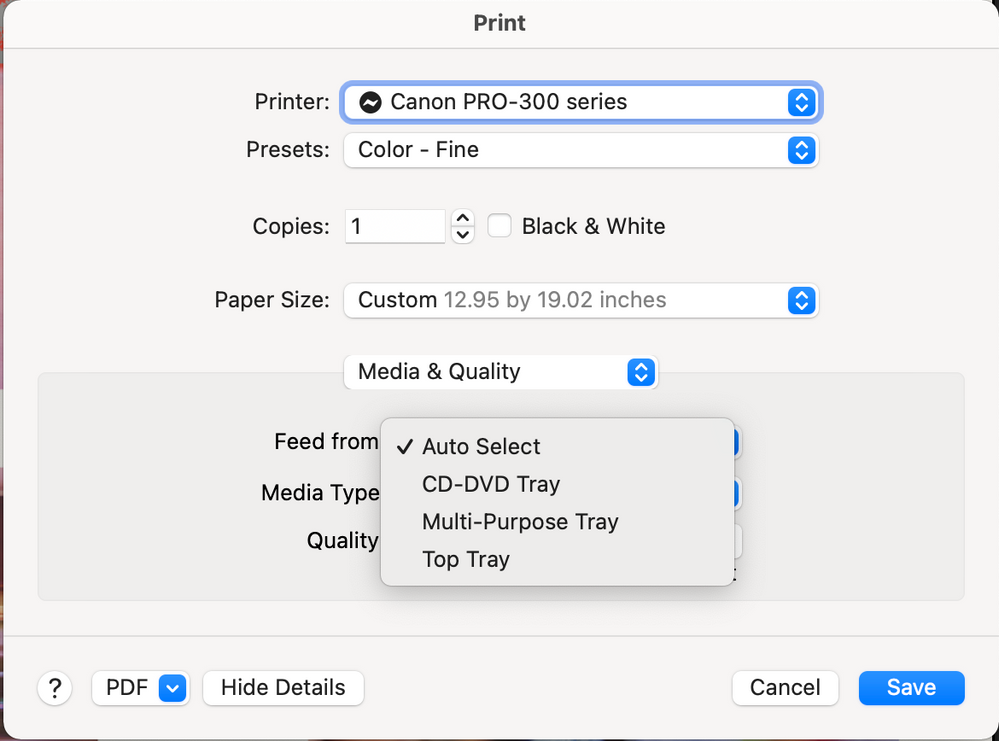

Options
- Mark as New
- Bookmark
- Subscribe
- Mute
- Subscribe to RSS Feed
- Permalink
- Report Inappropriate Content
10-05-2022 12:04 PM
Hi,
Try opening and close the feed slot cover and then try to print again. If the issue persists, I recommend reaching out to Canon support for this issue. You will need to register your Canon gear HERE to access additional support options.
Did this answer your question? Please click the Accept as Solution button so that others may find the answer as well.


Announcements
07/22/2026: New firmware updates are available.
EOS R6 Mark III - Version 1.1.0
05/13/2026: New firmware updates are available.
EOS R5 Mark II - Version 1.3.0
EOS R6 Mark II - Version 1.7.0
04/28/2026: Service Notice: Caution Concerning use of Lithium Batteries
03/17/2026: New firmware updates are available.
SELPHY CP1500 - Version 1.0.7.0
02/23/2026: New firmware update is available for EOS C50- Version 1.0.3.1
01/23/2026: New firmware update is available for RF 24-105mm F4 IS USM- Version 2.0.7
01/20/2026: New firmware updates are available.
10/21/2025: Service Notice: To Users of the Compact Digital Camera PowerShot V1
10/15/2025: New firmware updates are available.
Speedlite EL-5 - Version 1.2.0
Speedlite EL-1 - Version 1.1.0
Speedlite Transmitter ST-E10 - Version 1.2.0
07/28/2025: Notice of Free Repair Service for the Mirrorless Camera EOS R50 (Black)
05/21/2025: New firmware update available for EOS C500 Mark II - Version 1.1.5.1
Related Content
- Selphy 1300 unable to connect to my iPhone and iPad in Mobile & Compact Printers
- Print Studio Pro for Mac gone? in Printer Software & Networking
- Canon Pixma G3430 slow printing in Desktop Inkjet Printers
- How to switch PIXMA Print Plan to a new printer in Desktop Inkjet Printers
- MF Toolbox can't connect to scanner over the network, but printing works: registry fix MF210 in Printer Software & Networking

Ⓒ 2026
Canon U.S.A Inc. All Rights Reserved. Reproduction in whole or part without permission is prohibited.
