Turn on suggestions
Auto-suggest helps you quickly narrow down your search results by suggesting possible matches as you type.
- Canon Community
- Discussions & Help
- Printer
- Professional Photo Printers
- Re: canon-pixma pro-100 issue, potentially print h...
Options
- Subscribe to RSS Feed
- Mark Topic as New
- Mark Topic as Read
- Float this Topic for Current User
- Bookmark
- Subscribe
- Mute
- Printer Friendly Page
canon-pixma pro-100 issue, potentially print head alignment issue

Options
- Mark as New
- Bookmark
- Subscribe
- Mute
- Subscribe to RSS Feed
- Permalink
- Report Inappropriate Content
04-20-2022 12:55 PM
Hello,
I am new here, and a very armature printer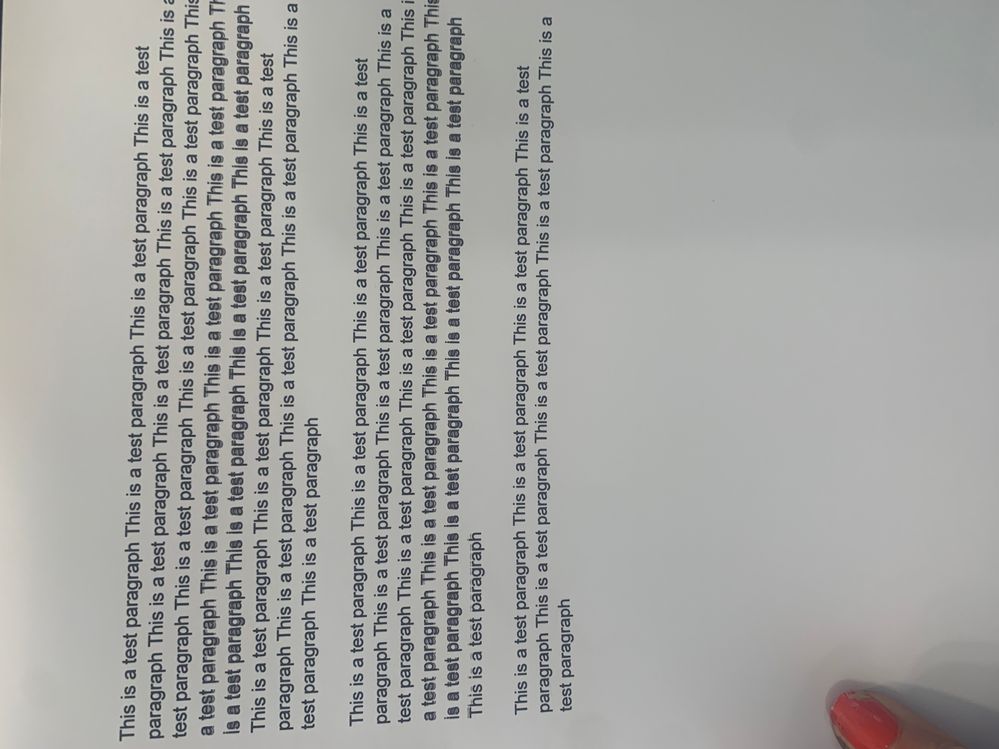
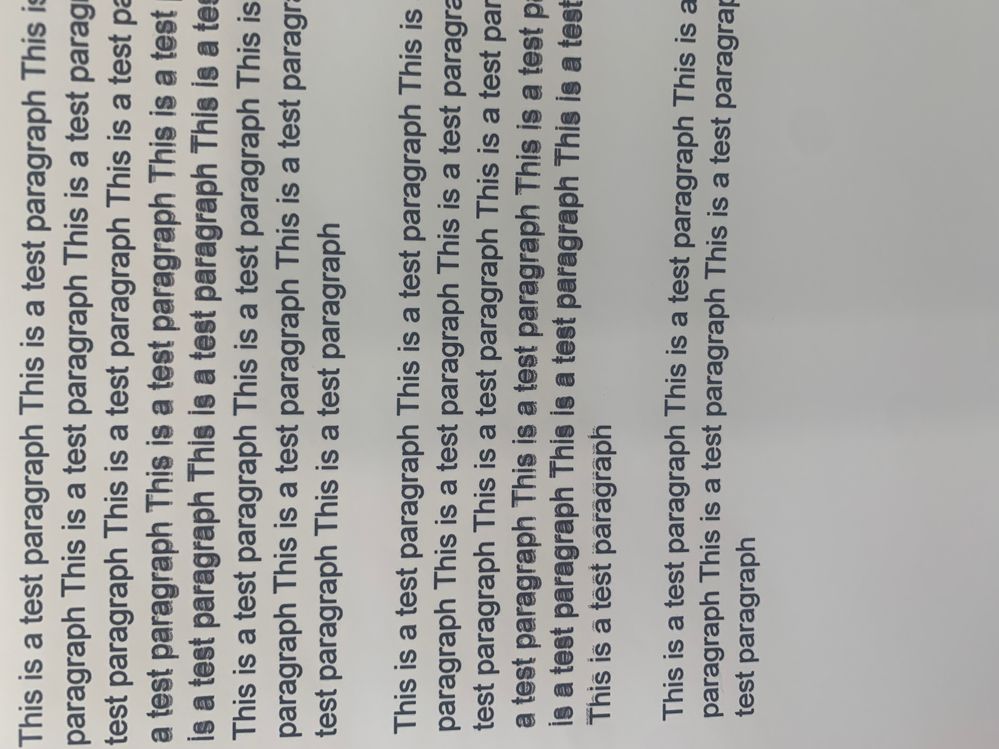
I was wiping some of the ink up on the inside of the printer, because I was getting a black streak on the back of some of my larger sized prints. I think in doing so, I may have messed up the print head alignment or something. I say this because. I printed greeting cards Monday no issue. Then after wiping inside, I started getting this issue. I ran the automatic print head alignment and then the manual. My print nozzles are not clogged, though I did run a cleaning to make sure. So I'm not really sure what else to do. I need to print orders and I can't seem to resolve this issue.
It doesnt matter the size or paper type, I keep getting the issue. or the software. I was previously printing from photoshop but tried just printing a google doc and same issue.
I would greatly appreciate any thoughts, help or troubleshooting. thank you.
3 REPLIES 3


Options
- Mark as New
- Bookmark
- Subscribe
- Mute
- Subscribe to RSS Feed
- Permalink
- Report Inappropriate Content
04-20-2022 01:30 PM
Since you were working inside the printer I think is more likely your problem:
Canon Knowledge Base - Cleaning the encoder (timing) strip - (PRO-10 / PRO-100)
John Hoffman
Conway, NH
R6 Mark III, M200 (converted to infrared), RF lenses, Pixma PRO-100, Pixma TR8620a, Lr Classic
Conway, NH
R6 Mark III, M200 (converted to infrared), RF lenses, Pixma PRO-100, Pixma TR8620a, Lr Classic
Options
- Mark as New
- Bookmark
- Subscribe
- Mute
- Subscribe to RSS Feed
- Permalink
- Report Inappropriate Content
04-20-2022 01:51 PM
yes it's like you're reading my search history, I just found an article about this, and I really thought it would fix my issue. just finished cleaning the encoding strip as carefully as I could, but sadly so far it is still printing the same. wondering if maybe I accidentally scratched or damaged it when i was wiping inside.
thank you for the suggested article!
Options
- Mark as New
- Bookmark
- Subscribe
- Mute
- Subscribe to RSS Feed
- Permalink
- Report Inappropriate Content
04-20-2022 02:26 PM
@alyssar621 wrote:yes it's like you're reading my search history, I just found an article about this, and I really thought it would fix my issue. just finished cleaning the encoding strip as carefully as I could, but sadly so far it is still printing the same. wondering if maybe I accidentally scratched or damaged it when i was wiping inside.
thank you for the suggested article!
Possibly it is damaged. Unfortunately, I don't think repair is going to be a viable path. Printer is discontinued and the likelihood of finding a repair shop (and parts) is low.
If you are USA based you could give Canon a call at 1-800-OK-CANON to see if they can recommend a repair place. If it's not within driving distance shipping could be expensive. I beleieve Canon does have some sort of reduced price purchase program if it can't be fixed.
John Hoffman
Conway, NH
R6 Mark III, M200 (converted to infrared), RF lenses, Pixma PRO-100, Pixma TR8620a, Lr Classic
Conway, NH
R6 Mark III, M200 (converted to infrared), RF lenses, Pixma PRO-100, Pixma TR8620a, Lr Classic

Announcements
07/22/2026: New firmware updates are available.
EOS R6 Mark III - Version 1.1.0
05/13/2026: New firmware updates are available.
EOS R5 Mark II - Version 1.3.0
EOS R6 Mark II - Version 1.7.0
04/28/2026: Service Notice: Caution Concerning use of Lithium Batteries
03/17/2026: New firmware updates are available.
SELPHY CP1500 - Version 1.0.7.0
02/23/2026: New firmware update is available for EOS C50- Version 1.0.3.1
01/23/2026: New firmware update is available for RF 24-105mm F4 IS USM- Version 2.0.7
01/20/2026: New firmware updates are available.
10/21/2025: Service Notice: To Users of the Compact Digital Camera PowerShot V1
10/15/2025: New firmware updates are available.
Speedlite EL-5 - Version 1.2.0
Speedlite EL-1 - Version 1.1.0
Speedlite Transmitter ST-E10 - Version 1.2.0
07/28/2025: Notice of Free Repair Service for the Mirrorless Camera EOS R50 (Black)
05/21/2025: New firmware update available for EOS C500 Mark II - Version 1.1.5.1

Ⓒ 2026
Canon U.S.A Inc. All Rights Reserved. Reproduction in whole or part without permission is prohibited.
