Turn on suggestions
Auto-suggest helps you quickly narrow down your search results by suggesting possible matches as you type.
- Canon Community
- Discussions & Help
- Printer
- Professional Photo Printers
- PIXMA PRO-200 Trouble Printing on 5x7 Cards
Options
- Subscribe to RSS Feed
- Mark Topic as New
- Mark Topic as Read
- Float this Topic for Current User
- Bookmark
- Subscribe
- Mute
- Printer Friendly Page
PIXMA PRO-200 Trouble Printing on 5x7 Cards

Options
- Mark as New
- Bookmark
- Subscribe
- Mute
- Subscribe to RSS Feed
- Permalink
- Report Inappropriate Content
05-08-2021
12:10 AM
- last edited on
11-03-2023
09:36 AM
by
 Danny
Danny
I have a brand new PIXMA Pro 200. I'm trying to print on a 5x7 card and it worked the first time I did it. Now I'm trying to do it again and I'm getting an error message that says "the size or type of paper loaded into the top tray is different from the print settings". There is no 5x7 size option in print settings though. Can anyone advise on (1) how to add this size to the print settings or (2) get it to bypass this error message and print like it did the first time around? The instruction manual is not very helpful with this issue.
4 REPLIES 4

Options
- Mark as New
- Bookmark
- Subscribe
- Mute
- Subscribe to RSS Feed
- Permalink
- Report Inappropriate Content
05-08-2021 04:21 PM
Hi, haydenedinger!
So that the Community can help you better, we need to know exactly which operating system is running on your computer (i.e. Windows or Mac OS, and which version thereof) and which applications you're trying to print from. That, and any other details you'd like to give will help the Community better understand your issue!
If this is a time-sensitive matter, click HERE search our knowledge base or find additional support options HERE.
Thanks and have a great day!

Options
- Mark as New
- Bookmark
- Subscribe
- Mute
- Subscribe to RSS Feed
- Permalink
- Report Inappropriate Content
11-02-2023 09:36 PM
I have the same issue. I’m on a Mac and am running Canon Professional Print and Layout
Options
- Mark as New
- Bookmark
- Subscribe
- Mute
- Subscribe to RSS Feed
- Permalink
- Report Inappropriate Content
12-04-2023 05:55 PM
Hi. The answer is very simple.
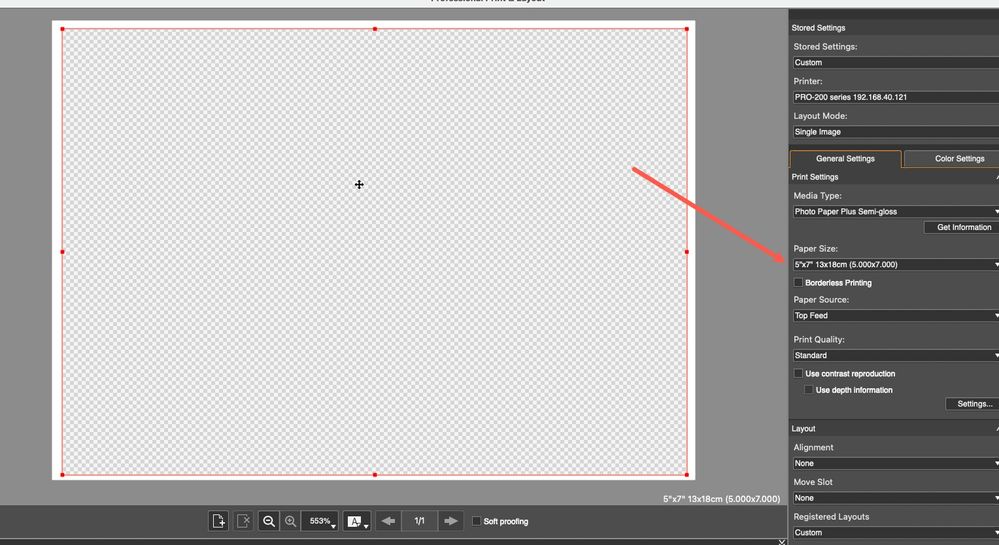
Please install the Canon Professional Print & Layout software, and you can print 5x7 from there. Very straight forward
see captures below:
Options
- Mark as New
- Bookmark
- Subscribe
- Mute
- Subscribe to RSS Feed
- Permalink
- Report Inappropriate Content
01-03-2026 09:37 PM
Do as shown above, in PPL app. Then, you must select the size, and register it, on the Pro200 screen, on the printer. If the paper size selected on the printer and the size selected in PPL app are not the same, you will get the "size of paper…is different…" error message.
HOWEVER, there is an easy solution if you don’t want to change paper settings on the printer every time you change paper sizes. Simply click the "ignore paper mismatch" option on the printer screen (same screen as where paper size is selected). It will remain the default until changed.

Announcements
07/22/2026: New firmware updates are available.
EOS R6 Mark III - Version 1.1.0
05/13/2026: New firmware updates are available.
EOS R5 Mark II - Version 1.3.0
EOS R6 Mark II - Version 1.7.0
04/28/2026: Service Notice: Caution Concerning use of Lithium Batteries
03/17/2026: New firmware updates are available.
SELPHY CP1500 - Version 1.0.7.0
02/23/2026: New firmware update is available for EOS C50- Version 1.0.3.1
01/23/2026: New firmware update is available for RF 24-105mm F4 IS USM- Version 2.0.7
01/20/2026: New firmware updates are available.
10/21/2025: Service Notice: To Users of the Compact Digital Camera PowerShot V1
10/15/2025: New firmware updates are available.
Speedlite EL-5 - Version 1.2.0
Speedlite EL-1 - Version 1.1.0
Speedlite Transmitter ST-E10 - Version 1.2.0
07/28/2025: Notice of Free Repair Service for the Mirrorless Camera EOS R50 (Black)
05/21/2025: New firmware update available for EOS C500 Mark II - Version 1.1.5.1
Related Content
- printer not responding in Printer Software & Networking
- Professional Print and Layout (ver1.6.1) stopped printing. Pixma Pro 200, Windows11 in Printer Software & Networking
- PIXMA PRO-200 Trouble printing from Photoshop Elements and selecting paper sizes in Professional Photo Printers
- imageCLASS LPB6030w Trouble printing on new Windows 11 computer in Office Printers
- PIXMA TS6420a wont Connect wirelessly and gives trouble printing wired regularly in Printer Software & Networking

Ⓒ 2026
Canon U.S.A Inc. All Rights Reserved. Reproduction in whole or part without permission is prohibited.
