Turn on suggestions
Auto-suggest helps you quickly narrow down your search results by suggesting possible matches as you type.
- Canon Community
- Discussions & Help
- Printer
- Production Printing
- Issue with imagePROGRAF TM-240 "Srgaster 1303" err...
Options
- Subscribe to RSS Feed
- Mark Topic as New
- Mark Topic as Read
- Float this Topic for Current User
- Bookmark
- Subscribe
- Mute
- Printer Friendly Page
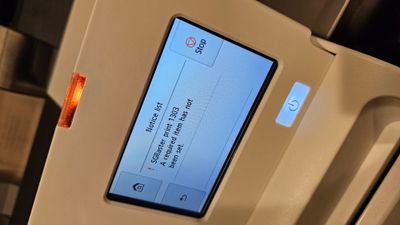
Issue with imagePROGRAF TM-240 "Srgaster 1303" error message

Options
- Mark as New
- Bookmark
- Subscribe
- Mute
- Subscribe to RSS Feed
- Permalink
- Report Inappropriate Content
03-17-2024
07:32 PM
- last edited on
09-04-2025
10:06 AM
by
 Danny
Danny
My newly bought tm-240 started to have issue just 1 month after buying, (roughly after 20-30 prints).
It prints really slow, and eventually got an error: Sgraster 1303 a required item has not been set.
This is very frustrating as it usually happened at the end of the print. I printed a big 24x30, and it got issue after 80% of finish. Lot of wasted ink and paper.
Software used: Free Layout Plus, Direct Print Plus, Professional print and layout.
I tested on both ios and win, the same issue.
I tested with wifi and cable, the same issue.
I believe the firmware is the newest 1.05
I reinstalled driver on ios and windows, problem still persists.
At this point I think the new firmware is the issue...but there's no way to reverse to the original one. I tried to factory reset but it still on the newest firmware.
5 REPLIES 5
Options
- Mark as New
- Bookmark
- Subscribe
- Mute
- Subscribe to RSS Feed
- Permalink
- Report Inappropriate Content
03-17-2024 07:44 PM

Options
- Mark as New
- Bookmark
- Subscribe
- Mute
- Subscribe to RSS Feed
- Permalink
- Report Inappropriate Content
11-08-2024 03:08 PM
Hi belulalart,
Because this issue may be hardware related, it is recommended that you contact technical support via phone for further assistance. There is NO charge for this call. Please dial 1-800-423-2366, Monday-Friday 8:00 am to 6:00 pm Eastern Time, excluding holidays. A Technical Support Representative can determine the cause of the issue and resolve it or provide you with your available service options.
Did this answer your question? If so, please click the Accept as Solution button below so that others may find the answer as well.
Options
- Mark as New
- Bookmark
- Subscribe
- Mute
- Subscribe to RSS Feed
- Permalink
- Report Inappropriate Content
08-30-2025 02:27 PM - edited 08-30-2025 02:31 PM
I have these SGRaster 1303 issues as well with the TM-300 and TM-350. It is very random. You'll know its about to print this way when the plotter makes a small beep and logs the error on the screen. During a print job of 10 copies, it might make the sound on the 2nd job and then on the 3rd job the error clears off the screen and prints fine until the 7th job and happens again. Sometimes happen on a single print, sometimes happens on a single random page in 10 copies. It will happen on large PDF map files or small PDF map files. Occurs with Arch C, Arch D, or Arch E. Tried updating firmware, drivers, and Direct Print Plus/Free Layout Plus. Tried rasterizing the PDF first.
I did speak with Canon Support in the Summer of 2024, but they just logged the issue and had no known fixes. As of today, I updated to the newest drivers/firmware/software and the issue persists at the same random frequency. We print about 4,000' of 36" rolled paper each summer and I see the issue at least once on average every 50'.
Options
- Mark as New
- Bookmark
- Subscribe
- Mute
- Subscribe to RSS Feed
- Permalink
- Report Inappropriate Content
09-02-2025 02:45 PM
I may have found something that helps on Windows computers. Go to Printers & Scanners > TM-350 (or your printer) > Printer Properties > Advanced tab > Print Processor > Canon TM-350 Print Processor > change from RAW to NT EMF 1.008.
You could try different print processors. My understanding is that the default "RAW" lets the printer handle most of the rasterization. I believe using the NT EMF 1.008 (or other print processor) would do more processing on the computer. On more complex maps, I have noticed a hesitation when printing larger map files that seems to happen only when changing the print processor.
So far, I've only seen one print out of 150 do the psychedelic banding, but it could have been a one-off. Maybe worth trying older or different print processors.
Options
- Mark as New
- Bookmark
- Subscribe
- Mute
- Subscribe to RSS Feed
- Permalink
- Report Inappropriate Content
09-02-2025 03:03 PM
Nice.
I gave up and buy another printer. Tm300 seems solid and didn't have this issue.

Announcements
12/22/2025: New firmware update is available for EOS R6 Mark III- Version 1.0.2
12/15/2025: New firmware update available for EOS C50 - Version 1.0.1.1
10/21/2025: Service Notice: To Users of the Compact Digital Camera PowerShot V1
07/28/2025: Notice of Free Repair Service for the Mirrorless Camera EOS R50 (Black)
05/21/2025: New firmware update available for EOS C500 Mark II - Version 1.1.5.1
12/18/2025: New firmware updates are available.
12/15/2025: New firmware update available for EOS C50 - Version 1.0.1.1
11/20/2025: New firmware updates are available.
EOS R5 Mark II - Version 1.2.0
PowerShot G7 X Mark III - Version 1.4.0
PowerShot SX740 HS - Version 1.0.2
10/21/2025: Service Notice: To Users of the Compact Digital Camera PowerShot V1
10/15/2025: New firmware updates are available.
Speedlite EL-5 - Version 1.2.0
Speedlite EL-1 - Version 1.1.0
Speedlite Transmitter ST-E10 - Version 1.2.0
07/28/2025: Notice of Free Repair Service for the Mirrorless Camera EOS R50 (Black)
7/17/2025: New firmware updates are available.
05/21/2025: New firmware update available for EOS C500 Mark II - Version 1.1.5.1
02/20/2025: New firmware updates are available.
RF70-200mm F2.8 L IS USM Z - Version 1.0.6
RF24-105mm F2.8 L IS USM Z - Version 1.0.9
RF100-300mm F2.8 L IS USM - Version 1.0.8
Related Content
- imagePROGRAF PRO-310 printing lines near edge of image. in Professional Photo Printers
- imagePROGRAF PRO-1100 Best paper for manual print head alignment in Professional Photo Printers
- imagePROGRAF PRO-310 Tips on conserving ink and electricity in Professional Photo Printers
- imagePROGRAF iPF6100 Printed colors don't match monitor after calibration in Production Printing
- imagePROGRAF PRO-2600 not showing cut sheet option in photoshop in Production Printing

Ⓒ 2026
Canon U.S.A Inc. All Rights Reserved. Reproduction in whole or part without permission is prohibited.
