Turn on suggestions
Auto-suggest helps you quickly narrow down your search results by suggesting possible matches as you type.
- Canon Community
- Discussions & Help
- Printer
- Printer Software & Networking
- Re: How do I close ScanGear!
Options
- Subscribe to RSS Feed
- Mark Topic as New
- Mark Topic as Read
- Float this Topic for Current User
- Bookmark
- Subscribe
- Mute
- Printer Friendly Page
imageCLASS MF4890dw - How do I close ScanGear!

Options
- Mark as New
- Bookmark
- Subscribe
- Mute
- Subscribe to RSS Feed
- Permalink
- Report Inappropriate Content
06-05-2023
11:22 AM
- last edited on
07-31-2025
08:44 AM
by
 James_C
I was having problems printing with my ImageClass MF4890dw printer, so I uninstalled it from my Windows 11 settings and downloaded the appropriate drivers from Canon's website.
When I tried to reinstall it, the installation begins to start but then I get this message,
"ScanGear is currently opened. Close the ScanGear window and run the setup again. If you do not have ScanGear open, it may be opened by other users on this system. Close all ScanGear windows and then try again."
I have closed anything and everything that I can see that maybe causing this an still I get this message everytime I try to reinstall my printer....
7 REPLIES 7


Options
- Mark as New
- Bookmark
- Subscribe
- Mute
- Subscribe to RSS Feed
- Permalink
- Report Inappropriate Content
06-05-2023 12:33 PM
Note that I currently don't use any Windows computers, but remember dealing with similar situations in the past.
First thing to try is a reboot if you haven't already. That should stop any rogue processes that may have ScanGear open.
Beyond that, you may have to see if there are any Windows services that are running. Check for any service with "Canon" or "ScanGear" in its name, then stop those services. After installation of the software, restart the services you stopped. Or, reboot (which should restart them).
--
Ricky
Camera: EOS R5 II, RF 50mm f/1.2L, RF 135mm f/1.8L
Lighting: Profoto Lights & Modifiers
Ricky
Camera: EOS R5 II, RF 50mm f/1.2L, RF 135mm f/1.8L
Lighting: Profoto Lights & Modifiers

Options
- Mark as New
- Bookmark
- Subscribe
- Mute
- Subscribe to RSS Feed
- Permalink
- Report Inappropriate Content
06-05-2023 12:53 PM
Greetings,
You can also terminate any program or process using Task Manager. Just right-click on a section of the task bar where there are no icons and select Task Manager from the context menu.
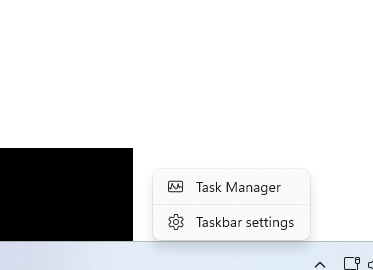
~Rick
Bay Area - CA
~R5 C (1.1.3.1), ~RF Trinity, ~RF 100 Macro, ~RF 100~400, ~RF 100~500, ~RF 200-800, ~RF 1.4x TC, BG-R10, 430EX III-RT ~DxO PhotoLab Elite ~DaVinci Resolve Studio ~ImageClass MF644Cdw MF656Cdw ~Pixel 10 ~CarePaks Are Worth It
Options
- Mark as New
- Bookmark
- Subscribe
- Mute
- Subscribe to RSS Feed
- Permalink
- Report Inappropriate Content
07-29-2025 08:24 PM
How do you stop or correct that issue when ScanGear is not installed on your system.
Options
- Mark as New
- Bookmark
- Subscribe
- Mute
- Subscribe to RSS Feed
- Permalink
- Report Inappropriate Content
07-29-2025 08:26 PM
I have the same issue. Did you get this resolved? I don't even have ScanGear on my pc.

Options
- Mark as New
- Bookmark
- Subscribe
- Mute
- Subscribe to RSS Feed
- Permalink
- Report Inappropriate Content
07-31-2025 10:46 AM
Hello RND,
Thanks for letting us know what Canon product you've got. The imageCLASS MF4890dw is an older model which we have retired. While that means that Canon USA no longer offers direct support for it, your friends here in the Canon Community are welcome to offer suggestions!
You can also speak with a Canon Upgrade Program specialist to help you score a modern replacement that would meet your current needs at a discount. You can reach them weekdays and Saturdays at 1-866-443-8002.
Hope this helps!
Options
- Mark as New
- Bookmark
- Subscribe
- Mute
- Subscribe to RSS Feed
- Permalink
- Report Inappropriate Content
07-31-2025 12:04 PM
Ron, I did not provide that information. Your post is not relevant to mine.

Options
- Mark as New
- Bookmark
- Subscribe
- Mute
- Subscribe to RSS Feed
- Permalink
- Report Inappropriate Content
07-31-2025 12:07 PM
Hi there,
Are you using the same printer? If yes, sorry it has been retired. If no, please create a new thread with your specific details so it can be addressed! Here's how to create a new thread if needed.
Hope this helps!


Announcements
07/22/2026: New firmware updates are available.
EOS R6 Mark III - Version 1.1.0
05/13/2026: New firmware updates are available.
EOS R5 Mark II - Version 1.3.0
EOS R6 Mark II - Version 1.7.0
04/28/2026: Service Notice: Caution Concerning use of Lithium Batteries
03/17/2026: New firmware updates are available.
SELPHY CP1500 - Version 1.0.7.0
02/23/2026: New firmware update is available for EOS C50- Version 1.0.3.1
01/23/2026: New firmware update is available for RF 24-105mm F4 IS USM- Version 2.0.7
01/20/2026: New firmware updates are available.
10/21/2025: Service Notice: To Users of the Compact Digital Camera PowerShot V1
10/15/2025: New firmware updates are available.
Speedlite EL-5 - Version 1.2.0
Speedlite EL-1 - Version 1.1.0
Speedlite Transmitter ST-E10 - Version 1.2.0
07/28/2025: Notice of Free Repair Service for the Mirrorless Camera EOS R50 (Black)
05/21/2025: New firmware update available for EOS C500 Mark II - Version 1.1.5.1
Related Content
- MF Toolbox can't connect to scanner over the network, but printing works: registry fix MF210 in Printer Software & Networking
- PIXMA TR4722 Unsatisfied with print quality in Desktop Inkjet Printers
- PIXMA TR4722 - Says out of paper when it's not - Answer is here as well in Desktop Inkjet Printers
- G3270 print head installation not working in Desktop Inkjet Printers
- imagePROGRAF PRO-1000 says print head joint lever not closed completely in Professional Photo Printers

Ⓒ 2026
Canon U.S.A Inc. All Rights Reserved. Reproduction in whole or part without permission is prohibited.
