Turn on suggestions
Auto-suggest helps you quickly narrow down your search results by suggesting possible matches as you type.
- Canon Community
- Discussions & Help
- Printer
- Printer Software & Networking
- i80 printer drivers and software downloads
Options
- Subscribe to RSS Feed
- Mark Topic as New
- Mark Topic as Read
- Float this Topic for Current User
- Bookmark
- Subscribe
- Mute
- Printer Friendly Page
i80 printer drivers and software downloads

Options
- Mark as New
- Bookmark
- Subscribe
- Mute
- Subscribe to RSS Feed
- Permalink
- Report Inappropriate Content
03-29-2024
09:55 PM
- last edited on
03-29-2024
10:51 PM
by
 Tiffany
I have a perfectly good i80 printer. It is now a retired piece of equipment. I lost the setup disk and cannot down load drivers for it because it is retired. I do not want to toss a perfectly good printer. How can I get a disk or the drivers to be able to use it again?
8 REPLIES 8


Options
- Mark as New
- Bookmark
- Subscribe
- Mute
- Subscribe to RSS Feed
- Permalink
- Report Inappropriate Content
03-29-2024 10:21 PM
Canon still lists drivers for it. Windows,Mac, Linux. Windows up to 7, which you could try for newer Windows versions.
https://www.usa.canon.com/support/p/i80
Options
- Mark as New
- Bookmark
- Subscribe
- Mute
- Subscribe to RSS Feed
- Permalink
- Report Inappropriate Content
03-29-2024 10:39 PM
I'm not that computer savvy. So I am not sure how to find that every time I look up the i80 I get 0 response.

Options
- Mark as New
- Bookmark
- Subscribe
- Mute
- Subscribe to RSS Feed
- Permalink
- Report Inappropriate Content
03-29-2024 10:40 PM
Greetings,
To put things in perspective, the i80 was released 20 yrs ago. If the drivers available do not work, it might be time to consider a new printer. The printer has certainly delivered a good ROI in its lifetime.
~Rick
Bay Area - CA
~R5 C (1.1.3.1), ~RF Trinity, ~RF 100 Macro, ~RF 100~400, ~RF 100~500, ~RF 200-800, ~RF 1.4x TC, BG-R10, 430EX III-RT ~DxO PhotoLab Elite ~DaVinci Resolve Studio ~ImageClass MF644Cdw MF656Cdw ~Pixel 10 ~CarePaks Are Worth It
Options
- Mark as New
- Bookmark
- Subscribe
- Mute
- Subscribe to RSS Feed
- Permalink
- Report Inappropriate Content
03-29-2024 11:02 PM
Now the problem I am having is since I do not have the software disk. How can I install the software to be able to run this printer since it is not supported by canon?
Options
- Mark as New
- Bookmark
- Subscribe
- Mute
- Subscribe to RSS Feed
- Permalink
- Report Inappropriate Content
03-29-2024 11:46 PM
Greetings,
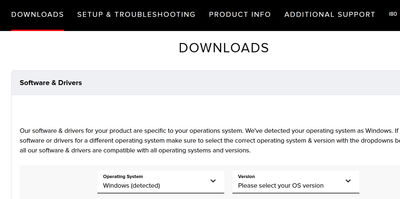
Click the link @normadel posted above. Then click downloads.
~Rick
Bay Area - CA
~R5 C (1.1.3.1), ~RF Trinity, ~RF 100 Macro, ~RF 100~400, ~RF 100~500, ~RF 200-800, ~RF 1.4x TC, BG-R10, 430EX III-RT ~DxO PhotoLab Elite ~DaVinci Resolve Studio ~ImageClass MF644Cdw MF656Cdw ~Pixel 10 ~CarePaks Are Worth It
Options
- Mark as New
- Bookmark
- Subscribe
- Mute
- Subscribe to RSS Feed
- Permalink
- Report Inappropriate Content
03-30-2024 12:12 AM
I did that and was able to download the easy photo. That was the only available download. I can't use it with the printer because the software for the printer is not installed. I do not have the setup disk that came with the printer to put the drivers on the computer to be able to use that program. So i am looking for a setup disk or software to be able to set up the printer on this PC.
Options
- Mark as New
- Bookmark
- Subscribe
- Mute
- Subscribe to RSS Feed
- Permalink
- Report Inappropriate Content
03-30-2024 09:30 AM
You'll need to select windows / windows 7 x64. Canon has not developed or released new Windows printer drivers for the i80 in about 14 yrs. This installation package may work with a later version of the OS. (Windows 10 or 11) You'll have to try and see.
~Rick
Bay Area - CA
~R5 C (1.1.3.1), ~RF Trinity, ~RF 100 Macro, ~RF 100~400, ~RF 100~500, ~RF 200-800, ~RF 1.4x TC, BG-R10, 430EX III-RT ~DxO PhotoLab Elite ~DaVinci Resolve Studio ~ImageClass MF644Cdw MF656Cdw ~Pixel 10 ~CarePaks Are Worth It
Options
- Mark as New
- Bookmark
- Subscribe
- Mute
- Subscribe to RSS Feed
- Permalink
- Report Inappropriate Content
03-30-2024 02:13 PM
YOU DON"T NEED a software disk. That's what downloads from Canon are for. If the download site does not show any software/driver for your operating system (which you have not identified) then your only option is to try the latest OS version that there is software/driver for (like Windows 7 if you have Windows 10 or 11).

Announcements
07/22/2026: New firmware updates are available.
EOS R6 Mark III - Version 1.1.0
05/13/2026: New firmware updates are available.
EOS R5 Mark II - Version 1.3.0
EOS R6 Mark II - Version 1.7.0
04/28/2026: Service Notice: Caution Concerning use of Lithium Batteries
03/17/2026: New firmware updates are available.
SELPHY CP1500 - Version 1.0.7.0
02/23/2026: New firmware update is available for EOS C50- Version 1.0.3.1
01/23/2026: New firmware update is available for RF 24-105mm F4 IS USM- Version 2.0.7
01/20/2026: New firmware updates are available.
10/21/2025: Service Notice: To Users of the Compact Digital Camera PowerShot V1
10/15/2025: New firmware updates are available.
Speedlite EL-5 - Version 1.2.0
Speedlite EL-1 - Version 1.1.0
Speedlite Transmitter ST-E10 - Version 1.2.0
07/28/2025: Notice of Free Repair Service for the Mirrorless Camera EOS R50 (Black)
05/21/2025: New firmware update available for EOS C500 Mark II - Version 1.1.5.1
Related Content
- imageCLASS MF644Cdw has trouble staying connected to network and computer in Printer Software & Networking
- imageCLASS D570 scanner no longer recognizes PC in Office Printers
- PIXMA TR4720 - Driver Won't Download in Printer Software & Networking
- PIXMA TR4722 - Says out of paper when it's not - Answer is here as well in Desktop Inkjet Printers
- update software --printer driver and all else -- for Pro 310 in Printer Software & Networking

Ⓒ 2026
Canon U.S.A Inc. All Rights Reserved. Reproduction in whole or part without permission is prohibited.
