Turn on suggestions
Auto-suggest helps you quickly narrow down your search results by suggesting possible matches as you type.
- Canon Community
- Discussions & Help
- Printer
- Printer Software & Networking
- TS9020 on WiFi does not wake up to print
Options
- Subscribe to RSS Feed
- Mark Topic as New
- Mark Topic as Read
- Float this Topic for Current User
- Bookmark
- Subscribe
- Mute
- Printer Friendly Page
TS9020 on WiFi does not wake up to print

Options
- Mark as New
- Bookmark
- Subscribe
- Mute
- Subscribe to RSS Feed
- Permalink
- Report Inappropriate Content
05-18-2020 11:19 PM
I have a TS9020 on WiFi that will not wake up when print jobs are sent to it.
In order to print I must:
- Manually hit the power button to wake the printer up before printing.
- Launch the scanner utility "scangearmp2" and attempting to scan a blank page, the scan utility outputs a not ready error but wakes the printer in the process.
If I do not wake the printer manually, before printing, the print driver fails to detect that the printer is not ready and sends the output which dissappears into the bit bucket.
Ideally I'm looking to get the print driver to wake the printer, when processing print output but, if I can't manage that, detecting a printer not ready status would be an improvement over the currenbt state.
This is on PcLinuxOS . 5.5.10 with the Canon Driver: cnijfilter2 5.40
Thanks for any help with this.
2 REPLIES 2


Options
- Mark as New
- Bookmark
- Subscribe
- Mute
- Subscribe to RSS Feed
- Permalink
- Report Inappropriate Content
05-19-2020 10:35 AM
Hi starrig,
You can check to make sure the auto power on setting is set to on and not off. Please follow the steps below:
- Make sure printer is turned on.
Select
 Setup on the HOME screen.
Select
 Settings.
Select
 ECO.
ECO.Select Energy saving settings.
Check on-screen instructions and select Next.
- Specify settings as necessary.
Did this answer your question? Please click the Accept as Solution button so that others may find the answer as well.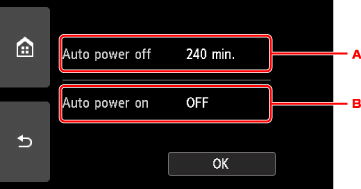
Options
- Mark as New
- Bookmark
- Subscribe
- Mute
- Subscribe to RSS Feed
- Permalink
- Report Inappropriate Content
05-19-2020 01:02 PM
I checked those settings:
- Auto Power off was set to: 30 Min ... I changed that to 240 min.
- Auto Power on was already set to: "ON".
Doesn't explain with printing does not wake it up but, at least it should provide a longer wait period before it goes to sleep?
Thank you

Announcements
07/22/2026: New firmware updates are available.
EOS R6 Mark III - Version 1.1.0
05/13/2026: New firmware updates are available.
EOS R5 Mark II - Version 1.3.0
EOS R6 Mark II - Version 1.7.0
04/28/2026: Service Notice: Caution Concerning use of Lithium Batteries
03/17/2026: New firmware updates are available.
SELPHY CP1500 - Version 1.0.7.0
02/23/2026: New firmware update is available for EOS C50- Version 1.0.3.1
01/23/2026: New firmware update is available for RF 24-105mm F4 IS USM- Version 2.0.7
01/20/2026: New firmware updates are available.
10/21/2025: Service Notice: To Users of the Compact Digital Camera PowerShot V1
10/15/2025: New firmware updates are available.
Speedlite EL-5 - Version 1.2.0
Speedlite EL-1 - Version 1.1.0
Speedlite Transmitter ST-E10 - Version 1.2.0
07/28/2025: Notice of Free Repair Service for the Mirrorless Camera EOS R50 (Black)
05/21/2025: New firmware update available for EOS C500 Mark II - Version 1.1.5.1
Related Content
- Professional Print & Layout crashes when attempting to read bit depth information in Printer Software & Networking
- imageCLASS MF753Cdw II won't wake up from sleep mode! in Office Printers
- MF753CDW II – Network Not Recovering After Sleep Mode in Office Printers
- PIXMA TS9020 printing blank pages - HELP! in Desktop Inkjet Printers
- PIXMA TS9020 Cyan will not print despite all efforts in Desktop Inkjet Printers

Ⓒ 2026
Canon U.S.A Inc. All Rights Reserved. Reproduction in whole or part without permission is prohibited.
